What Is Unified Communications? A Complete Business Guide for 2026


What is unified communications? It is the model most businesses now use to run every conversation, from phone calls to video meetings to team chat, through one platform instead of five disconnected tools. If your company still pays for a phone system, a video service, a chat app, and a fax line from four vendors, you are paying more and getting less. This guide explains unified communications in plain English: what it merges, how it works, how it differs from VoIP and UCaaS, and how to pick a platform that fits your team in 2026.
TL;DR and Key Takeaways
Unified communications (UC) brings voice, video, messaging, SMS, fax, and often contact center tools into one platform with one login and one bill. Delivered from the cloud, it is called UCaaS. Most businesses adopt it to cut telecom costs, support hybrid work, and add AI features that standalone tools lack.
- Unified communications merges at least six channels: calls, video meetings, team chat, SMS, fax, and file sharing.
- UCaaS is unified communications delivered as a cloud service, priced per user per month with no PBX hardware.
- VoIP is only the calling piece. Unified communications is the whole conversation stack around it.
- Merging vendors is the fastest telecom cost win: one platform replaces three to five separate bills.
- In 2026, the platform question includes AI: receptionists, meeting transcription, and number reputation now live inside UC.
Who This Is For
Best for: IT directors, owners, and ops leaders at companies of 5 to 5,000 employees comparing communications platforms, plus anyone who inherited a phone system decision.
Not ideal for: Readers looking for consumer calling apps or a deep telecom engineering reference.
Top use cases: Replacing an aging PBX, consolidating tools after a merger, supporting hybrid teams, and adding a contact center without a second vendor.

What Is Unified Communications?
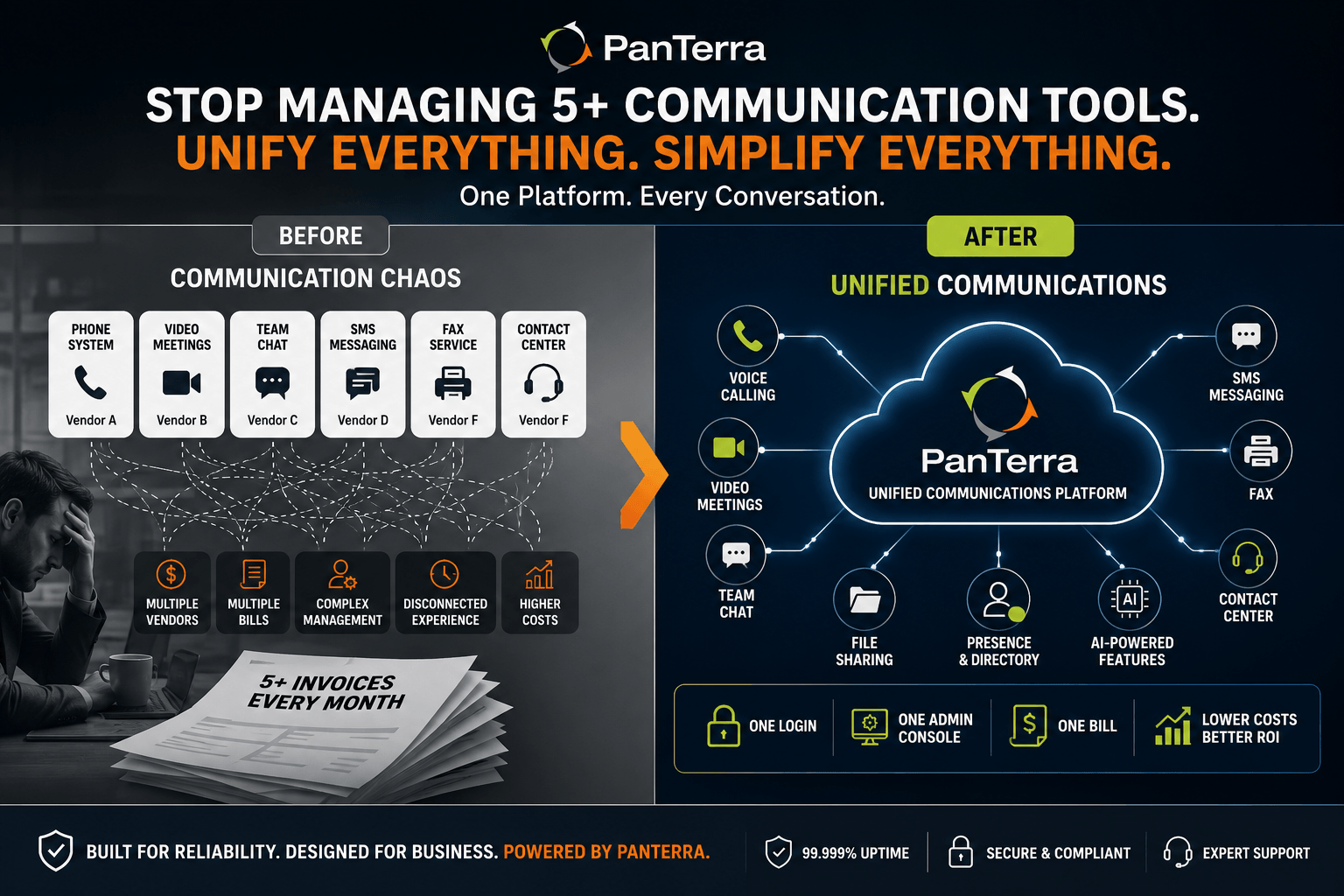
Unified communications is a business technology model that combines voice calling, video meetings, team messaging, SMS, fax, and presence into a single platform managed from one interface. Its primary function is to let employees move between channels without switching tools. The key differentiator is integration: every channel shares one directory, one identity, and one admin console. It spans desk phones, computers, and mobile apps.
Industry references like the UCToday enterprise UC guide track dozens of platforms in this market, but the concept stays constant. The term sounds abstract until you count your current tools. A typical company runs a phone system from one vendor, video meetings from another, chat from a third, and eFax from a fourth. Unified communications collapses that stack. One platform, one login, one bill, one place to manage users.
A concrete example of unified communications in action: a customer calls your main line. The call rings your desk phone and your laptop at once. You answer on the laptop, move the call to your mobile as you leave your desk, then follow up afterward by SMS from the same business number. The full history sits in one thread.
What Can Unified Communications Merge?
Unified communications can merge every channel a business uses to talk, meet, and message. The standard set in 2026 covers eight functions:
- Business phone calls, including call routing, auto attendants, and voicemail with transcription.
- Video meetings, webinars, and screen sharing.
- Team messaging and persistent group chat.
- Business SMS and MMS from your company numbers.
- Digital fax for industries that still require it, such as healthcare and legal.
- File sharing and storage tied to conversations.
- Presence, so coworkers can see who is available before they call.
- Contact center functions such as queues, analytics, and agent tools.
That last item matters more each year. The wall between UC and the contact center is coming down. Per No Jitter's 2026 trends report, nearly 26 percent of midsize enterprises plan contact center investments, and vendors keep merging both product lines into one platform (No Jitter, January 2026).
UC vs. UCaaS vs. VoIP: What Is the Difference?
UC is the model, UCaaS is the delivery method, and VoIP is one channel inside both. The three terms get mixed up constantly, so here is the boundary line for each:
|
Term |
What it means |
What you buy |
|---|---|---|
|
VoIP |
Voice over Internet Protocol. Phone calls carried over the internet instead of copper lines. |
Calling only |
|
Unified communications (UC) |
The model that merges calling, video, chat, SMS, fax, and presence into one system. |
The full conversation stack |
|
UCaaS |
Unified communications as a service. UC delivered from the cloud by subscription. |
The full stack, hosted, per user per month |
UCaaS meaning, in one sentence: you rent the whole UC stack from a cloud provider instead of buying and maintaining PBX hardware. That shift is why adoption keeps climbing. There is no server room to build, updates ship from the provider, and adding a user takes minutes. Our UCaaS vs VoIP guide goes deeper on when basic VoIP is enough and when it is not.
How Does Unified Communications Work?
UC works by routing every channel through one cloud platform that manages identity, devices, and connections. The flow is simpler than it sounds:
- Your provider hosts the platform. Calling, video, messaging, and fax run in the provider's data centers, not on hardware in your office.
- Every user gets one identity. A single login covers the desk phone, desktop app, and mobile app, and presence follows the user across all three.
- Channels share one data layer. Calls, chats, and files connect to the same directory and history, which is what makes moving between channels possible.
- The internet carries the traffic. Voice and video travel over your existing connection, with quality of service rules keeping calls clear.
- Admins manage it from one console. Users, numbers, permissions, and integrations live in one portal instead of five.
One deployment note for Microsoft shops: UC does not have to replace Microsoft Teams. Platforms can embed full calling inside Teams while keeping the voice layer independent, so phones stay up even when Teams has an outage. Our guide to Microsoft Teams continuity explains how that architecture works.
Why Unified Communications Matters in 2026
UC matters because it attacks three problems at once: cost sprawl, fragmented work, and the growing gap between businesses with AI in their communications and businesses without it.
Cost Consolidation
How does UC cut telecom costs? By replacing separate bills for phone, video, chat, and fax with one subscription. Most businesses that consolidate drop three to five vendor contracts. The savings show up in license fees, in admin time, and in the support contracts nobody audits. Add the hidden costs of an aging PBX (maintenance visits, replacement parts, the eventual forklift upgrade) and the cloud model usually wins on plain math.
AI Inside the Platform
In 2026, the meaningful AI features live inside the platform rather than bolted on. Examples from our own stack at PanTerra: Luna, an AI receptionist that answers and routes calls around the clock; Contact Center AI, which handles queues with predictive routing; and Connect AI, which adds live captions and transcription to video meetings. Buyers comparing platforms should ask which AI features are native, because integrations between separate vendors are where reliability and accountability break down.
Reputation and Deliverability
Here is the piece most UC guides skip: outbound calls only work if people answer them. Carrier spam filters now label busy business numbers as "Spam Likely," which can cut answer rates by 40 to 60 percent. Number reputation has become part of the communications stack, and healthcare offers the clearest example — see our guide to phone number reputation management for healthcare. When reputation monitoring is built into the platform, flagged numbers get caught and cleaned without a separate vendor.
How to Choose a Unified Communications Platform
Choose a UC platform by testing vendors against the requirements that actually bite later: uptime, support, compliance, and total cost. This checklist covers the evaluation:
- Uptime SLA in writing. Demand 99.999 percent. The gap between 99.9 and 99.999 percent is about 8.7 hours of downtime per year, and for a phone system that is the difference between an incident and a pattern.
- Support you can reach. Ask where support engineers sit and how fast a human answers. PanTerra answers live in 30 seconds from US teams; whatever vendor you pick, get the number in the contract.
- Compliance included, not upsold. Healthcare needs HIPAA with a signed BAA. Finance needs retention and audit trails. Ask what the base plan covers before comparing prices.
- Native contact center. If you will ever need queues and agents, pick a platform where UC and contact center share one vendor and one data layer.
- Microsoft Teams strategy. If your company lives in Teams, require calling that embeds in Teams and survives Teams outages.
- Number reputation protection. Ask whether the platform monitors and remediates spam labels, and what it costs per number.
- Honest pricing. Retail plans in this market run roughly $17.95 to $24.95 per user per month for core business tiers. Treat lower teaser rates as conditional and ask what terms they require.
Metric callout: 99.9 percent uptime allows about 8.8 hours of downtime per year. 99.999 percent allows about 5 minutes. When the system carrying your revenue calls goes down, that gap is the whole story.
The best UCaaS providers for small business guide applies this checklist to specific vendors, and the PanTerra UC platform page shows how one implementation covers the full stack. If you are pricing a migration, current per user rates are listed on the pricing page.
FAQ
What does UCaaS stand for?
UCaaS stands for unified communications as a service. It is the cloud delivery model for unified communications: the provider hosts calling, video, messaging, SMS, and fax, and your business subscribes per user per month instead of buying phone system hardware.
How does unified communications work?
A cloud provider hosts every channel on one platform. Each user gets a single identity that works across desk phone, desktop app, and mobile app, and all channels share one directory and history. Traffic travels over your internet connection, and admins manage everything from one console.
Why is unified communications so important?
Because fragmented tools create real costs: duplicate vendor bills, lost context between channels, and slower responses to customers. Unified communications combines spending into one bill, keeps conversation history in one place, and gives hybrid teams the same tools in the office and at home.
What can unified communications merge?
Voice calls, video meetings, team chat, SMS, digital fax, file sharing, presence, and in many platforms the contact center. The defining feature is that these channels share one login, one directory, and one admin console rather than living in separate products.
What is an example of unified communications?
A customer call rings your desk phone and laptop together. You answer on the laptop, shift the call to your mobile as you leave, then send a follow up SMS from the same business number. One platform handles every step and keeps the whole exchange in one thread.
Is Microsoft Teams a unified communications platform?
Teams covers chat, meetings, and file sharing, and it can add calling through Microsoft or through a UCaaS provider. Many businesses embed a dedicated voice platform inside Teams to get enterprise calling features and to keep phones working during Microsoft outages.
How does unified communications reduce telecom costs?
It replaces three to five separate services (phone, video, chat, fax, and sometimes contact center) with one subscription. Businesses save on license fees, admin hours, PBX maintenance, and the vendor management overhead of juggling multiple contracts.
What is the difference between unified communications and a contact center?
Unified communications serves your whole company's internal and external conversations. A contact center adds tools built for teams that handle customer conversations at volume: queues, skills routing, analytics, and supervisor features. In 2026 the two increasingly ship on the same platform.
.jpg?width=500&height=500&name=Are%20you%20Getting%20a%20Good%20Deal%20(1).jpg)
Comments