Business Phone System Features: 2026 Checklist

Business phone system features lists have a problem: they all look identical, and none of them tell you which features you will actually use. Every vendor page lists fifty capabilities. Buyers copy the list into a spreadsheet, check every box, and still end up surprised at renewal. This checklist takes a different approach — features grouped by the job they do, with honest notes on which ones matter for which teams, and a 2026 section covering the capabilities most lists have not caught up to yet: AI answering, number reputation protection, and Microsoft Teams embedding.
TL;DR and Key Takeaways
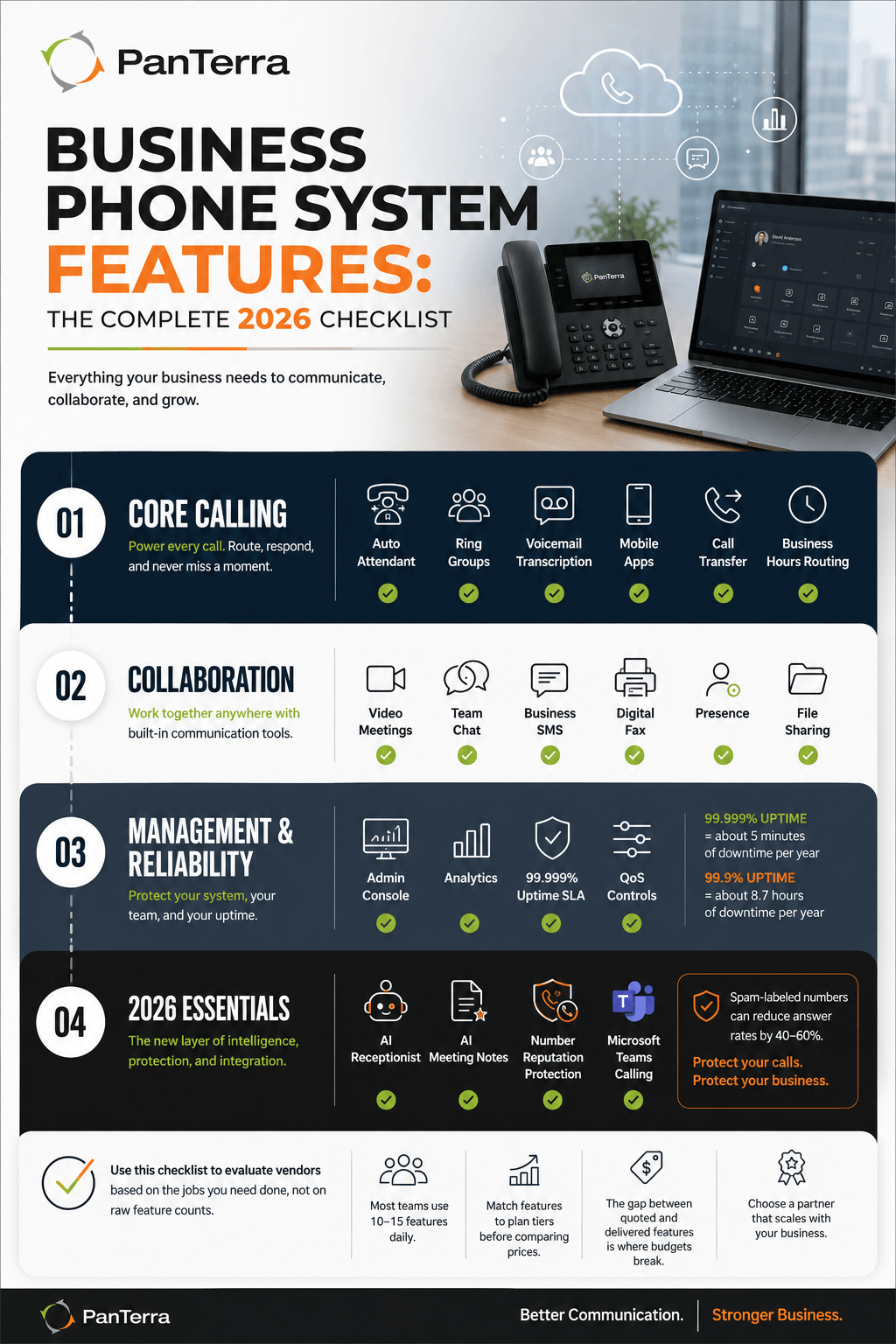
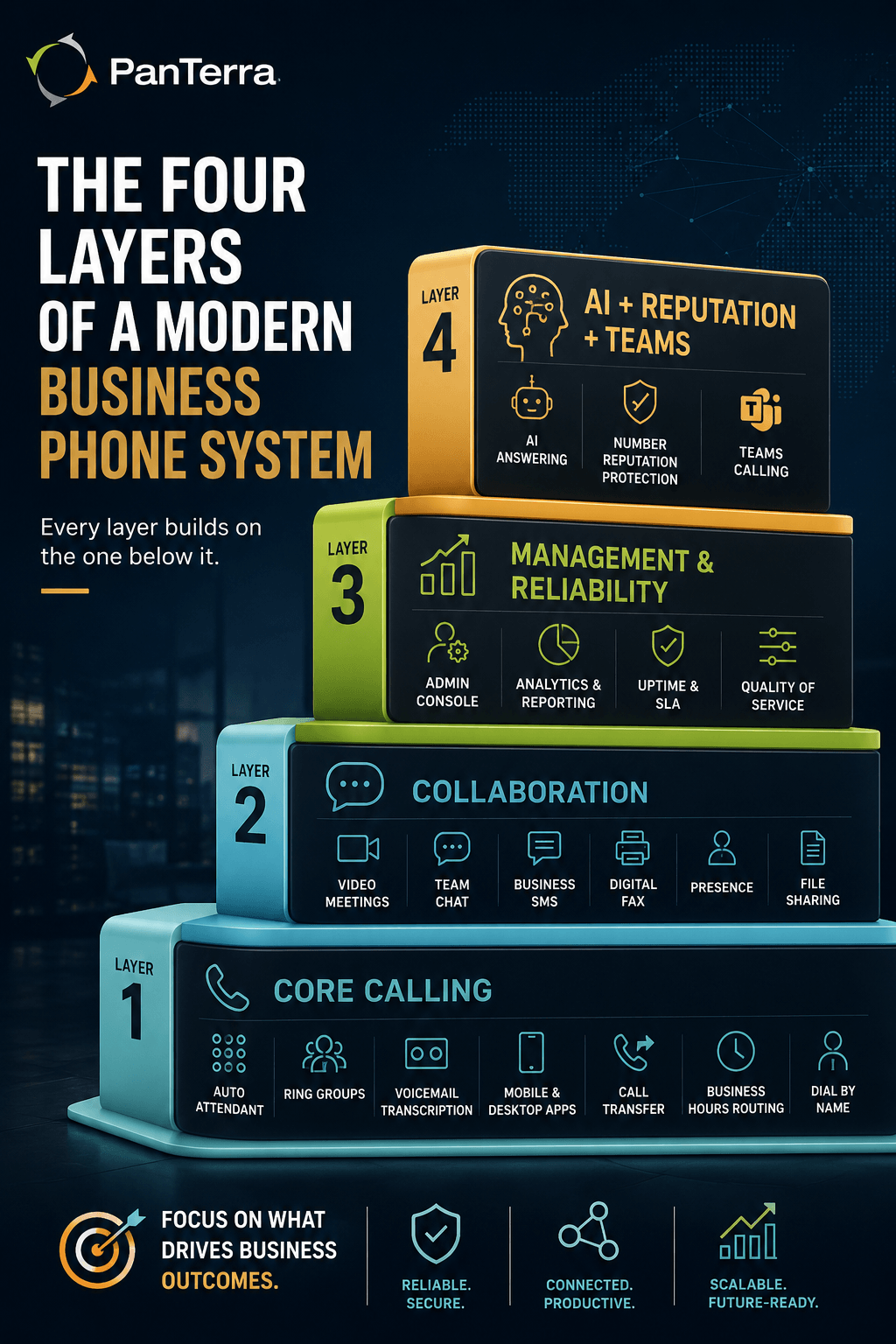
A complete business phone system in 2026 covers four feature groups: core calling (routing, attendant, voicemail), collaboration (video, chat, SMS, fax), management (admin console, analytics, uptime), and the new layer (AI features, reputation protection, Teams options). Use the groups to compare vendors on the jobs you need done, not on raw feature counts.
- Core calling features decide daily experience: auto attendant, ring groups, voicemail transcription, and mobile apps top the list.
- Collaboration features replace separate subscriptions: video meetings, team chat, business SMS, and digital fax in one plan.
- Management features protect you long term: real analytics, a usable admin console, and a written 99.999 percent uptime SLA.
- The 2026 layer separates vendors: AI answering, built in number reputation protection, and calling inside Microsoft Teams.
- Match features to plan tiers before comparing prices. The gap between quoted and delivered features is where budgets break.
Who This Is For
Best for: Anyone building a phone system requirements list: owners, office managers, and IT leads comparing vendors or auditing their current plan.
Not ideal for: Contact center feature planning, which involves queues, workforce tools, and a separate checklist.
Top use cases: Writing an RFP or needs list, auditing what your phone system plan includes versus what you use, and comparing phone system tiers across vendors.
What Features Does a Business Phone System Need?
A business phone system needs features in four groups: core calling to answer and route every call, collaboration to cover meetings and messaging, management to keep the system healthy, and the 2026 layer of AI and reputation capabilities. Most teams use ten to fifteen features daily. The checklist below marks which belong on every requirements list and which depend on your team.
One usage note: this checklist pairs with our buyer's guide to small business VoIP, which covers pricing math and vendor selection. This page answers "what should the system do." That one answers "how do I buy it well."
Core Calling Features
Core calling features determine what callers and staff experience every day. Every phone system needs list should include these seven:
- Auto attendant. Automated greeting and menu routing so every call lands somewhere useful. Setup quality matters as much as the feature; our auto attendant guide covers the design choices.
- Ring groups and hunt groups. Ring a team together or in sequence, with overflow rules when nobody answers.
- Voicemail with transcription. Messages arrive as readable text in email or chat, so nothing waits for someone to dial in.
- Mobile and desktop apps. The business line on every device, with one identity and shared call history.
- Call transfer, hold, and park. Table stakes, but test how they work across desk phone and app, because clumsy transfers frustrate callers daily.
- Business hours and holiday routing. Different behavior when you are open, closed, or at lunch, switched automatically.
- Dial by name and extensions. Regular callers and internal calls skip the menus.
Collaboration Features
These features are where a phone system becomes a full platform, and where separate bills disappear from the budget:
- Video meetings with screen sharing, and captions or transcription if available. This replaces a separate meetings bill.
- Team chat and channels. Persistent messaging tied to the same directory as calling.
- Business SMS and MMS. Texting from company numbers, with shared inboxes for front desk lines. Customers answer texts faster than voicemail.
- Digital fax. Still required in healthcare, legal, and finance. Cloud fax removes the machine, not the capability.
- Presence. See who is on a call before transferring. Small feature, daily payoff.
- File sharing tied to conversations. Useful when quotes and photos move with the customer thread.
If you want the deeper map of how these pieces fit together into one platform, our guide to what unified communications is walks the full stack.
Management and Reliability Features
Management features protect you after the honeymoon. Four belong on every list:
- A usable admin console. The office manager should be able to change a greeting, add a user, and reroute a line without a support ticket.
- Analytics you will read. Missed call counts, menu drop off, response times. This data finds revenue leaks; a dashboard nobody opens does not.
- A written uptime SLA. Demand 99.999 percent. That allows about five minutes of downtime per year, versus nearly nine hours at 99.9 percent.
- Quality of service controls. The platform should help prioritize voice traffic on your network so calls stay clear when the office bandwidth is busy.
Metric callout: The difference between a 99.9 and a 99.999 percent uptime SLA is roughly 8.7 hours of downtime per year. On a phone system, those hours land during business days, one outage at a time.
The 2026 Additions Most Checklists Miss
Three tools separate current platforms from lists written three years ago.
AI Features Built Into the Platform
AI answering and meeting notes moved from novelty to daily tool. Examples from our platform at PanTerra: Luna, an AI receptionist that answers, screens, and books around the clock; and Connect AI, which adds live captions and transcription to meetings. The evaluation question is not "does the vendor say AI" — it is which AI features are native to the platform, because bolted on AI from a second vendor is where accountability gets blurry. Industry coverage agrees: No Jitter's market reporting names AI and integration as the axes UCaaS vendors now compete on (No Jitter, 2026).
Number Reputation Protection
Outbound calls fail silently when carriers label your numbers "Spam Likely," and answer rates drop 40 to 60 percent on flagged numbers. Reputation monitoring and cleanup now belong on the feature checklist, not the nice to have pile. Our business guide to phone number reputation explains how labels happen; on PanTerra's platform the protection is built in at $10 per number monthly.
Calling Inside Microsoft Teams
If your company lives in Teams, the phone system should embed there: full calling in the Teams client, with a voice layer that keeps working when Teams itself has an outage. Ask vendors specifically how their Teams integration behaves during a Microsoft outage, because the architectures differ widely.
How to Use This Checklist When Buying
Use the checklist in three passes. First, mark the features your team uses today, because those are non negotiable in any new phone system. Second, mark the ones you want within a year (texting, AI answering, reputation protection are the common ones) and confirm which plan tier includes each at every vendor you compare. Third, price the tier that includes your full list, not the entry tier from the ad. Feature gating between tiers is the most common source of quote surprises.
From there, the buyer's guide above covers cost math and vendor testing, and the business phone system page shows how the full checklist looks implemented on one platform.
FAQ
What features does a business phone system need?
Four groups: core calling (auto attendant, ring groups, voicemail transcription, mobile apps), collaboration (video, chat, SMS, fax), management (admin console, analytics, a 99.999 percent uptime SLA), and the 2026 layer (native AI features, number reputation protection, and a Microsoft Teams option).
What is the most important VoIP feature for a small business?
The auto attendant, because it shapes every inbound phone system call from day one. Close behind: voicemail transcription and a solid mobile app, since both determine whether calls get handled when nobody sits at the front desk.
What VoIP features are usually gated behind higher tiers?
Commonly gated features include call analytics, business SMS, video meeting length, contact center functions, and AI capabilities. Always confirm which tier includes each feature on your needs list before comparing vendor prices, because entry tier quotes rarely include the full checklist.
Do all business phone systems include AI features now?
No. Vendors advertise AI broadly, but the depth varies from native AI receptionists and meeting transcription to thin integrations with third party tools. Ask which AI features run inside the platform itself and which require a separate vendor and bill.
What is number reputation protection and why is it on this list?
It is monitoring and cleanup for the spam labels carriers attach to busy outbound numbers. Flagged numbers lose 40 to 60 percent of answers, which quietly breaks callbacks and reminders. Because the damage is invisible until someone notices patients or customers stopped answering, protection belongs on the standard checklist.
.jpg?width=500&height=500&name=Are%20you%20Getting%20a%20Good%20Deal%20(1).jpg)
Comments