Why Contact Center AI and Connect AI Change How Mid-Market Teams Run Customer Conversations and Meetings

The two places mid-market teams lose the most time are inside meetings and inside customer conversations. Meetings run long, action items get buried in notes no one revisits, and agents spend significant energy on after-call work that AI can now handle automatically. PanTerra Networks has built responses to both problems directly into the Streams.AI platform.
Contact Center AI and Contact AI are now live, as detailed in PanTerra's official launch announcement. Both are native to Streams.AI: no outside integrations, no separate logins, no bolt-on contracts. Here is what each product does, where the overlap creates compounding value, and which teams should move first.
TL;DR: Key Takeaways
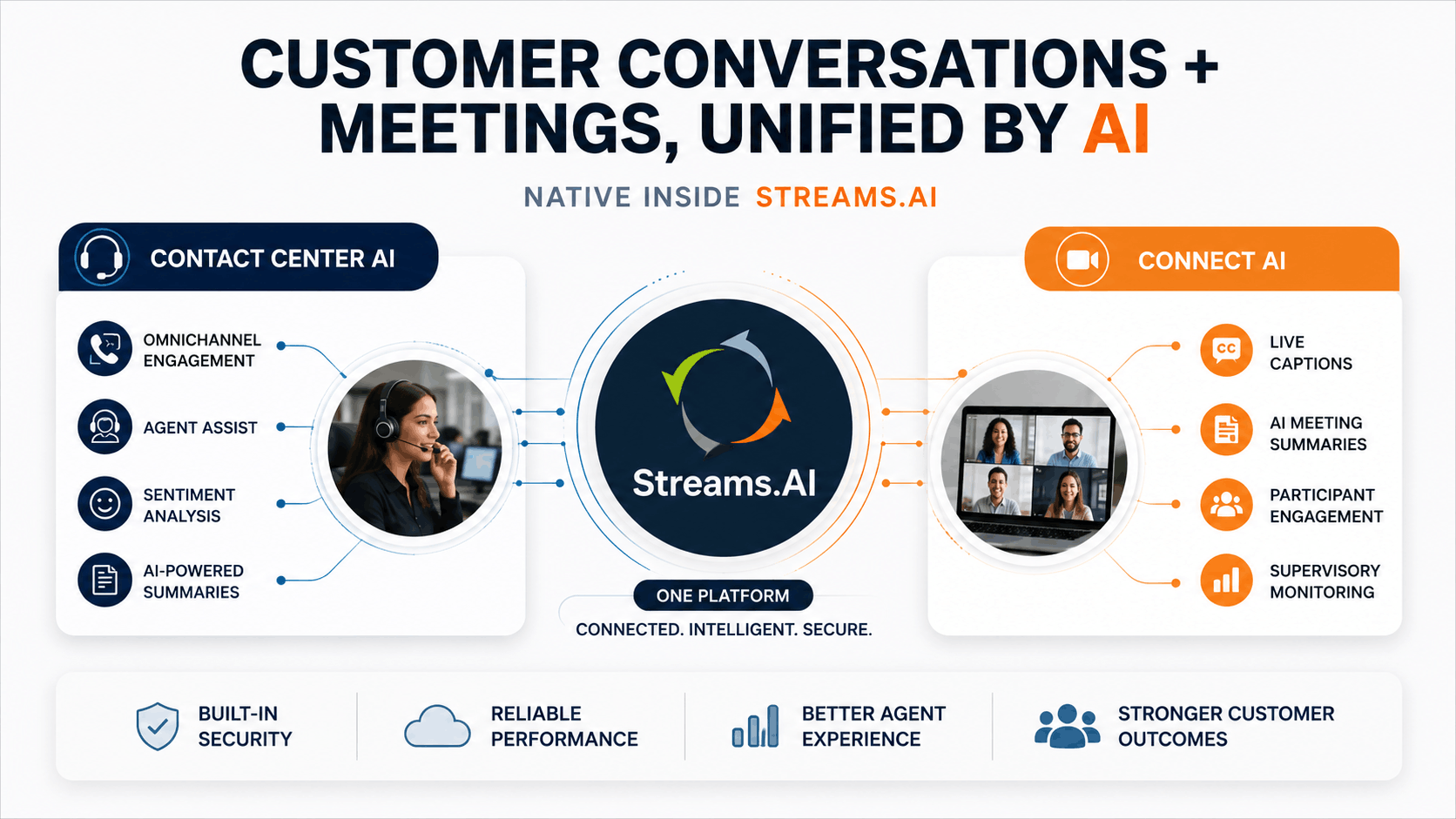
- Contact Center AI brings omnichannel customer engagement, agent assist, sentiment analysis, and AI powered workflow automation to the Streams.AI platform.
- Connect AI brings live captioning, AI generated meeting summaries, post-meeting sentiment, and supervisory monitoring to every video meeting.
- Both are native to Streams.AI: they run inside the same platform your team already uses for voice, messaging, and file sharing.
- Mid-market teams running a contact center and a distributed meeting schedule see compounding ROI: shorter after-call work, better agent coaching, and meetings that generate follow-up action without manual notes.
- PanTerra's Arthur Chang: "We're empowering enterprises to work smarter, stay agile, and be competitive in the marketplace."
Who This Is For
- Best for: Operations leaders, IT directors, and CX managers at mid-market organizations running a contact center or customer-facing team alongside distributed internal meetings.
- Not ideal for: Solo operators or very small teams with basic calling needs and no formal customer service operation — simpler plans without CCaaS are a better fit.
- Top use case: Adding AI powered contact center automation and intelligent meeting capabilities to an existing Streams.AI UCaaS deployment without adding a new vendor.
The Problem Contact Center AI Solves
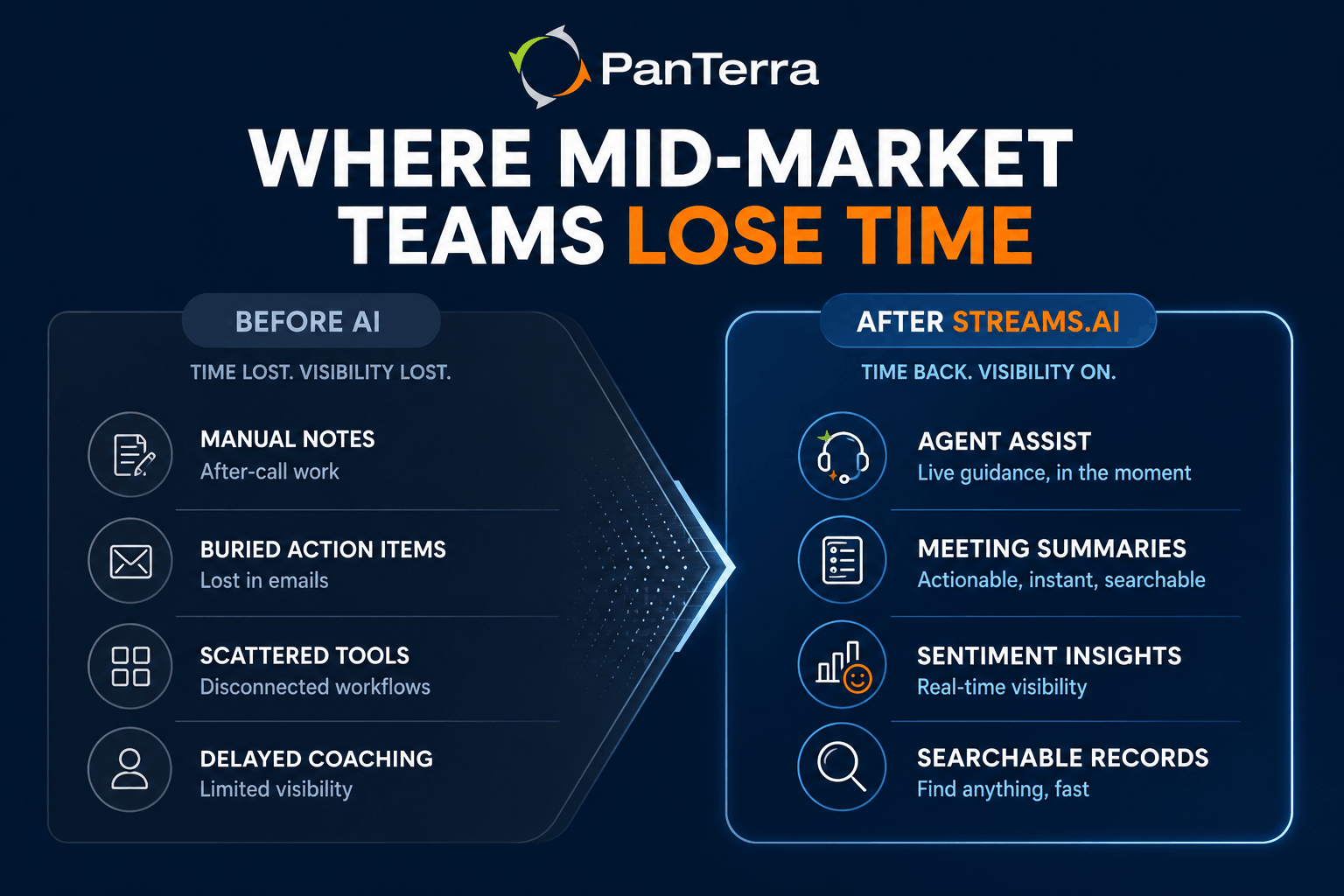
Most mid-market contact centers are running with two structural inefficiencies that technology has not historically addressed well: agents spend too much time on post-call administration, and supervisors have limited visibility into what is happening in conversations until after problems surface.
Contact center AI addresses both directly. Agent Assist surfaces real time guidance during a call based on what the customer is saying: relevant knowledge base articles, suggested responses, escalation cues, without the agent needing to break the conversation to look anything up. Sentiment analysis provides the supervisor layer — a live read of customer emotional state that lets team leads intervene before a conversation deteriorates, not after.
The workflow automation component tackles after-call work. Real time transcription captures the conversation as it happens. AI generated summaries distill it into key points, outcomes, and next steps. Instead of an agent spending five to ten minutes on post-call notes, that work is done by the time the call ends.
What differentiates PanTerra's implementation is that Contact Center AI is built directly into the Streams.AI platform: the same environment your agents already use for voice calls, team messaging, and omnichannel routing. There is no separate CCaaS application to manage, no API integration to maintain, and no additional vendor to support.
What Contact Center AI Includes
Contact Center AI is available as an add-on to the Streams.AI Call Center plan ($44.95/user/mo retail, qualified from $29.95/user/mo). Key capabilities:
Omnichannel Engagement. Connect with customers across voice, chat, email, and social channels from a single agent interface. Customers do not need to repeat context when moving between channels because the interaction history follows them.
Agent Assist and Sentiment Analysis. Real time guidance surfaces relevant information to agents during live calls. Sentiment analysis provides supervisors with a live read on customer emotional state, enabling proactive intervention and better coaching conversations.
AI Powered Analytics and Automation. Deeper customer insights from conversation data. Workflow automation handles administrative tasks that pull agents away from customer interactions: routing logic, post-call summaries, escalation triggers.
Real-Time Transcriptions and Summaries. Every interaction is captured and summarized automatically. Contact center managers get searchable records with key topics and outcomes identified, which reduces review time and makes quality assurance systematic rather than sample based.
ACD and Routing. Automatic Call Distribution with skills based and priority routing, 10 included call queues, queue callbacks, and supervisor monitoring tools, all managed from the same Admin AI portal that governs the rest of the Streams.AI platform.
What Connect AI Adds on the Meeting Side
If Contact Center AI handles the customer-facing operation, Connect AI handles the internal-facing one. Mid-market organizations running distributed teams hold significant meeting volume: strategy sessions, customer reviews, team stand-ups, training calls. The recurring cost is not the meeting time itself but the follow-up work: transcribing notes, identifying action items, and getting alignment on next steps.
Connect AI automates that follow-up at the moment the meeting ends.
Live Captioning and Meeting Transcriptions. Real time captions display during the meeting. Full transcription is available immediately after. Both serve accessibility compliance requirements and reduce the note-taking burden on meeting participants.
AI Generated Summaries. After each meeting, Connect AI produces a summary of key discussion points, decisions made, and next steps identified, with meeting sentiment included. The team lead gets a usable document without assigning anyone to write one.
Scale and Engagement. Connect AI supports up to 1,000 participants with audience engagement tools: hand-raising, video paging, audience roles, and interactive controls that make large-format meetings functional rather than passive.
Supervisory Mode. Team leads and training managers can monitor multiple active meetings simultaneously through the Streams Unified Live Monitor. This is the same supervisory infrastructure Contact Center AI uses for call monitoring, applied to the meeting layer. New hire training, quality review, and live coaching are all enabled from the same interface.
Outlook and Google Calendar integrations handle scheduling and one click join, slotting Connect AI into the scheduling workflows your team already uses.
Why Native Integration Changes the ROI Calculation
The most important aspect of both launches is not what each product does in isolation. It is what both products do together, inside a platform the team is already running.
A common mid-market scenario: a customer service team handles inbound contacts through the contact center, and those same managers run weekly performance reviews, coaching sessions, and operational stand-ups via video. Before Contact Center AI and Connect AI, these were two separate workflows with two separate documentation burdens. The agent did after-call work manually. The manager took notes during the performance review manually. Both sets of information lived in different places.
After the launch, those workflows converge. Contact Center AI produces structured records of customer interactions. Connect AI produces structured summaries of internal reviews. The manager coaching a new agent has access to transcribed call data in the same system where the coaching session itself is being captured.
"At PanTerra, we're committed to helping businesses achieve more with less effort. Connect AI and Contact Center AI represent the next evolution of communication and engagement solutions, making it easier for organizations to collaborate, connect, and create meaningful customer experiences. With these AI enhanced innovations, we're empowering enterprises to work smarter, stay agile, and be competitive in the marketplace."
— Arthur Chang, President and CEO, PanTerra Networks
How This Fits Into Streams.AI
Both Contact Center AI and Connect AI are enhancements to the existing Streams.AI platform. Organizations running Streams.AI do not need to migrate, reconfigure their admin setup, or train users on a new interface. The capabilities are additive.
PanTerra holds the TrustRadius 2026 Buyer's Choice Award, earned through verified customer reviews. Review PanTerra pricing for current plan details. Connect AI is available on Business Plus and above. Contact Center AI is the CCaaS add-on to the Call Center plan. Both run under the same 99.999% uptime SLA, US-based 30-second response time support, and HIPAA/HITECH certification that governs the rest of the Streams.AI environment.
For distributed teams still running phone and video on separate platforms, this launch is a useful forcing function. See our best cloud phone system for remote teams guide for the checklist of what a unified platform needs to deliver.
Frequently Asked Questions
What is Contact Center AI in PanTerra Streams.AI?
Contact Center AI is PanTerra's CCaaS product built natively into Streams.AI. It includes omnichannel customer engagement across voice, chat, email, and social; real time agent assist and sentiment analysis; AI powered analytics and workflow automation; real time transcription and post-call summaries; and ACD with skills based routing, call queues, and supervisor monitoring. Available as an add-on to the Streams.AI Call Center plan.
What is Connect AI?
Connect AI is PanTerra's AI video conferencing capability inside Streams.AI. It delivers live captioning, full meeting transcription, AI generated post-meeting summaries with sentiment, audience engagement tools for up to 1,000 participants, and supervisory monitoring across multiple simultaneous meetings. Integrates with Outlook and Google Calendar for one click meeting access.
Are Contact Center AI and Connect AI separate products from Streams.AI?
No. Both are native enhancements to the Streams.AI platform. They run inside the same environment your team uses for voice, messaging, and file sharing: no separate application, no outside integration, no additional admin portal. Organizations already on Streams.AI can activate both without migrating or reconfiguring their existing setup.
What does agent assist mean in practice?
Agent Assist monitors the content of a live customer call and surfaces relevant information to the agent — knowledge base articles, suggested responses, escalation triggers — without the agent leaving the call to search for it. The agent stays in the conversation. The AI provides context in the background.
Does Contact Center AI support HIPAA compliance?
Yes. Contact Center AI runs within the Streams.AI platform, which is HIPAA and HITECH certified across all channels on every plan. Healthcare organizations, dental practices, and regulated-industry businesses can use Contact Center AI under the same compliance framework that covers voice, video, messaging, and file sharing on Streams.AI.
How does Connect AI handle meeting summaries?
After each video meeting, Connect AI automatically produces a written summary of key discussion points, decisions, and next steps, with meeting sentiment included. The summary is available immediately after the meeting ends, without any participant needing to write or review notes.
Which Streams.AI plans include Contact Center AI and Connect AI?
Connect AI is included in Business Plus plans and above. Contact Center AI is available as an add-on to the Call Center plan ($44.95/user/mo retail, from $29.95/user/mo qualified). Review current plan details and pricing for the most up-to-date breakdown.
Can I use Contact Center AI if I'm already on Streams.AI?
Yes. Contact Center AI is an add-on to existing Streams.AI deployments. If your organization is on a Call Center plan, Contact Center AI adds CCaaS capabilities without a platform migration. If you are on a lower-tier plan and need CCaaS, upgrading to Call Center and activating Contact Center AI is handled through the standard Admin AI portal.
.jpg?width=500&height=500&name=Are%20you%20Getting%20a%20Good%20Deal%20(1).jpg)
Comments