Contact Center AI: Why Built-In Beats Bolted-On for Mid-Market Communications


The Conversation I Have Most Often Right Now
Every couple of weeks, I sit down with an IT leader at a mid-market company who tells me roughly the same thing.
They have a UCaaS platform. They have a contact center. They have a video conferencing tool. Each of those vendors has added "AI" in the last 18 months — meeting transcripts here, sentiment analysis there, an agent-assist feature in another corner. On paper, they have AI everywhere. In practice, no one inside the company can tell whether any of it is actually working.
Verified customer reviews on G2 and TrustRadius flag the same friction: too many vendors, too many admin panes, too little operational clarity.
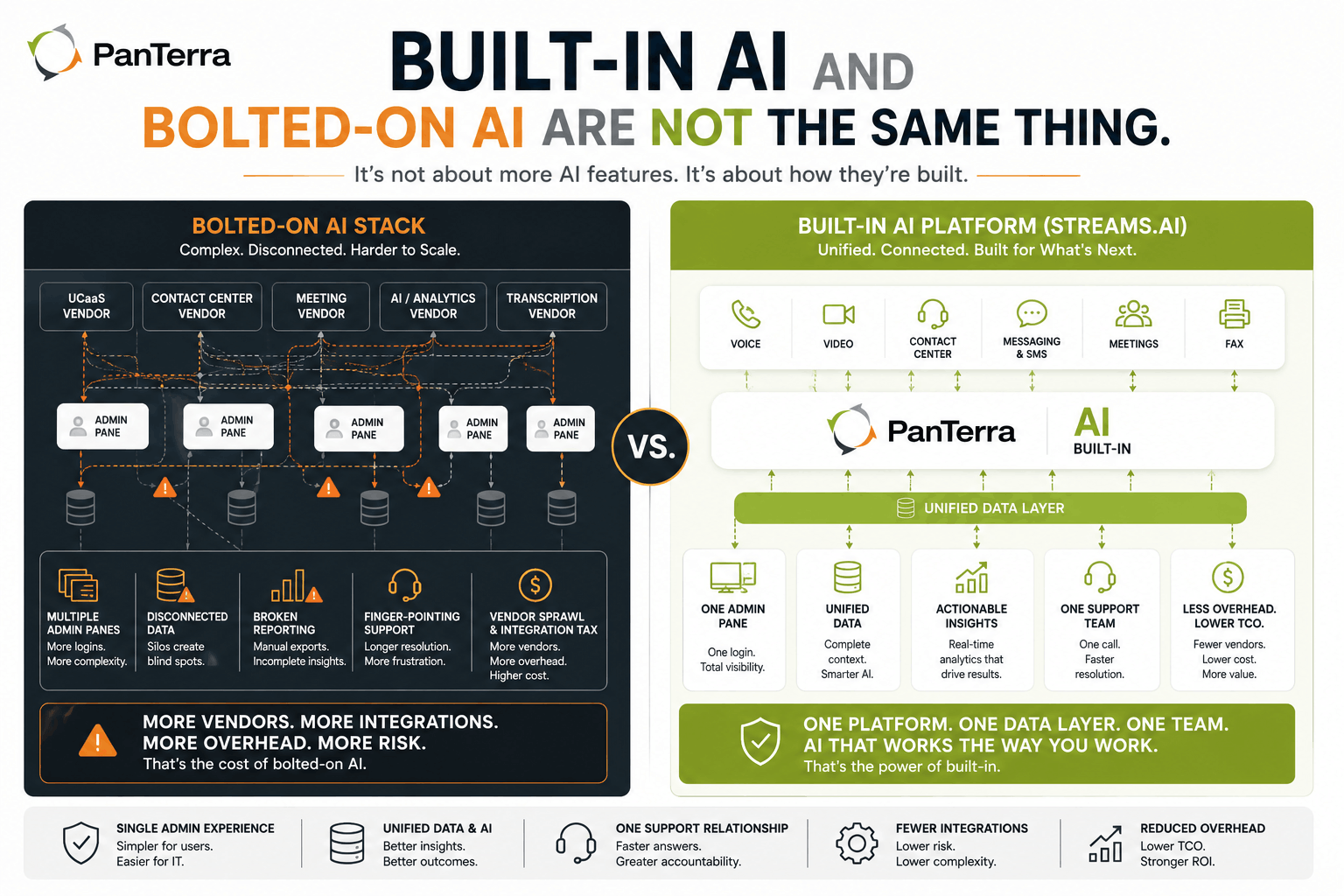
Two things just changed. PanTerra Networks released Contact Center AI and Connect AI, both built directly into the Streams.AI platform. The launch matters less for what those products do than for what it exposes — the structural difference between AI built into a platform and AI bolted on around it.
Here is how to tell the difference, and why it matters in real business terms.
TL;DR
Most UCaaS and contact center vendors are converging on similar AI feature lists. The real question is not what AI features they offer. It is whether their AI runs on the same data, admin layer, and support relationship as the rest of your stack — or whether you are stitching it together through partnerships.
Key takeaways:
- AI capabilities are converging across vendors. Feature comparison no longer separates platforms.
- What separates them is structural: built-in AI shares data and admin with the rest of the stack; bolted-on does not.
- The integration tax — separate data layers, permissions, support escalation paths — is the real cost most evaluations miss.
- A useful evaluation framework comes down to five questions about operational reality.
- Four roles gain different things from built-in AI: IT, operations, customer experience, and finance.
The Five Questions That Reveal Whether AI Will Actually Hold Up
When I am walking through an evaluation with an IT leader, this is the framework I keep coming back to. It is not about features. It is about what the platform looks like 12 months in.
1. How many admin panes does an end-user actually need?
If your contact center supervisor logs into one tool for call recordings, a second for AI summaries, and a third for sentiment trends, the AI is not built into your platform. It has been layered on top.
2. Where does the AI's data come from, and where does it go?
AI features are only as useful as the data they run on. If transcription happens in one vendor's cloud and sentiment analysis happens in another, reporting becomes a reconciliation project.
3. When something breaks, whose phone do we call?
Bolted-on AI lives at the boundary between two vendors. The platform vendor points at the AI partner. The AI partner points at the platform. Resolution time stretches.
4. What does the support relationship look like 12 months in?
Renewal conversations are easier with one vendor. Adding a fifth or sixth AI partner means another contract, another security review, another procurement cycle every renewal window.
5. How does the platform handle continuity if the AI provider has an outage?
This is the one most evaluations skip. With bolted-on AI, you have two providers in the call path. Two failure points instead of one. Built-in AI consolidates that risk to the same infrastructure as the rest of your platform.
These questions cut through feature parity. They reveal what businesses actually need to evaluate — the operational shape of what you are buying, regardless of which vendor wins.
What "Built-In" Looks Like in the Real World
Connect AI handles the meeting side — live captions, transcriptions, AI summaries with sentiment, support for sessions up to 1,000 participants, and a supervisory mode for managers. Contact Center AI handles the customer side — agent assist, real-time sentiment, omnichannel reach across voice, chat, email, and social, plus AI-powered analytics.
Most major UCaaS providers are converging on similar feature lists. What separates this launch is that both products run on the same Streams.AI infrastructure that already handles voice, video, messaging, SMS, fax, and contact center for over 10,000 businesses. Same admin pane. Same data layer. Same support relationship.
In real business terms: fewer integrations to maintain. Fewer data silos to reconcile. Fewer vendor relationships. A faster path from "what's happening across our communications?" to an actual answer.
That is the structural argument worth understanding when evaluating any vendor right now.
One of our customers, Chris Bonilla at Arc Health — a private equity firm operating multiple healthcare franchise brands — described the platform-architecture difference in a way I hear in some form on most evaluation calls:
"PanTerra's multi-tenant architecture let us keep every franchise as a completely separate PBX on the platform, while our IT team can jump in and manage any account from a single pane of glass. No workarounds, no duct tape — it just works the way our organization actually operates."
— Chris Bonilla, Arc Health
The same single-pane control that runs phone systems now also runs the AI features. For multi-entity organizations especially, that is the difference between a platform that scales with you and a stack that fights you on every new location.
Who Gains What When AI Is Built In
The benefits are not evenly distributed. Different roles see different improvements, and it is worth being specific about which ones land for whom.
|
Role |
Pain without built-in AI |
What changes with built-in AI |
|---|---|---|
| IT leaders & directors | Multiple AI vendor relationships, fragmented admin permissions, integration support overhead growing every quarter | Single admin pane, one support relationship, fewer security reviews and renewals to manage |
| Operations & customer experience | Reporting lag, missed coaching moments, fragmented customer record across channels | Real-time visibility, live sentiment surfaced while it matters, unified customer record across voice, chat, email, social |
| Contact center managers | Post-call QA only, manual sentiment review, training disconnected from live calls | Agent assist while the call is happening, live whisper coaching, automated transcription feeding QA workflows |
| Finance & procurement | Stack TCO inflation, multiple vendor invoices, hidden integration costs at every renewal | Predictable TCO, single billing relationship, fewer renewal cycles to negotiate |
A note on that last row. The trade-off worth understanding for finance teams: bolted-on AI almost always shows up cheaper at the sticker-price level. The cost catches up at the renewal cycle and at the support-incident level. Asking for a 24-month TCO comparison rather than a first-year price comparison usually surfaces this clearly.
For healthcare and other regulated organizations, there is one more layer worth flagging: when AI runs on the same infrastructure as the rest of the platform, HIPAA and HITECH compliance extends across the AI layer rather than living in a separate vendor's environment.
FAQ
What's the difference between Connect AI and Contact Center AI?
Connect AI handles internal meetings and video conferencing — live captions, transcriptions, AI summaries, supervisory monitoring. Contact Center AI handles external customer conversations — agent assist, real-time sentiment, omnichannel engagement, contact center analytics. Both run on the Streams.AI platform.
How is "built-in" different from "deeply integrated"?
Built-in means the AI runs on the same infrastructure, the same data layer, and the same admin pane as the rest of the platform — under one license, one support relationship, one contract. Deeply integrated usually means a partnership where two vendors have engineered their tools to talk. The user experience can feel similar; the operational reality at scale is different.
Does this require a separate license or upgrade?
Connect AI and Contact Center AI are part of the Streams.AI platform offering. Specific availability and tier requirements vary by plan. The full breakdown is on the Streams.AI page.
How do I evaluate this against vendors I'm already considering?
Run the five questions in the section above against each vendor on your shortlist. Most evaluations stop at feature comparison. The five questions surface what the platform actually looks like 12 months in, which is usually where built-in and bolted-on diverge.
What This Adds Up To
The next 12 months will settle a lot of questions about where AI fits in business communications. Most answers will not come from feature lists. They will come from how the AI behaves once it has been running inside a real business for a year.
If you are evaluating UCaaS or contact center platforms, stop comparing feature matrices and start asking the operational questions. Five admin panes do not become four because the vendors are good companies. They become four when one platform replaces several.
Learn more about how Connect AI and Contact Center AI work inside the broader Streams.AI platform. The original launch is in the PanTerra newsroom.
.jpg?width=500&height=500&name=Are%20you%20Getting%20a%20Good%20Deal%20(1).jpg)
Comments