Best VoIP for Small Business in 2026: A Buyer's Guide for Under-50-Employee Companies


The best VoIP for small business is not the platform with the longest feature list. It is the one a small business team actually uses — calls that ring the right person, texting from the business number, a mobile app that works, and a bill that matches the quote. Most buying guides are written for enterprises and scaled down. This one starts from the under 50 employee reality, where nobody has a telecom manager, the office manager owns the phones, and a bad choice costs real money every month. Here is how to buy well in 2026: the cost math, the features that matter, and the pitfalls that catch small teams.
TL;DR and Key Takeaways
Small business VoIP replaces the phone line with calling over your internet connection, usually as part of a cloud platform that adds texting, video, and an auto attendant. Prices run $15 to $30 per user per month at honest vendors. The buying risks are teaser rates, feature creep into higher tiers, and support you cannot reach.
- VoIP fits small businesses because it removes hardware, scales per user, and bundles the tools a small team needs into one bill.
- Expect $15 to $30 per user monthly at retail. Treat lower advertised rates as conditional until the full quote proves otherwise.
- Seven features carry most of the value: auto attendant, business texting, mobile app, voicemail transcription, number reputation protection, a Microsoft Teams option, and analytics.
- Test support before you sign. Response time during the sales cycle predicts response time after.
- Your numbers move with you. The FCC requires providers to port numbers, so a bad choice is recoverable.
Who This Is For
Best for: Owners, office managers, and the "person who handles IT" at companies with 5 to 50 employees buying or replacing a business phone system.
Not ideal for: Enterprises with procurement teams, or contact centers hiring dozens of agents, though the same principles scale up.
Top use cases: Leaving a landline, replacing a consumer cell number setup, fixing an unreliable current provider, and adding texting plus an auto attendant without new hardware.
What Makes a VoIP System "Best" for a Small Business?
The best VoIP for small business is the system that matches four constraints small teams share: no dedicated IT staff, a tight monthly budget, one person wearing the admin hat, and zero tolerance for missed customer calls. Judged that way, "best" means simple setup, honest pricing, reachable support, and the handful of features a small team uses daily, rather than the longest checklist.
That definition changes the shortlist. Enterprise oriented rankings reward integration counts and global coverage. A 20 person plumbing company, dental office, or agency needs the opposite: a system the office manager can change without a consultant, and a vendor who answers the phone when something breaks.
Small business VoIP in 2026 almost always ships as UCaaS, the cloud model that bundles calling with texting, video, and chat. If those terms are new, our UCaaS vs VoIP guide sorts them out in five minutes.
Is VoIP Good for Small Businesses?
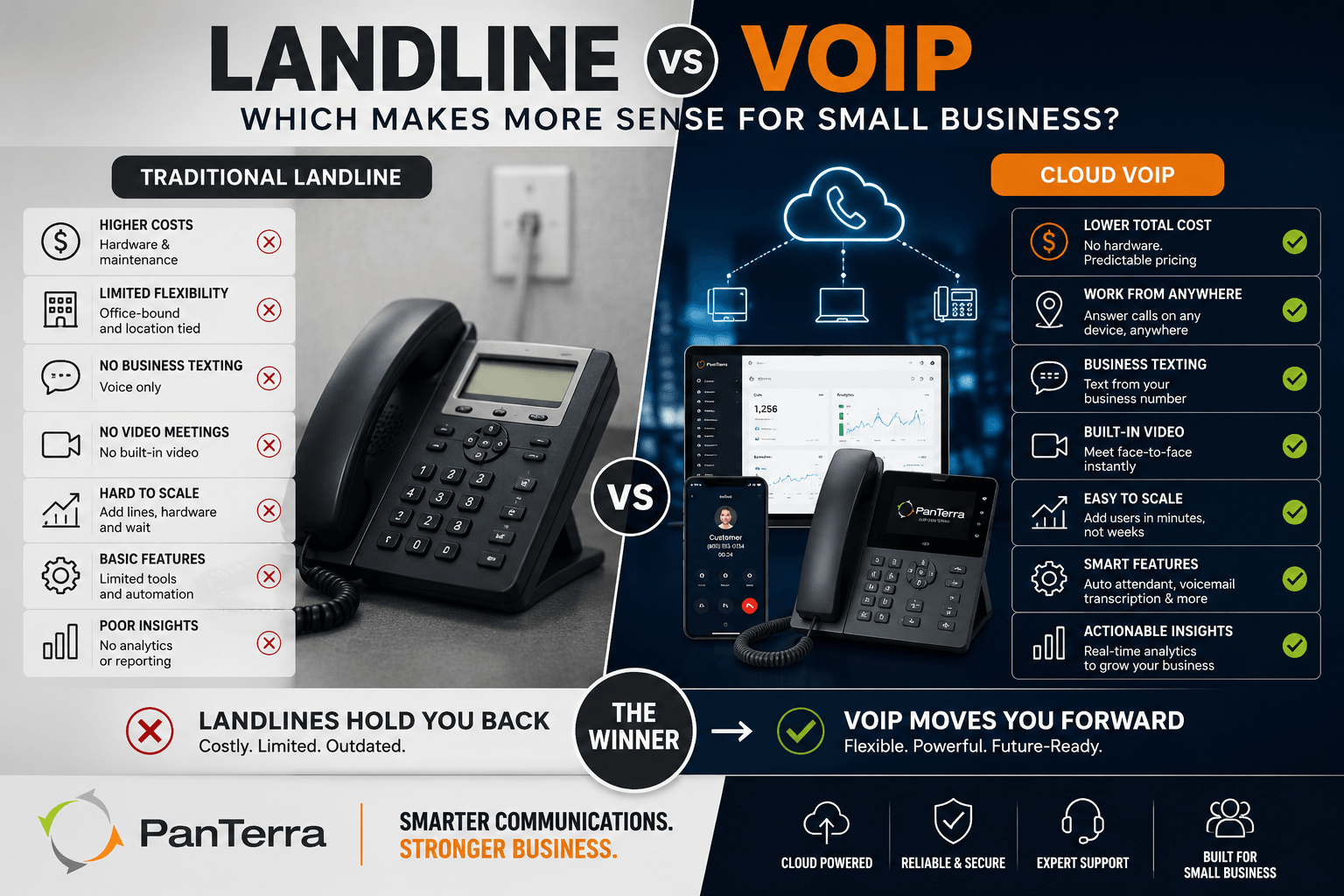
Yes, VoIP is good for small businesses in almost every scenario, which is why the landline share of business phone service keeps shrinking. The case rests on three facts. Cost: no PBX hardware, no wiring, no maintenance contracts. Flexibility: employees answer the business line from desk phones, laptops, or the mobile app, which matters when your team works from trucks, job sites, or home. Bundling: the same subscription includes the auto attendant, texting, and video that used to require separate services.
The honest limits: VoIP depends on your internet connection, so a business with unreliable broadband should fix that first. Power outages take down desk phones, though mobile apps keep working on cellular. And call quality reflects network quality, which is usually a router setting away from solved.
For most small teams the trade resolves quickly: an internet dependent system that costs less and does more, versus a landline that survives a power cut but cannot text a customer — for most small business owners, that settles it. Our comparison of on premise vs hosted VoIP covers the rare cases where hosting your own still makes sense.
The Real Cost Math for Small Business VoIP
Small business VoIP costs break into three layers, and the quote you compare must include all three.
What You Pay the Provider
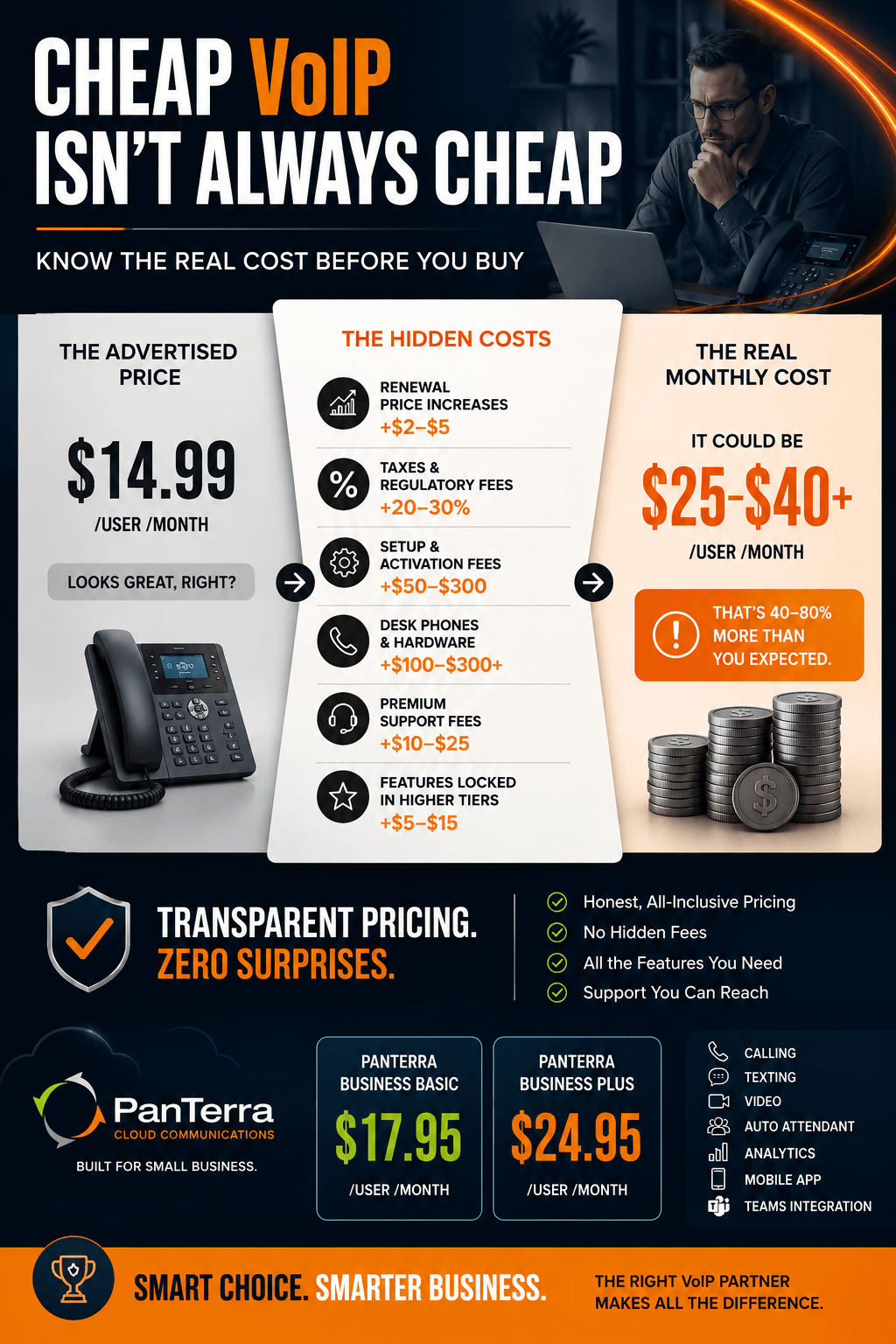
Retail per user pricing at honest vendors runs $15 to $30 monthly for core business tiers. PanTerra publishes retail at $17.95 per user per month for Business Basic and $24.95 for Business Plus, and qualified rates start lower for annual agreements and migrations. Whatever vendor you evaluate, anchor on the retail rate. Advertised prices well below that range are usually intro rates with conditions attached, and the renewal letter is where you find out.
The Costs the Quote Hides
Four line items surprise small buyers: device costs if you want desk phones (many teams now skip them for apps and headsets), implementation fees some vendors charge for setup, taxes and regulatory fees that add roughly 20 to 30 percent to the software line, and add ons like extra toll free minutes or premium support. Demand the all in monthly number for your exact head count in writing.
Metric callout: A 20 person team at $24.95 per user pays about $499 monthly at retail before taxes and fees. If a competing quote lands far below that, find the condition, because the gap always comes from somewhere: a term commitment, a feature gate, or a renewal jump.
The 7 Features Small Teams Actually Use
Seven features carry most of the daily value for a small business under 50 employees:
- Auto attendant. The automated greeter that routes callers so the owner stops playing receptionist. Our auto attendant guide covers setup choices that keep callers happy.
- Business texting. Customers answer texts faster than voicemail. Texting from the business number, not someone's personal cell, keeps the thread when staff changes.
- A mobile app that matches the desk. The business line in every pocket, with presence so calls stop chasing people who are off shift.
- Voicemail transcription. Voicemails as readable text, so nothing waits until someone has time to dial in.
- Number reputation protection. Outbound numbers flagged "Spam Likely" lose 40 to 60 percent of answers. Platforms like PanTerra include monitoring and cleanup at $10 per number, which beats discovering the label months late.
- A Microsoft Teams option. If your team lives in Teams, calling should embed there rather than fight it.
- Analytics you will actually read. Missed call counts and menu abandonment tell you where revenue leaks.
How to Choose Small Business VoIP in 5 Steps
Choose a small business VoIP system with this sequence:
- Write down your ten needs. Real ones from daily work: "ring the front desk then everyone," "text appointment reminders," "route after hours to the on call phone."
- Build a shortlist of three. Our roundup of the best UCaaS providers for small business ranks the vendor field; pick candidates whose strengths match your list.
- Test support before buying. Call each vendor's support line, not sales. Note how long a human takes. Our support desk answers in about 30 seconds with US based teams; whatever you choose, get the support commitment in the contract.
- Get the SLA in writing. A 99.999 percent uptime commitment allows about five minutes of downtime a year. Vaguer promises allow whole afternoons.
- Plan the number port. Your numbers are portable, and the FCC's porting rules require your old provider to release them; see the FCC's porting guide. Keep the old service until every number confirms.
Common Pitfalls When Small Businesses Buy VoIP
Three pitfalls catch small business buyers over and over. The teaser rate: an advertised price that requires a multi year term, a big seat count, or disappears at renewal. The feature gate: the demo shows the auto attendant and analytics, then the contract reveals they live two tiers up. And outsourced support: the platform works fine until it does not, and the 2 a.m. outage ticket lands with a contractor reading scripts. Every one of these is preventable with the full quote in writing, the tier for each must have feature confirmed, and a support test call before signature.
The market direction favors small business buyers who ask sharp questions. Vendors now compete on AI features and integration depth, per No Jitter's 2026 trends coverage (No Jitter, January 2026), and small business plans increasingly include capabilities that were enterprise only three years ago. Pricing for the plans referenced through this guide is on the pricing page, and every number there is the retail rate you would actually pay.
FAQ
What is the best VoIP for small business?
The best VoIP for a small business is the platform that covers your specific daily needs at an honest retail price with support you can reach. Judge candidates on setup simplicity, published pricing, a strong uptime SLA, and the seven core features: auto attendant, texting, mobile app, transcription, reputation protection, a Teams option, and analytics.
How much does VoIP cost for a small business?
Retail pricing at credible vendors runs $15 to $30 per user per month for core tiers, plus taxes and fees that add roughly 20 to 30 percent, plus optional desk phones. PanTerra's retail rates are $17.95 for Business Basic and $24.95 for Business Plus per user monthly.
Is VoIP good for small business?
Yes, for nearly all small businesses. It removes phone hardware, lets staff answer the business line anywhere, and bundles texting, video, and an auto attendant into one bill. The main requirement is a reliable internet connection, since call quality rides on your network.
Can I keep my phone number when switching to VoIP?
Yes. FCC porting rules require your current provider to release your numbers to the new one, and the new provider manages the transfer. Keep your old service active until every number has confirmed on the new platform.
How long does VoIP setup take for a small business?
Cloud VoIP needs no wiring, so setup is configuration rather than construction. PanTerra deploys standard setups in about one business day. Number porting runs on its own timeline, typically days for small number blocks.
Do I need desk phones for VoIP?
No. Many small teams run entirely on desktop and mobile apps with headsets. Desk phones remain an option for front desks and shared spaces, but they are a choice, not a requirement, which removes most of the hardware budget.
What internet speed does small business VoIP need?
Each concurrent call uses roughly 100 kbps in each direction, so even ten simultaneous calls fit easily in a basic business broadband plan. Stability matters more than speed: a jittery connection degrades calls long before bandwidth runs out.
What is the difference between VoIP and a landline for business?
A landline carries voice over dedicated copper wiring and does only voice. VoIP carries calls over your internet connection and arrives bundled with texting, video meetings, an auto attendant, and a mobile app. VoIP costs less per user and adds capability; a landline's only remaining advantage is independence from your internet connection.
.jpg?width=500&height=500&name=Are%20you%20Getting%20a%20Good%20Deal%20(1).jpg)
Comments