How to Switch from Landline to VoIP: Business Migration Guide


Switching your business from a landline to VoIP is one of the high-return infrastructure decisions a mid-sized company can make. You get lower per-line costs, mobile access for remote teams, more features than a traditional PBX, and a system that scales by adding a user in a portal rather than running new copper.
The switch itself is not complicated. But it does require a clear sequence: assess your network, choose your provider, configure the system, port your numbers, and cut over without losing calls. This guide walks through each step so you know exactly what to prepare, what to ask your provider, and what a zero-downtime migration actually requires.
TL;DR: Key Takeaways
- Most businesses complete a landline-to-VoIP migration in two to four weeks with proper planning. Some straightforward configurations go-live in under a week.
- Number porting keeps your existing phone numbers. Landline ports typically complete in 7 to 14 business days; do not cancel your old service until the port is confirmed.
- Your internet connection needs approximately 100 kbps of bandwidth per simultaneous call. Run a speed test before committing to a timeline.
- The most critical moment is cutover day. The right provider runs old and new systems in parallel so your team can test before going live.
- PanTerra Networks includes white glove migration support at no additional cost, handling number porting, hardware provisioning, call flow design, and end user training.
Who This Is For:
Best for: IT managers, business owners, and operations leads planning a migration from a legacy landline or on-premise PBX to a cloud phone system — especially those with a deadline-driven by AT&T's copper retirement timeline.
Not ideal for: Organizations already on a cloud VoIP or UCaaS platform looking to switch providers rather than migrate from a physical system.
Top use case: Executing a zero-downtime landline-to-VoIP migration with number porting, hardware cutover, and team training handled in a single coordinated sequence.
Why Businesses Are Switching from Landline to VoIP
Traditional landlines run on the Public Switched Telephone Network (PSTN), a copper wire infrastructure that telecom providers are actively retiring. AT&T stopped accepting new copper line orders on October 15, 2025, and has FCC approval to retire over 30% of its copper footprint by the end of 2026, affecting roughly 90,000 business customers who received service discontinuation notices for November 2026. The FCC’s March 2026 Network Modernization Order eliminated the Section 214 approval process and most federal barriers to copper retirement, meaning carriers can now shut down legacy lines with as little as 90 days’ notice. Businesses that migrate on their own timeline have a fundamentally different experience than those forced into it by a carrier retirement notice.
Beyond the urgency, VoIP delivers three concrete advantages over landlines.
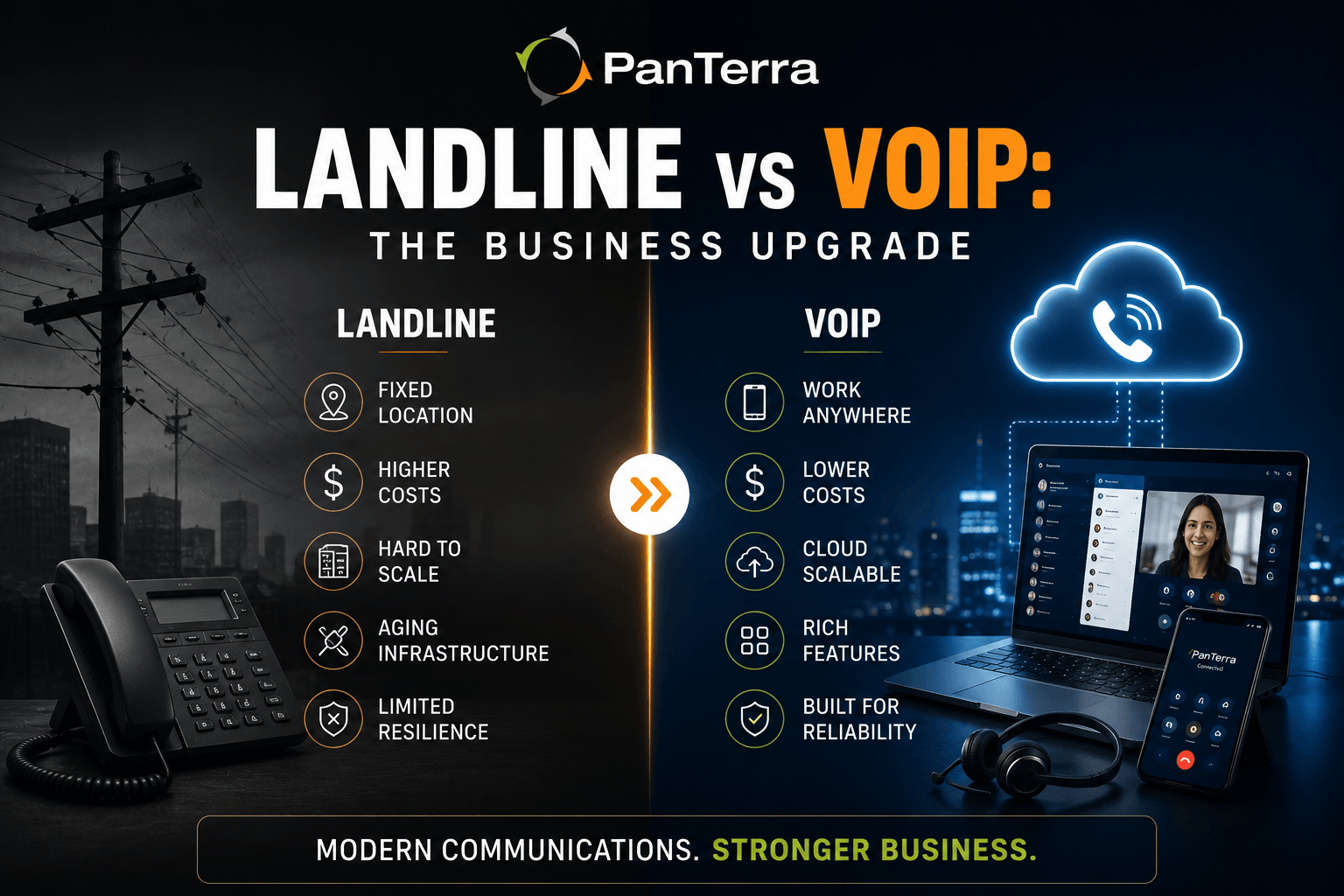
Cost per line. A traditional business landline typically runs $40 to $60 per line per month. Business VoIP plans run $15 to $30 per user per month and include features that cost extra on a legacy system: call recording, voicemail to email, auto-attendant, and conference calling. According to industry data from Brightlio, businesses save 30% to 50% on communication costs by migrating from landlines to VoIP, with small businesses on usage-based plans reporting savings up to 68%.
Remote and mobile access. A landline is fixed to a physical location. VoIP runs on any internet connection, which means your team can use the same business number from a desk phone, a laptop softphone, or a mobile app. For businesses with hybrid or distributed teams, unified communications via VoIP is how modern work actually functions.
Scalability. Adding a line to a traditional phone system means provisioning physical infrastructure. Adding a VoIP user means creating an account and assigning an extension. You can scale up the day you need to and scale back down if team size changes.
Before You Start: Four Things to Check
Before scheduling your migration, confirm these four items. Skipping any one of them is the most common reason migrations hit unexpected problems.
1. Internet Bandwidth
VoIP calls use approximately 100 kbps of upload and download bandwidth per simultaneous call. A team of 20 people making simultaneous calls needs roughly 2 Mbps dedicated to voice traffic, which is a small fraction of most business internet connections, but still something to verify. Run a speed test and identify peak usage hours. If your internet consistently drops below the threshold during busy periods, either upgrade the connection or configure Quality of Service (QoS) settings on your router to prioritize voice traffic.
2. Network QoS Configuration
VoIP is sensitive to packet loss, jitter, and latency: the three metrics that determine whether calls sound clear or choppy. Most modern business routers support QoS rules that assign priority to voice traffic. Your VoIP provider should be able to advise on optimal QoS settings for your hardware. If your router does not support QoS, factor in the cost of a replacement.
3. Existing Contract Terms
Check when your landline contract expires and what early termination fees apply. In many cases, timing the migration to coincide with a contract end date removes the termination cost entirely. Also confirm which numbers you want to port versus which can be released and replaced with new numbers.
4. Hardware Inventory
Make a list of every device currently connected to your phone system: desk phones, fax lines, alarm systems, and credit card terminals. Modern IP desk phones work natively with VoIP. Analog phones can be adapted using an Analog Telephone Adapter (ATA). Fax lines, alarm systems, and payment terminals require individual evaluation. Many can be converted, but some may need a dedicated POTS replacement line.
Step-by-Step: How to Switch from Landline to VoIP
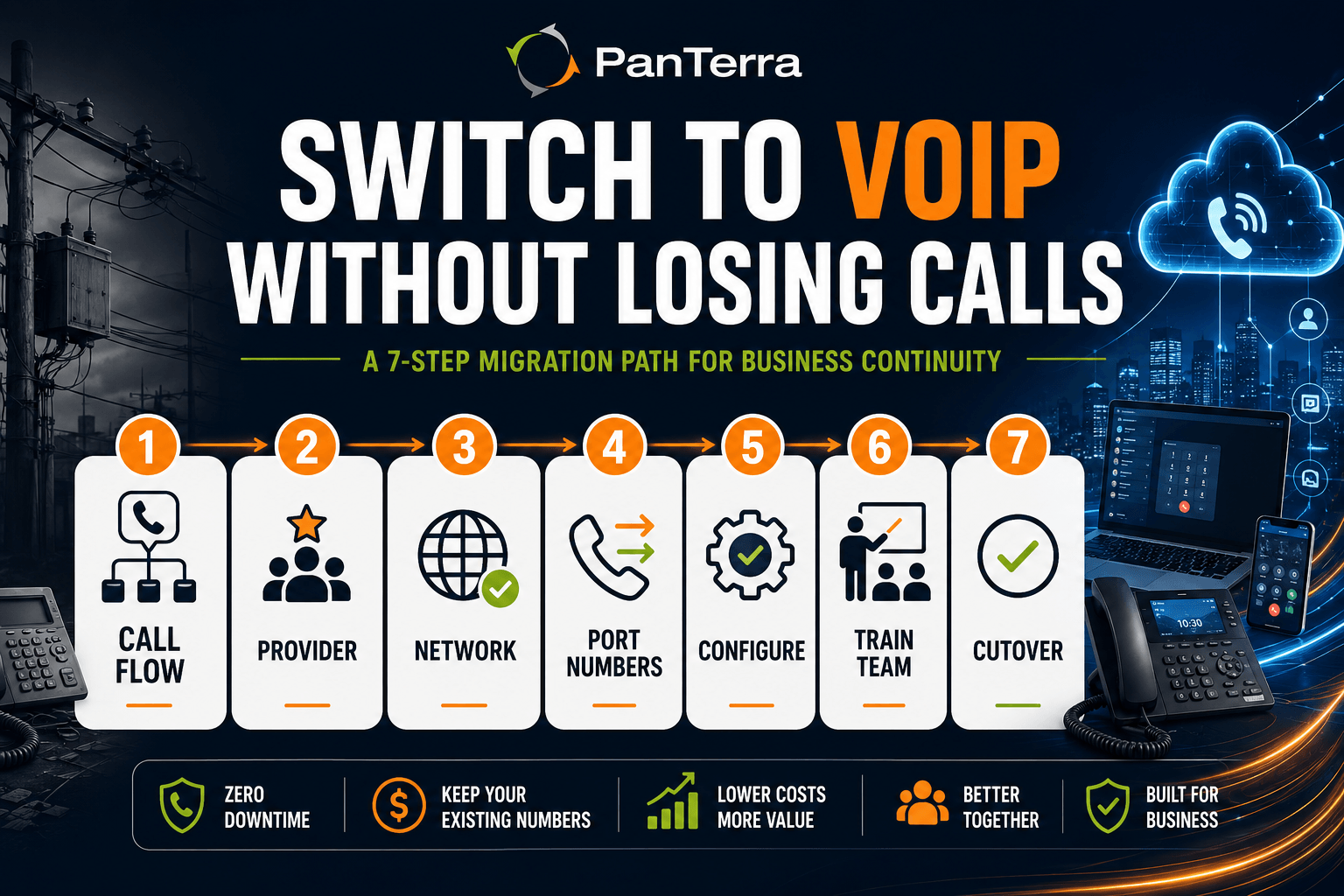
Step 1: Define Your Call Flow Requirements
Before selecting a provider or configuring anything, document how your phone system currently works: how many inbound lines you need, whether you have direct-dial extensions, whether you use an auto-attendant or IVR, how calls route to departments or hunt groups, and whether any locations require dedicated fax lines. This documentation becomes the blueprint your VoIP provider uses to configure the system. The more detail you provide upfront, the smoother the configuration phase.
Step 2: Choose a VoIP Provider
Not all VoIP providers handle business migrations the same way. The distinction between a standalone VoIP phone service and a full UCaaS platform matters at this stage. VoIP gives you calling; UCaaS adds messaging, video, file sharing, and contact center in a single platform. When evaluating options, look for:
Uptime SLA. Business-grade VoIP providers should offer a 99.99% uptime SLA backed by redundant, carrier-grade infrastructure. Anything below 99.9% means planned and unplanned downtime will affect your calls.
Migration support. Find out whether the provider offers managed migration: they handle number porting coordination, hardware provisioning, call flow design, and cutover. Ask specifically who files the port request, who monitors its status, and who is available if something goes wrong on cutover day.
Support model. After go-live, your team will have questions. Verify that the provider offers US based live support, not a ticket queue, and confirm their average response time.
Compliance requirements. If your business operates in healthcare, legal, or financial services, verify that the provider offers HIPAA/HITECH certification. Not all VoIP providers build compliance into the platform; many treat it as an add-on.
Hardware compatibility. Confirm whether the provider supports the desk phone hardware you want to use and whether they handle pre-configuration so phones arrive ready to plug in.
Step 3: Audit and Prepare Your Network
Once you have chosen a provider, work through the technical prerequisites before provisioning begins:
- Confirm bandwidth capacity meets the provider’s per call requirement
- Configure QoS on your router to prioritize voice traffic
- Verify firewall rules allow VoIP traffic on required ports (typically UDP 5060 for SIP and a range of RTP ports for media)
- Check that Power over Ethernet (PoE) switches are available if deploying IP desk phones
- Test your internet speed during peak hours, not just off-peak
Your provider should supply a network readiness checklist. If they do not offer one, treat that as a signal about their migration process.
Step 4: Port Your Phone Numbers
Number porting is the process of transferring your existing business phone numbers from your current landline carrier to your new VoIP provider. Under FCC number portability rules, carriers are required to release your numbers when you request a port. You own the right to keep your number regardless of which provider you use.
What you need to provide: your account number with the current carrier, billing name and address exactly as it appears on the account, PIN or passcode if your carrier requires one, and a copy of a recent bill if the carrier requests it.
Landline number ports typically take 7 to 14 business days. The actual cutover happens at a specific time on the port completion date, usually during low call volume hours.
Critical: Do not cancel your old landline service before your provider confirms the port is complete. If you cancel early, the number may be released and become unrecoverable. Keep the old service active until you receive written confirmation that all numbers are live on the new system.
Step 5: Configure the System Before Go-Live
Most VoIP providers allow you to configure and test your new system before the numbers port over. Use this window to set up your auto-attendant or IVR menu, create extensions and user accounts, configure hunt groups and call queues, record greetings, and test call routing with temporary numbers before your real numbers are live.
Running the old and new systems in parallel during this phase is the key to zero-downtime cutover. Your team uses the new system for outbound calls while the old lines remain active for inbound. When the port completes, the new system takes over without a gap.
Step 6: Train Your Team Before Cutover
The most overlooked step in any VoIP migration is user training. The technology works on day one. Whether your team uses it effectively on day one depends on how much preparation went in before the cutover. Cover the basics before go-live: how to make and receive calls, how to transfer calls, how to access voicemail, and how to reach support if something is not working. Give people at least a few days with the new system before the old lines are switched off.
Step 7: Execute the Cutover
Cutover day is when your phone numbers officially move to the new system and all inbound calls route through VoIP. Schedule the cutover during a low call volume window, have your provider’s migration team on call for the duration, test inbound and outbound calls immediately after the port completes, confirm all extensions and auto-attendant routing work as configured, and keep your provider’s emergency support contact visible to your IT staff. For most businesses, the actual port cutover takes minutes.
What to Expect: VoIP Migration Timeline
Most business landline-to-VoIP migrations follow this general sequence:
|
Phase |
Timeline |
What Happens |
|---|---|---|
|
Assessment and provider selection |
Days 1–5 |
Network audit, provider evaluation, contract signing |
|
System configuration |
Days 3–7 |
Account setup, call flow design, hardware provisioning |
|
Port request submission |
Days 5–7 |
Provider files port request with current carrier |
|
Hardware delivery and testing |
Days 7–10 |
Phones arrive pre-configured; parallel testing begins |
|
Number port completes |
Days 10–14 |
Numbers transfer; system goes live |
|
Post-migration tuning |
Days 14–30 |
Call quality monitoring, configuration adjustments, training follow up |
Straightforward configurations can go-live in under a week. Complex deployments with multiple locations, contact center queues, and CRM integrations take two to four weeks.
How PanTerra Handles the Migration
PanTerra Networks includes white glove migration support with every deployment. The migration team handles number porting coordination, hardware provisioning, call flow design, auto-attendant setup, hunt group configuration, and end-user training, all at no additional cost. Most migrations are operational within 5 to 10 business days; simpler configurations go-live in 48 to 72 hours.
The Streams.AI platform includes everything your migrated business phone system needs in a single application: cloud business phone, video conferencing, team messaging, business SMS, enterprise file sharing, and Luna AI Receptionist. Unlike legacy systems with separate licensing tiers for each feature, every Streams.AI seat includes the full feature set.
For IT decision-makers evaluating providers:
- 99.99% uptime SLA: backed by carrier grade redundant infrastructure
- 30-second support response time: from US based live support, available 24/7
- Number porting included: your existing DIDs, toll-free numbers, and company numbers transfer without interruption
- HIPAA/HITECH certified: across the entire platform, not just selected tiers
- STIR/SHAKEN compliant: all outbound calls are authenticated at the carrier level automatically. See our STIR/SHAKEN guide for how authentication works alongside your new system.
Review PanTerra pricing for Business Basic ($17.95/user/mo) and Business Plus ($24.95/user/mo) plan details. Qualified pricing starting at $12.95/user/mo is available for annual agreements, migrations, bundled deployments, and volume licensing. For the hardware side of your migration, see PanTerra’s business phone lineup.
Migration Checklist
Use this checklist as you plan your migration. Every item below should be confirmed before cutover day.
Network and Infrastructure
□ Internet bandwidth tested and verified (100 kbps per simultaneous call)
□ QoS configured on router to prioritize voice traffic
□ Firewall rules allow SIP (UDP 5060) and RTP media ports
□ PoE switches in place for IP desk phones (if applicable)
□ Backup internet connection or failover plan identified
Number Porting
□ Current carrier account number confirmed
□ Billing name and address confirmed (must match carrier records exactly)
□ PIN/passcode obtained from current carrier
□ Recent bill available if required
□ Old service confirmed active until port completion
System Configuration
□ Call flow documented (auto-attendant menus, hunt groups, extensions)
□ User accounts created and extensions assigned
□ Voicemail configured and greetings recorded
□ Hold music and after-hours routing set up
□ CRM integration configured (if applicable)
Team Readiness
□ All users trained on new desk phone or softphone
□ Mobile app installed and tested on team devices
□ Support contact visible to all staff on cutover day
□ IT staff briefed on escalation path
Cutover Day
□ Provider migration team confirmed available
□ Cutover window scheduled during low call volume hours
□ Test call plan ready (inbound, outbound, transfers, voicemail)
□ All staff notified of cutover time
Frequently Asked Questions
Can I keep my existing business phone number when switching to VoIP?
Yes. Under FCC number portability regulations, you have the right to port your phone number to any provider, including VoIP services. The process typically takes 7 to 14 business days for landline numbers. Do not cancel your current service until your provider confirms the port is complete.
What internet speed do I need to run VoIP?
Plan for approximately 100 kbps of upload and download bandwidth per simultaneous call. What matters more than raw speed is consistency: packet loss above 1%, jitter above 30ms, or latency above 150ms will affect call quality regardless of total bandwidth. Your VoIP provider can run a network quality test before the migration.
How long does a business landline-to-VoIP migration take?
Most businesses complete the migration in two to four weeks from contract signing to final cutover. Simple configurations can go-live in under a week. The main variable is number porting: landline ports take 7 to 14 business days, and that timeline is set by the current carrier, not the VoIP provider.
What happens to fax lines and alarm systems when switching to VoIP?
Analog fax lines and alarm systems require special handling. A standard VoIP connection cannot directly replace an analog fax line without an Analog Telephone Adapter (ATA) or a cloud fax service. Alarm systems and payment terminals often need a dedicated POTS replacement line or a cellular backup unit. Inventory all analog devices before your migration begins.
What is the difference between a hosted VoIP system and an on-premise PBX?
A hosted VoIP system runs on your provider’s infrastructure. You access it over the internet and the provider handles maintenance, upgrades, and redundancy. An on-premise PBX runs on hardware you own and maintain at your location. Hosted VoIP has lower upfront costs, scales without hardware purchases, and requires no in-house telecom expertise to maintain. The UCaaS vs VoIP guide covers the full breakdown if you are evaluating which model fits your team.
Will my calls be as clear as a landline?
On a properly configured network, VoIP call quality is equal to or better than a landline. Poor call quality after migration is almost always a network configuration issue, not an inherent VoIP limitation. The codec quality of modern VoIP platforms exceeds what legacy PSTN infrastructure supports.
Can remote employees use the same business phone system after the switch?
Yes. A cloud-based phone system works on any internet connection. Remote and hybrid employees can use a desktop softphone, a mobile app, or a physical IP desk phone at a home office, all on the same business number with access to the same extensions, voicemail, and call routing rules as in office staff.
What is STIR/SHAKEN and does it affect my VoIP migration?
STIR/SHAKEN is the FCC-mandated call authentication framework your VoIP provider implements at the carrier level. When you migrate to a compliant VoIP platform, your outbound calls receive STIR/SHAKEN authentication automatically. For a full explanation, see our STIR/SHAKEN explained guide.
.jpg?width=500&height=500&name=Are%20you%20Getting%20a%20Good%20Deal%20(1).jpg)
Comments