How to Remove a Spam Label from Your Business Phone Number


If your business phone number is showing as “Spam Likely,” “Scam Risk,” or “Potential Spam” on customer phones, every outbound call you make is working against you. Recipients see the label before they decide whether to answer. Most do not.
Knowing how to remove a spam label from your phone number is straightforward once you know which carrier applied it. The process requires filing remediation requests with each carrier and analytics provider that flagged the number, and it takes time. This guide walks through each step, carrier by carrier, so you know exactly where to go and what to expect.
TL;DR — Key Takeaways
- Spam labels on business phone numbers come from carrier analytics engines, not a central database. Learning how to remove a spam label from your phone number means contacting each carrier separately.
- The three major remediation portals are AT&T (via Hiya), T-Mobile (via First Orion), and Verizon (via TNS), each with a different submission process.
- Manual remediation typically takes one to four weeks per carrier. There is no way to expedite reviews once submitted.
- Removing a label without fixing the calling behavior that triggered it means the label will return.
- PanTerra’s Phone Number Reputation Management automates the entire process: monitoring, detection, remediation filing, and follow up, resolving most labels within two to three business days.
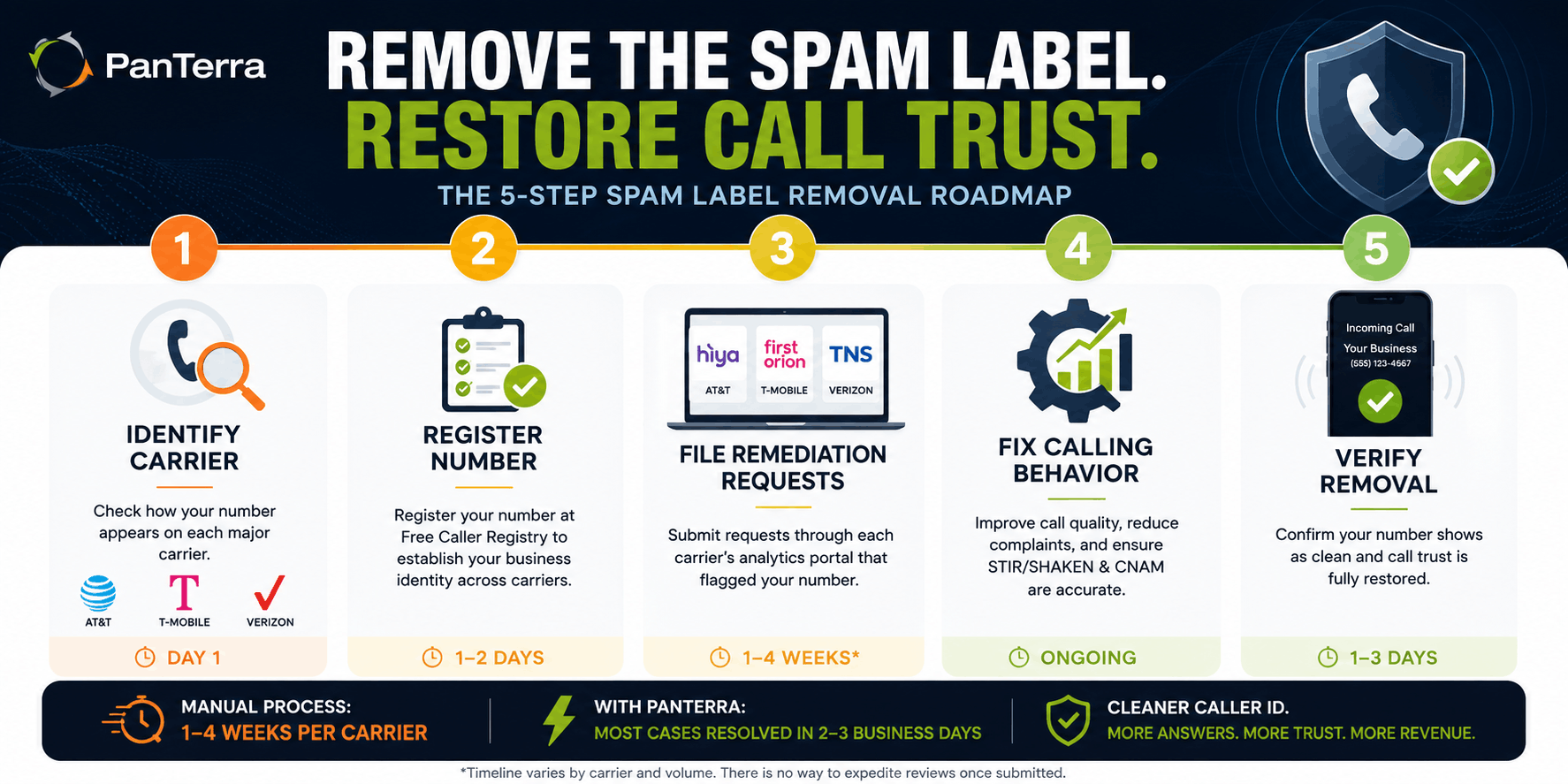
Step 1: Confirm Which Carrier Flagged Your Number
Before filing any remediation request, you need to know which carrier applied the label. A number flagged on T-Mobile will display “Scam Likely.” The same number may appear clean on AT&T and Verizon. Remediation filed with the wrong carrier does nothing.
The fastest method: call your own number from a personal mobile device on each of the three major carriers — AT&T, T-Mobile, and Verizon — and observe what label appears on screen. If you do not have access to all three, ask a colleague, a customer, or a trusted contact on each network to report back exactly what they see.
Make a note of which carrier displayed a label, the exact wording of the label, and the date you confirmed it. This information will be required in your remediation submissions.
Quick check: If a 30–50% drop in your connect rate appeared over two to three weeks with no other variable changing, your number is almost certainly flagged. Do not wait for a customer to tell you.
Step 2: Register Your Number with the Free Caller Registry
Before filing individual carrier disputes, register your business numbers at freecallerregistry.com. This is a centralized registry operated jointly by the three major analytics engines — Hiya, First Orion, and TNS — that feed spam data to AT&T, T-Mobile, and Verizon.
Registration submits your business identity and number information to all three analytics providers in a single step. It does not immediately remove an active label, but it establishes a verified business record that reduces the likelihood of relabeling after remediation is complete and strengthens your case when submitting individual carrier disputes.
The registration process asks for your business name, the phone numbers you want to register, contact information, and a brief description of your call practices. Allow one to two business days for the registration to propagate.
Step 3: File Remediation Requests Carrier by Carrier
Each major carrier manages spam labeling through a separate analytics provider. There is no single form that reaches all three. File with each carrier where you confirmed a label.
AT&T — Submit via Hiya
AT&T uses Hiya as its analytics provider for call labeling. All AT&T remediation requests route through the Hiya platform.
Portal: att.com/reviewmycalllabel
This link redirects to the Hiya support portal. Select “Report an incorrect call label” and submit a ticket. Provide the phone number being incorrectly labeled, the label that is appearing, your business name and contact information, and a brief description of your legitimate calling practices.
Timeline: AT&T and Hiya typically complete reviews within one to two weeks of submission. Hiya also offers a free business registration program that can prevent future labeling on AT&T’s network once your number has been reviewed and cleared.
T-Mobile — Submit via First Orion
T-Mobile uses First Orion as its analytics partner. Their portal accepts both individual number submissions and bulk uploads for businesses with multiple flagged numbers.
Portal: callreporting.t-mobile.com
You will need to create a free account before submitting. Once logged in, you can report one number at a time or upload a CSV file for bulk submissions. The form asks for the affected phone number, call type, and a description of the issue.
Timeline: T-Mobile and First Orion typically complete reviews within one to two weeks. First Orion also offers a registration program that reduces future flagging on T-Mobile’s network.
Verizon — Submit via TNS
Verizon routes its call labeling through TNS (Transaction Network Services). Verizon’s remediation portal is separate from the other two carriers and requires its own submission.
Portal: voicespamfeedback.com
The form asks for the flagged phone number, the type of label displayed, and business identification information. You can also reach TNS directly at communications@tnsi.com if the online form does not resolve the issue after submission.
Timeline: Verizon via TNS tends to take slightly longer: typically two to four weeks for initial review. If your number serves high call volume or has a significant complaint history, additional documentation may be required.
Hiya — Submit for Outside App Labels
If the spam label appears in outside caller ID apps like Google Phone or on Apple devices, the label may be coming from Hiya directly. Submit a dispute ticket at hiyahelp.zendesk.com.
Step 4: Fix the Behavior That Triggered the Flag
Filing remediation requests without addressing the underlying calling behavior is a temporary fix. Most labels return within weeks if the pattern that triggered them continues.
Call volume from a single number. The carrier algorithms observed high outbound volume and interpreted it as spam like behavior. If your operations require high daily call volume, distribute calls across multiple registered numbers rather than concentrating them on one.
Short call durations. If a high percentage of your calls are ending in under ten seconds, recipients are screening and rejecting them. This feeds negatively into the analytics scoring. Focus on improving contact list accuracy before resuming high volume.
Consumer complaints. If recipients have been marking your calls as spam in their carrier apps, those complaints accumulate in the analytics databases. The only remedy is reducing the complaint signal over time through calling cleaner lists, calling at appropriate hours, and giving recipients a clear reason to answer.
Missing or inconsistent CNAM data. Ensure your Caller Name (CNAM) record is accurate and matches your registered business name. Inconsistent CNAM data is an easy fix that reduces anonymous caller risk signals.
Remediation restores a clean label. Behavioral changes keep it that way.
Step 5: Verify the Spam Label Is Gone from Your Phone Number
After submitting remediation requests, test your number across all three carriers again. Use the same method from Step 1: call from personal devices on each network and record what displays.
Carrier updates do not propagate instantly. Even after a carrier approves a remediation request, it can take an additional two to seven days for the cleared status to reflect on recipient devices. Test at least one week after the carrier confirms resolution.
If the label persists beyond four weeks after submission, follow up directly with the relevant portal or contact the analytics provider by email. Keep records of your original submission date and any confirmation or reference IDs you received.
Manual Remediation vs. Automated: What the Difference Costs You
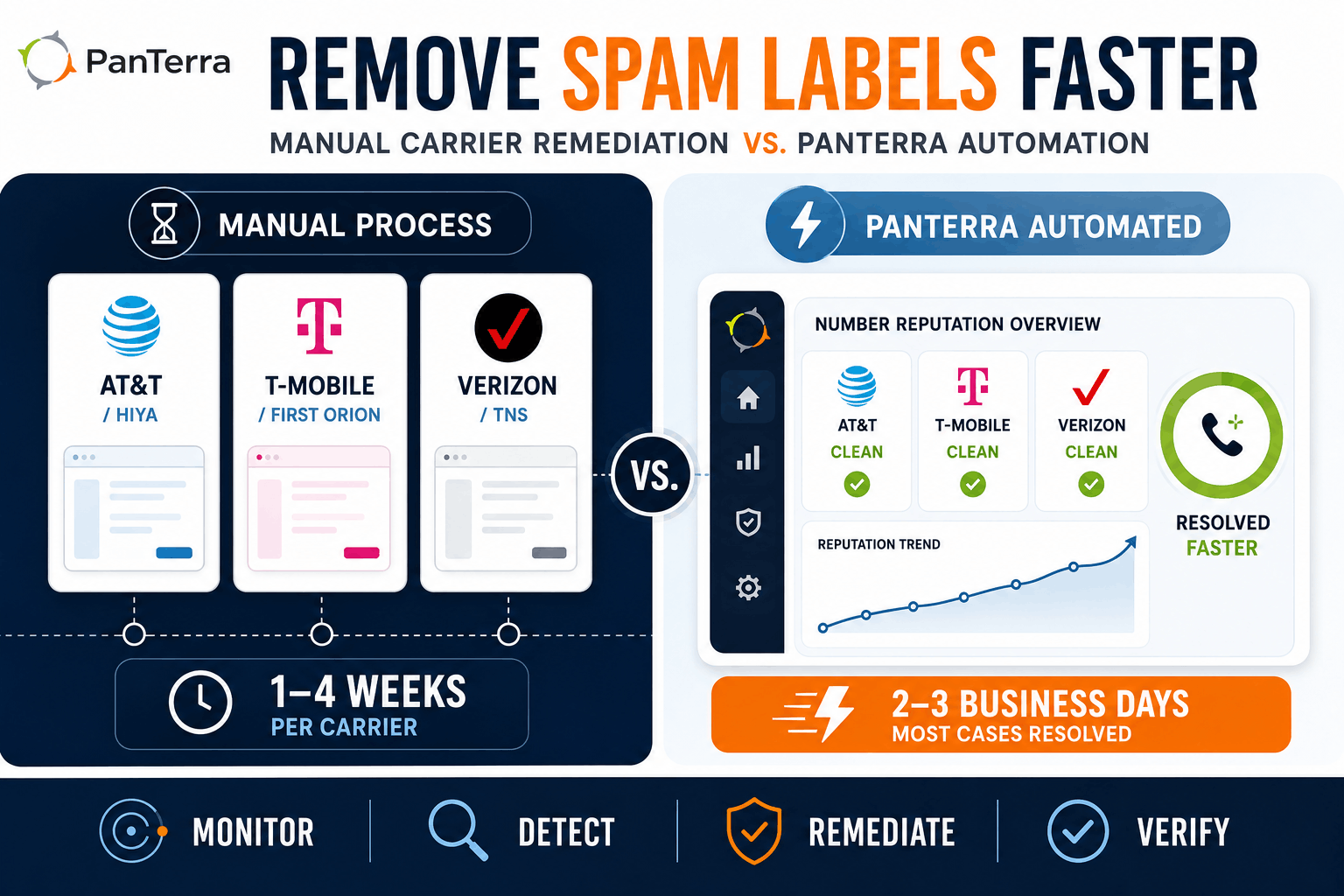
The carrier by carrier process above works, but it takes time, requires tracking multiple portals, and offers no early warning if a number gets flagged again after remediation.
For businesses where outbound calling drives revenue, that timeline carries a real cost. According to PanTerra’s product data, a spam label can cause a 40–60% drop in answer rates. At that rate, a two to four week manual remediation cycle represents weeks of degraded outbound performance.
PanTerra’s Phone Number Reputation Management addresses this at the platform level. The service monitors your registered numbers 24/7 across AT&T, Verizon, T-Mobile, and all three major analytics providers. When a spam label appears, PanTerra initiates the remediation filing automatically. Most labels resolve within two to three business days through PanTerra’s established carrier relationships, compared to the one to four week manual timeline.
For the full explanation of how carrier scoring works and what triggers labels in the first place, see our guide on phone number reputation management. For context on how STIR/SHAKEN authentication fits alongside reputation management, see STIR/SHAKEN explained.
The service is available on the PanTerra Streams.AI platform at $10 per number per month. Review PanTerra pricing for current plan details.
Frequently Asked Questions
How long does it take to remove a spam label from a business phone number?
Manual remediation through individual carrier portals typically takes one to four weeks from submission. AT&T via Hiya and T-Mobile via First Orion generally complete reviews in one to two weeks. Verizon via TNS can take two to four weeks. Once a carrier approves the request, allow several additional days for the cleared status to propagate to recipient devices. PanTerra’s automated service resolves most labels within two to three business days through direct carrier relationships.
Do I have to contact every carrier separately?
Yes. There is no single form that reaches AT&T, T-Mobile, and Verizon simultaneously. Each carrier routes its spam labeling through a separate analytics provider: Hiya for AT&T, First Orion for T-Mobile, and TNS for Verizon. Each requires its own submission. Registering with the Free Caller Registry covers all three analytics engines in one step, but active label removal still requires separate carrier filings.
Will registering with the Free Caller Registry remove my spam label?
Not directly. Free Caller Registry registration establishes a verified business identity record with Hiya, First Orion, and TNS. It reduces the likelihood of future labeling and supports your case when filing individual carrier disputes. To remove an active label, you still need to submit remediation requests through each carrier’s portal.
What if my label comes back after remediation?
Recurring labels almost always mean the calling behavior that triggered the original flag has not changed. After completing remediation, review and adjust call volume per number, call timing, contact list quality, and CNAM accuracy to reduce future flagging risk.
Can I dispute a spam label if my calls are STIR/SHAKEN compliant?
Yes, and you should. STIR/SHAKEN compliance verifies that you are authorized to use the calling number but does not prevent spam labels. Labels come from behavioral analytics scoring, which operates independently of authentication. File a remediation dispute through the relevant carrier portal regardless of your STIR/SHAKEN status.
What information do I need to submit a remediation request?
Each carrier portal asks for slightly different information, but common requirements are: the phone number being incorrectly labeled, the exact label text appearing on recipient devices, your business name and contact information, and a brief description of your legitimate calling practices. Having a record of when the label first appeared and on which carrier strengthens the submission.
How do I check if my number is flagged without calling from each carrier?
The Free Caller Registry displays basic reputation status after registration. Numeracle’s Number Check tool provides carrier level screenshots of how your number currently displays. PanTerra’s reputation management dashboard shows real time label status across AT&T, Verizon, T-Mobile, and analytics providers for enrolled numbers.
Does number rotation fix a spam label?
No, and it makes the problem worse. Carrier algorithms are designed to detect rotation patterns and treat them as a spam behavior signal. Rotating numbers also prevents any single number from accumulating positive reputation history, which is the only sustainable path to clean caller ID. Remediate the flagged number and address the underlying behavior rather than abandoning it.
.jpg?width=500&height=500&name=Are%20you%20Getting%20a%20Good%20Deal%20(1).jpg)
Comments