Multi-Location Small Business Phone System: What Actually Works


The first phone system a growing business buys usually works well enough for one location. The second one: the one they buy after the first one breaks. It often has the same problem. Not because the buyer made a bad choice, but because most phone system evaluations are run as feature comparisons rather than architecture evaluations. They ask 'does it have an auto-attendant?' instead of 'can this system run ten locations on one bill, one admin portal, and one support contract?'
Multi-entity SMBs: franchises, multi-site healthcare practices, regional retail chains, professional services firms with branch offices, outgrow their small business phone system at a predictable point. The breakpoint is not headcount. It is operational complexity. And it arrives faster than most operators expect. As documented in research on multi-location phone systems, this pattern repeats across industries and business sizes.
This article covers what that breakpoint looks like, why the first replacement usually fails, and what a phone system actually needs to do for a business running multiple locations.
TL;DR: Key Takeaways
- Multi-entity SMBs do not outgrow their phone system because of call volume. They outgrow it because of operational complexity: multiple vendors, multiple bills, no central reporting, and call routing that breaks when the business grows past its original location count.
- The four failure signals are predictable and appear in a consistent sequence: billing fragmentation, routing failures between locations, directory management becoming a part-time job, and the inability to report across the business as a whole.
- Most first replacements fail because they solve the feature problem without solving the architecture problem. Adding a better VoIP system to a per-location setup still gives you multiple systems.
- What actually works is a single-platform UCaaS with centralized administration and per-location configuration: one system where each location can operate independently while IT manages everything from one portal.
- Cupbop, a 64-location Korean BBQ chain, runs all U.S. locations on one PanTerra platform. New locations go live in one day.
Who This Is For
- Best for: Owners, operators, and IT leads at multi-entity SMBs — franchises, multi-site healthcare practices, regional retail operations, or professional services firms with two or more locations, who are hitting the limits of their current phone system.
- Not ideal for: Single-location businesses that have not yet opened a second site. The multi-location complexity this article addresses has not yet appeared for you.
- Top use case: Replacing a per-location phone system patchwork with a single cloud platform that gives each location independent configuration while giving IT centralized visibility, billing, and reporting across all of them.
The Four Signs a Multi-Entity SMB Has Outgrown Its Phone System
The breakpoint rarely announces itself as a catastrophe. It usually shows up as a slow accumulation of friction that everyone has stopped complaining about because it feels permanent.
1. Billing fragmentation. You have more than one phone vendor. Different invoices, different contract renewal dates, different per-line costs that have drifted apart since initial deployment. Nobody on your team knows exactly what you are paying for phone service across the full business because the answer requires pulling three invoices and doing math.
2. Routing failures between locations. Transferring a customer from one location to another is unreliable. Calls drop, hold music cuts out, or the transfer sends the customer back to the main menu instead of the person they were just talking to. The staff at each location has learned a workaround: usually hanging up and calling the customer back. Nobody has ever written it down or fixed it.
3. Directory management as a part-time job. Every new hire, every departure, every desk phone reassignment requires touching the phone system at that location. If you have four locations, that is four systems. Changes do not propagate. The directory at location three does not know about the new hire at location one.
4. No cross-location reporting. You cannot answer 'how many calls did we handle across all locations last month' without requesting data from multiple systems, exporting to a spreadsheet, and hoping the format is consistent. Supervisor visibility into hold times, answer rates, and inbound volume does not exist at the business level.
If three of these four are familiar, the phone system is not a cost center. It is an operational drag that compounds with every location added.
Why the First Small Business Phone System Replacement Usually Fails
The most common mistake multi-entity SMBs make when replacing a broken phone system is solving the wrong problem.
The typical evaluation process runs like this: the operations team gets tired of the vendor and starts shopping. They compare features: auto-attendant, voicemail to email, mobile app, call recording. They find a provider with all the features the current one lacks and switch. Two years later, the same problems are back, sometimes worse, because the new system has the same architecture as the old one: one system per location, deployed independently, billed separately.
The feature problem was never the real problem. The architecture problem was.
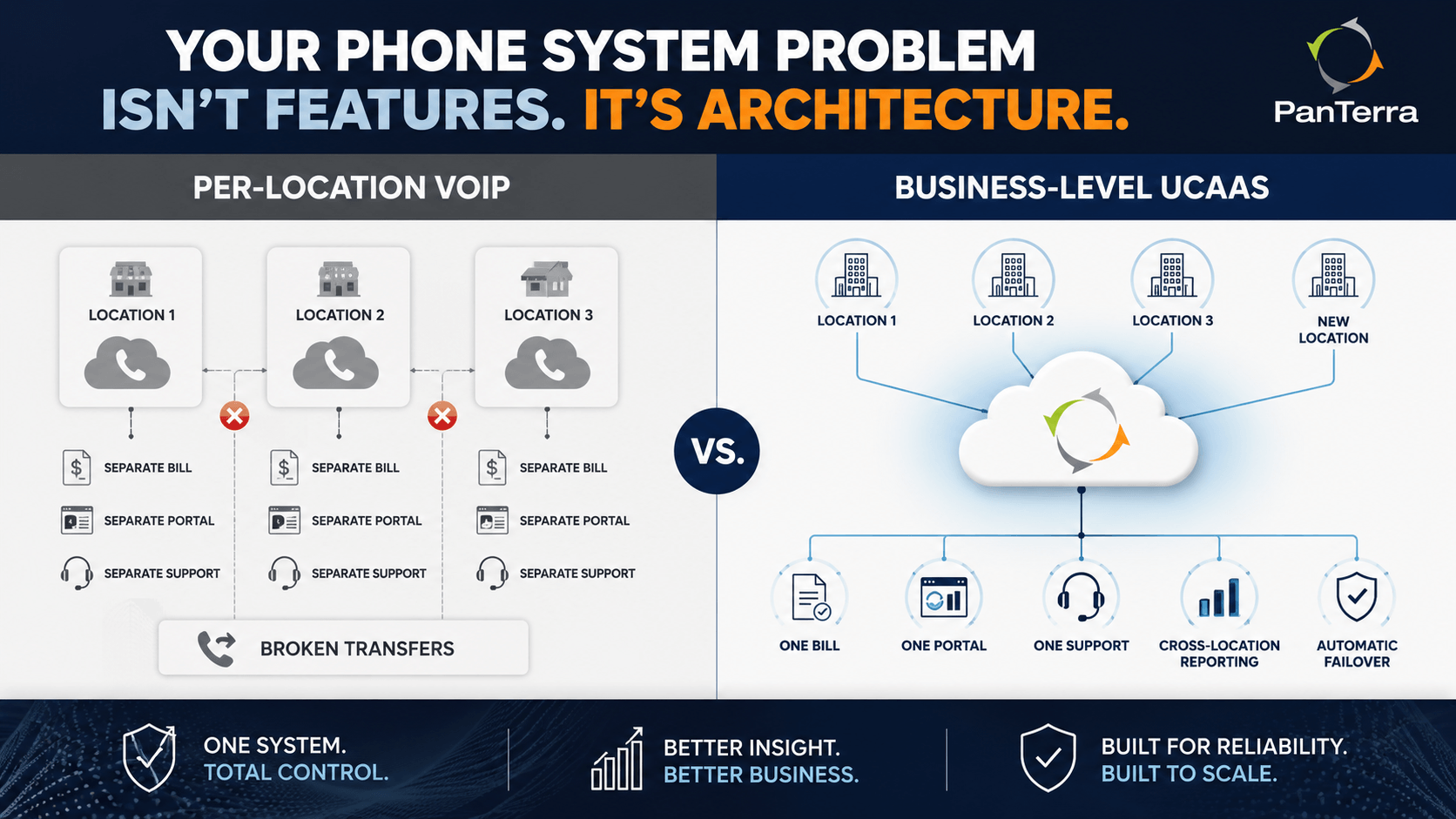
A phone system that works for one location can completely fall apart at multiple locations. The specific failures are:
- Call routing between locations becomes a daily failure point. Transfers drop. Hold music cuts out. The customer hears silence before being reconnected.
- Billing chaos accumulates. Different invoices, different terms, different support numbers, different per-line costs that never match the salesperson's quote.
- Disaster recovery does not exist in any meaningful way. If one location's internet goes down, calls do not reroute. The phones stop ringing there until the internet comes back or IT manually intervenes.
- Reporting fragmentation persists. You still cannot see what is happening across the business. You can see what is happening at each location, in separate logins, with separate report formats.
Adding a better VoIP system to this structure does not fix it. You get better features with the same architecture problem.
What Actually Works: The Architecture Distinction
The difference between a phone system that scales with a multi-entity SMB and one that does not is not features. It is the fundamental question of whether the system is designed around locations or around the business.
A per-location system treats each office as the unit of management. Good for one location. Workable for two. An operational problem at five.
A business-level UCaaS platform treats the entire organization as the unit of management, with per-location configuration inside it. Each location can have its own phone numbers, its own auto-attendant and IVR settings, its own call routing rules, its own hours, and its own local extensions. But all of it is managed from one admin portal, billed on one invoice, supported by one vendor, and reported on in one dashboard.
"We needed each location to operate as its own independent phone system — with its own settings, users, and call flows — while still giving our corporate IT team centralized visibility and control across all of them." — PE firm operator managing multiple healthcare franchise brands
That is the architecture question most phone system evaluations never ask.
What to Look For Before You Evaluate Vendors
Before comparing provider names and pricing pages, get answers to these questions from any vendor you are seriously considering:
How is provisioning handled when a new location opens? The answer should be: IT adds the location in the admin portal, assigns numbers and users, and the location is live. It should not be: IT contacts the vendor to open a new account. If opening a new location requires a new vendor contract, you are buying a per-location system that will not scale.
Is billing consolidated across all locations? One invoice, one account, one renewal date. If the answer is 'we can work toward that' or 'it depends on how we structure the account,' you are looking at future billing fragmentation.
What happens to calls at Location A when Location A's internet goes down? The answer should be automatic rerouting to another location, a mobile app, or a backup path, within seconds, without IT involvement. If the answer is 'calls will be affected until the connection restores,' that is a disaster recovery gap.
Can a supervisor at corporate see call activity across all locations in one report? If the answer is 'each location has its own reporting dashboard,' you will rebuild the spreadsheet problem you are already running.
Who supports the whole system? One support contact, one account number, one escalation path. Multiple support relationships by location multiply your exposure in a crisis.
How PanTerra Streams.AI Handles Multi-Location SMBs
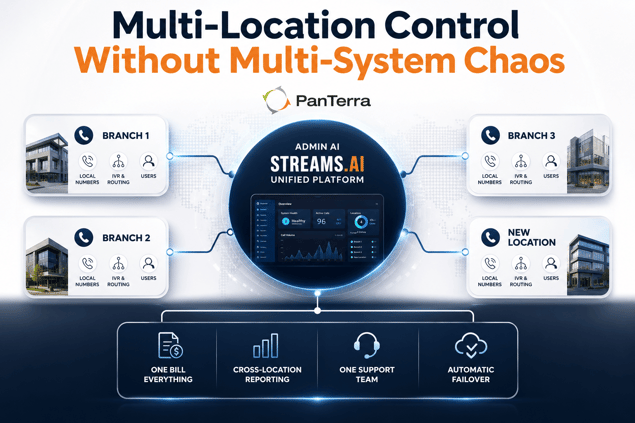
PanTerra's Streams.AI platform is built for exactly this architecture. Every plan, from Business Basic at $17.95/user/mo through Call Center at $44.95/user/mo, includes multi-site readiness, centralized administration, and unified billing across all locations.
Each location operates independently inside a single account. Local phone numbers, local auto-attendant settings, location-specific call routing, and local user directories all function per site. But IT manages all of it from one Admin AI portal, reports across the full organization from one dashboard, and contacts one US-based support team for anything across the entire deployment.
When a location's internet goes down, PanTerra's failover routes calls to mobile apps, desktop apps, and IP phones automatically: no IT action, no missed customer calls.
Cupbop, a Korean BBQ chain operating 64 locations across the United States, runs its entire phone operation on one PanTerra platform. New locations go live in one day. According to Brightlio's UCaaS research, multi-location businesses that consolidate on a single UCaaS platform save an average of 30% to 50% on communication costs compared to maintaining per-location VoIP setups.
Review PanTerra pricing for current plan details. If your organization is evaluating a transition from a per-location VoIP setup, see our cloud migration guide for what the transition process looks like. For very small businesses evaluating whether they have already hit the scale wall on a consumer-grade system, the PanTerra vs Ooma comparison covers that transition specifically.
Frequently Asked Questions
At what point does a small business need a multi-location phone system?
The need for a unified multi-location phone system typically surfaces when an SMB opens its second or third location and begins accumulating operational friction: separate vendor invoices, call routing that fails between locations, directory changes that do not propagate, and no way to report across the full business. Most operators hit the wall somewhere between two and five locations. After that point, adding more locations to a per-location system compounds the problem rather than solving it.
What is the most common mistake businesses make when replacing a multi-location phone system?
The most common mistake is solving the feature problem rather than the architecture problem. A business switches from one per-location VoIP system to a better per-location VoIP system and gets better features with the same structural problem: multiple systems, multiple bills, no centralized reporting, no unified administration. The architecture question — is this system designed around locations or around the business? — is rarely asked during the evaluation process.
What should a multi-location phone system include as standard?
A multi-location phone system should include: centralized administration for all locations from one portal, consolidated billing on one invoice, automatic call rerouting when a location's internet fails, cross-location reporting across the full business, per-location configuration for phone numbers, IVR, and routing rules, and a single vendor relationship for support across the entire deployment.
How long does it take to set up a new location on a cloud phone system?
On a properly architected cloud phone system, adding a new location is an admin portal task that takes minutes, not a new vendor contract or a technical installation project. PanTerra customers consistently report new locations going live in one day. The key variable is number porting from a prior vendor, which takes 7 to 14 business days for landline numbers.
Can each location have its own phone number and call routing on one system?
Yes. Each location should have its own direct inward dial numbers, its own auto-attendant greeting and menu, its own routing rules and business hours, and its own local user directory, while all of this is managed and reported on from a single admin portal at the account level. A system that does not support this structure is a per-location system, not a business-level platform.
What happens to calls if one location's internet goes down?
On a properly configured cloud phone system with automatic failover, calls to a location with an internet failure automatically reroute to mobile apps, desktop softphone applications, or IP phones on cellular data, within seconds, without IT intervention. On most per-location VoIP systems, the phones at that location simply stop ringing until the internet connection is restored.
Is a cloud phone system HIPAA compliant for multi-site healthcare practices?
HIPAA compliance for a multi-site healthcare operation requires that every channel: voice, messaging, fax, and any file transfer, is covered under the provider's BAA and that the compliance framework applies identically across all locations. PanTerra's Streams.AI platform is natively HIPAA and HITECH certified across all channels on every plan, including multi-site deployments, with a BAA included at no additional cost.
What is the difference between VoIP and UCaaS for a multi-location business?
VoIP provides voice calling over the internet. UCaaS provides voice, video, messaging, SMS, and file sharing in a single cloud platform. For a single-location small business with basic calling needs, VoIP may be sufficient. For a multi-location business where staff across sites need to collaborate and transfer calls reliably, UCaaS eliminates the tool fragmentation that VoIP alone cannot address. The centralized administration, consolidated billing, and unified reporting that multi-entity SMBs require are features of UCaaS platforms, not standalone VoIP services.
.jpg?width=500&height=500&name=Are%20you%20Getting%20a%20Good%20Deal%20(1).jpg)
Comments