AI Answering Services for Small Business: The 2026 Buyer's Guide

If you run a small business and calls are going unanswered, an AI answering service will fix that faster and more cheaply than hiring will. Whether it is the right choice depends on what your callers want when they call.
Small businesses have a specific version of this problem: you are not staffing a contact center, you are trying to stop losing customers while doing four other jobs. This guide is written for that situation.
TL;DR
An AI answering service uses an ai receptionist — software that answers calls, understands natural speech, and books, routes, or answers rather than just taking a message. It is not an auto-attendant and not the same as a live answering service staffed by people. Before shopping, run the Coverage Gap Audit below: pull your missed calls, map them to the clock, and sort what callers wanted. Most small businesses find the majority of missed calls were routine questions or booking requests — exactly what software handles well — and that the gap costs more per month than closing it would.
Key Takeaways
- Run the audit before you shop. Twenty minutes of your own call data beats any vendor comparison.
- Missed calls cluster in three predictable windows: lunch, after closing, and your busiest operational period.
- Calendar integration is the single biggest determinant of value. An AI receptionist that cannot see availability can only take a message.
- Ask for the actual concurrency limit rather than accepting "unlimited."
- Industry requirements should shape your shortlist early — healthcare needs a BAA, trades need emergency dispatch logic, multilingual businesses need understanding rather than just greeting.
- Budget a few hours across two weeks for setup, and plan to review recordings and adjust in the first fortnight.
Who This Is For
Best for: small businesses losing calls to voicemail · practices, trades, and service businesses with routine inbound volume · owner-operators who cannot answer every call themselves.
Not ideal for: businesses whose inbound calls are mostly complex sales conversations · very low call volume where per-call human answering stays cheap · anyone needing outbound campaign tools.
Top use cases: after-hours coverage · appointment booking · overflow at peak · front-desk relief for a small team.
What Is an AI Answering Service?
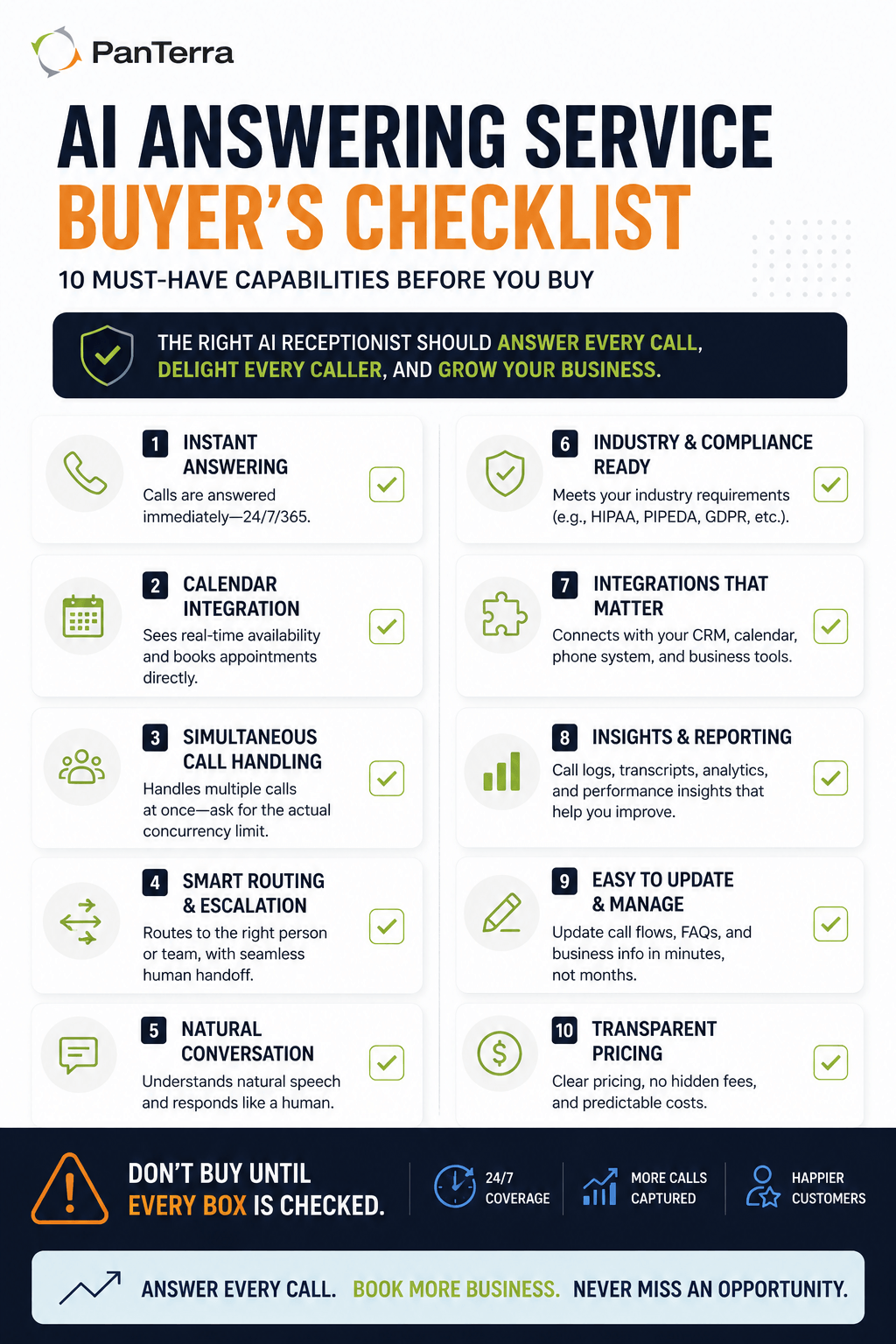
An AI answering service uses an ai receptionist — software that answers your calls, understands what the caller wants in ordinary speech, and does something useful with it: books the appointment, routes the call, answers the question, takes the message, or passes the caller to you with context attached.
It is not an auto-attendant, which reads a menu and waits for a keypress. An AI receptionist has a conversation: a caller can say "do you have anything Thursday afternoon" and get an answer.
It is also not a live answering service, which routes calls to remote staff answering as your business. That option is people; this one is software. We compare the two directly in our guide on AI receptionists versus virtual receptionist services.
Do You Actually Need One? The Coverage Gap Audit
Twenty minutes, and it tells you both whether you need one and what it is worth.
☐ Step 1 — Count what you are missing. Pull missed and unanswered calls for the last month from your phone system. If yours cannot report that, note it — the reporting gap is its own problem.
☐ Step 2 — Map them to the clock. Sort missed calls by hour and day. The pattern is almost always the same shape: a cluster at lunch, a cluster after closing, a cluster during your busiest operational period. Those are your coverage gaps.
☐ Step 3 — Sort what they wanted. Take twenty recent answered calls and label each: information (hours, location, do you do X), transaction (book, reschedule, cancel), judgment (a complaint or something unusual), or sale (a live opportunity).
☐ Step 4 — Do the arithmetic. Missed calls × the share that were information or transaction calls = what an AI receptionist would have handled. Missed calls × average customer value × close rate = what the gap costs.
Most small businesses find the majority of missed calls were information or transaction calls, and that the monthly cost of the gap exceeds the monthly cost of closing it.
What Does It Cost?
Pricing is typically a flat monthly platform fee, sometimes tiered by call volume, occasionally with a setup charge.
Against voicemail, you are paying to convert missed calls into handled ones — the audit gives you that value directly.
Against a live answering service, you trade human judgment for flat pricing and instant pickup. Live services bill per minute or per call, so a good month for your business is an expensive month for that line.
Against hiring, there is little contest at small-business scale — a fraction of a fully loaded part-time salary, covering all one hundred and sixty-eight hours of the week rather than twenty or forty.
Check the quote for: setup fees, whether changing your greeting or hours is self-service or a support ticket, whether calendar and CRM integrations are included, what happens above a volume tier, and whether the rate requires an annual commitment.
What Should It Be Able to Do?
Five capabilities separate something useful from something that just answers.
Answer instantly, every time, including simultaneously. The main advantage over a person is that ten calls at once get ten answers. Ask for the concurrency number.
Book into your real calendar. The single biggest determinant of whether it saves time or moves work around.
Route with context. When it hands off, you should get the caller's number, what they asked for, and what was already tried.
Answer your specific questions — your hours, services, parking, policies. Ask how the knowledge is configured and how you update it.
Escalate cleanly. The transition to a person should be smooth, and the caller should not repeat themselves.
What Are the Industry-Specific Requirements?
Small businesses are not one category, and several sectors have requirements that should shape your shortlist rather than being an afterthought.
Healthcare and dental practices. Patient calls involve protected health information, and your provider becomes a business associate under HIPAA. Ask whether they sign a Business Associate Agreement and whether it is included or gated behind a tier. Also ask what the system says back — repeating a patient's name and procedure onto a voicemail is a disclosure a live person would have handled differently.
Trades and field services. After-hours dispatch is usually the requirement. Can the system distinguish an emergency from a routine request and reach the on-call person, rather than taking a message read the next morning?
Multilingual customer bases. Ask which languages are supported for understanding, not just greeting. A system that greets in Spanish then cannot understand the reply is worse than one that greets in English.
Legal and financial services. Client confidentiality applies from the first call, and some intake information should not be captured automatically at all. Ask what is recorded, where it is stored, and how it is deleted.
Retail and hospitality. Volume is spiky and seasonal. Check what happens at the top of your tier — your peak is when you most need calls answered.
The general point: ask what your industry requires before comparing features, because in several of these cases a requirement eliminates options that otherwise look identical.
How Long Does Setup Take?
A few hours of your attention spread over a week or two, and most of it is not technical.
What takes time is deciding what the AI should say — greeting, answers to common questions, routing, after-hours behavior, escalation triggers. This is the work, and it determines the quality of every call afterward.
What is usually quick is the technical setup: pointing your number, connecting a calendar and CRM.
What people underestimate is the first two weeks. Listen to recordings, find the calls that went sideways, adjust. An AI receptionist configured once and never reviewed will be noticeably worse than one that got two rounds of correction in its first month.
What Can It Not Do?
It will not handle an upset caller the way a person would. It will not sell — a live buying conversation needs someone who can read the situation. It will not exercise judgment about an unusual request. And it will not recognize the regular customer whose voice your team knows.
Which is why the setup that works for most small businesses is not full replacement. It is: the AI answers everything instantly, handles information and transaction calls completely, and gets a person on the line for anything else.
What to Check Before You Sign
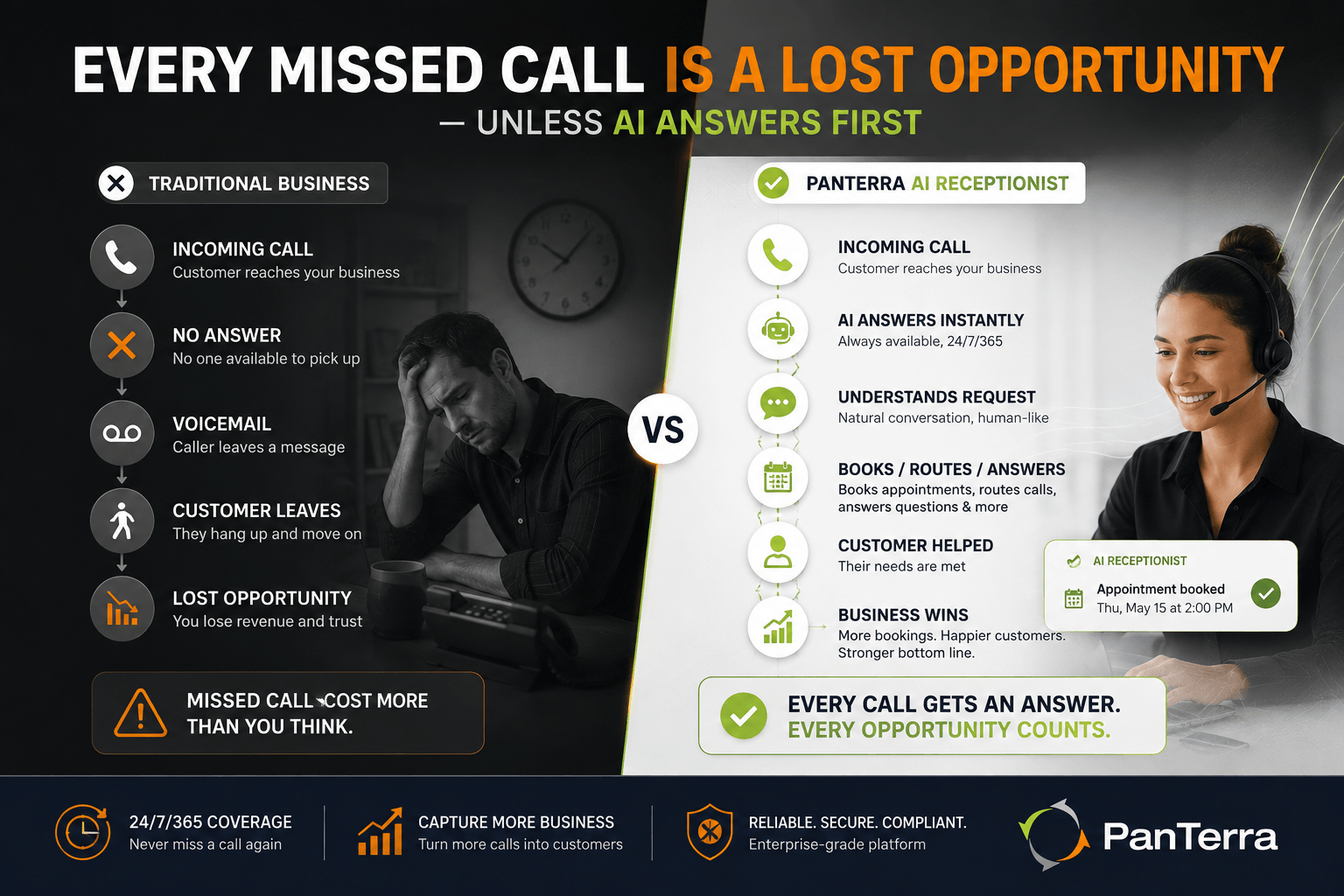
- Hear a real call recording, not a scripted demo
- Confirm the concurrency limit rather than accepting "unlimited"
- Test the escalation yourself, as a caller
- Confirm which integrations are included in the quoted price
- Ask how you make changes after launch, and whether it costs anything
- Ask your industry question, and get compliance answers in writing
- Check the contract term and what happens if you leave
Frequently Asked Questions
What is an AI answering service?
An AI answering service uses software to answer your business calls, understand what the caller wants in natural speech, and act on it — booking an appointment, routing the call, answering a question, or capturing a message with context.
How much does an AI answering service cost for a small business?
Typically a flat monthly platform fee, sometimes tiered by call volume, occasionally with a setup charge. Check whether integrations and post-launch changes are included, since those are the two costs most often added later.
Is an AI answering service better than voicemail?
For most small businesses, substantially — a caller who reaches voicemail frequently does not leave a message and calls the next business instead. The Coverage Gap Audit in this guide quantifies that difference for your own numbers.
Can an AI answering service book appointments?
Yes, when integrated with your calendar. Without calendar access it can only take a message, which removes most of the value — so confirm integration is included rather than an add-on.
How long does it take to set up an AI receptionist?
A few hours of your time across a week or two. Most of that is deciding what it should say and how calls should route, not technical work. Plan to review recordings and adjust during the first two weeks.
Does an AI answering service work for a medical or dental practice?
It can, provided the vendor signs a Business Associate Agreement and you control what the system repeats back on confirmations and voicemails. Confirm both in writing before committing.
.jpg?width=500&height=500&name=Are%20you%20Getting%20a%20Good%20Deal%20(1).jpg)
Comments