How to Evaluate Microsoft Teams Calling in 2026: Licensing, TCO, and the Continuity Question


A 100-User Company Walks Into a Microsoft Teams Phone Evaluation
The IT director thinks the math is simple. They are already paying for Microsoft 365. Microsoft promotes Teams Phone Standard at around $10 per user per month. For a 100-user company, that looks like $1,000 a month — predictable and contained.
Six weeks into procurement, the picture has changed. The $10 license is real. But it does not include the connection to the public phone network. A calling plan adds $12 to $18 per user. Auto attendants and call queues need separate resource accounts. Hardware costs land between $150 and $400 per certified desk phone. Number porting carries a per-number fee. The IT team's monthly admin overhead — provisioning, troubleshooting, configuration changes — turns out to be 10 to 20 hours.
By the time deployment is fully scoped, the per-user cost is closer to $25 to $35 per month. Total monthly spend lands in the $2,500 to $3,500 range. Not the $1,000 the original quote suggested.
That gap is the real Teams Phone evaluation. The published price is one thing. The fully-loaded, in-production cost is another. Most evaluations underestimate it by 2x or 3x — not because Microsoft is hiding anything, but because the licensing structure has more moving parts than a single SKU price suggests.
TL;DR
Microsoft Teams Phone is rarely as cheap as the headline price suggests. Sticker prices start around $10 per user per month, but real-world fully-loaded costs typically land at $25 to $35 per user per month once licensing layers, calling plans, resource accounts, hardware, admin overhead, and continuity exposure are accounted for. PanTerra's Microsoft Teams Phone System Buyer's Guide for 2026 walks through that math.
Key takeaways:
- Teams Phone Standard list price is around $10 per user per month for the PBX layer only. PSTN connectivity adds another $12 to $18.
- A fully-loaded 100-user Teams Phone deployment typically reaches $25 to $35 per user per month.
- Hidden costs include resource account licenses, number porting, certified hardware, support upgrades, and admin time.
- Continuity exposure — Teams Phone going down when Teams goes down — is the cost line item that almost never makes the procurement spreadsheet.
- Independent platforms inside Teams (like Streams.AI at $14.95 per user per month) consolidate these line items into a single license while solving the continuity dependency.
The Licensing Stack Is What Catches Buyers Out
The Teams Phone evaluation has three layers, and most evaluations only price the first.
Layer 1 — The Microsoft 365 base license. Every Teams Phone user has to be on a Microsoft 365 plan. Business plans run $6 to $22 per user. Enterprise plans (E3, E5) range from $36 to $57.
Layer 2 — The Teams Phone license. Teams Phone Standard at the Microsoft Teams add-on licensing page is around $10 per user per month. Microsoft 365 E5 includes Teams Phone in the base license; every other M365 SKU requires this as a separate add-on.
Layer 3 — PSTN connectivity. This is the layer buyers underestimate. The Teams Phone license alone does not let you make external calls. You need a Microsoft Calling Plan ($12 to $18 per user per month for domestic), Operator Connect (carrier-dependent), or Direct Routing (lower per-minute, but requires a Session Border Controller at $3,000 to $15,000 plus configuration).
The real question is rarely about which layer is cheapest. It is about how the layers stack for your actual user base — and what happens when a user needs an auto attendant, a call queue, or a toll-free number, none of which the three core layers include.
What 100 Users Actually Costs: The TCO Comparison
Here is where most evaluations go wrong. The procurement spreadsheet usually has one line for "Teams Phone — $10/user." The deployment hits the budget six months later with a much larger number.
This is the comparison PanTerra walked through in its 2026 Buyer's Guide, applied to a 100-user organization. List prices are current as of late 2025 and subject to change.
|
Cost line |
Microsoft Teams Phone (per user/month) |
Streams.AI for Microsoft Teams (per user/month) |
|---|---|---|
| Microsoft 365 base license | $12.50 (Business Standard) | $12.50 (Business Standard) |
| Teams Phone Standard license | ~$10 | Included |
| PSTN connectivity / calling plan | $12-$18 | Included |
| Resource accounts (auto attendants, call queues) | Add-on per resource | Included |
| AI voice reception | Not native — third-party add-on | Included (Luna AI) |
| SMS / MMS | Not native | Included |
| Fax | Not native — third-party add-on | Included |
| Continuity infrastructure (independent failover when Teams is down) | Not included | Included |
| Single-license total | ~$35-$45 + add-ons | $14.95 |
| Combined with Microsoft 365 base | ~$48-$58 + admin overhead | $27.45 |
The trade-off worth understanding: Microsoft Teams Phone can be the right choice — particularly for organizations on Microsoft 365 E5 (Teams Phone is included) with simple inbound/outbound calling and minimal resource account needs. The evaluation question is whether your organization fits that profile, or whether the line items keep stacking past the headline number.
In real business terms: a 100-user organization on Business Standard might be looking at roughly $4,800 to $5,800 per month for Teams Phone fully-loaded versus roughly $2,745 per month for an independent platform that includes the same capabilities. Over 36 months, that is a $75,000 to $110,000 difference.
The procurement conversation that ends at "$10 per user" misses 60 to 70 percent of the real cost. Resource accounts, number porting, certified hardware, support upgrades, and ongoing admin time all stack up — and they almost never appear in initial quotes.
The Continuity Line Item Nobody Prices
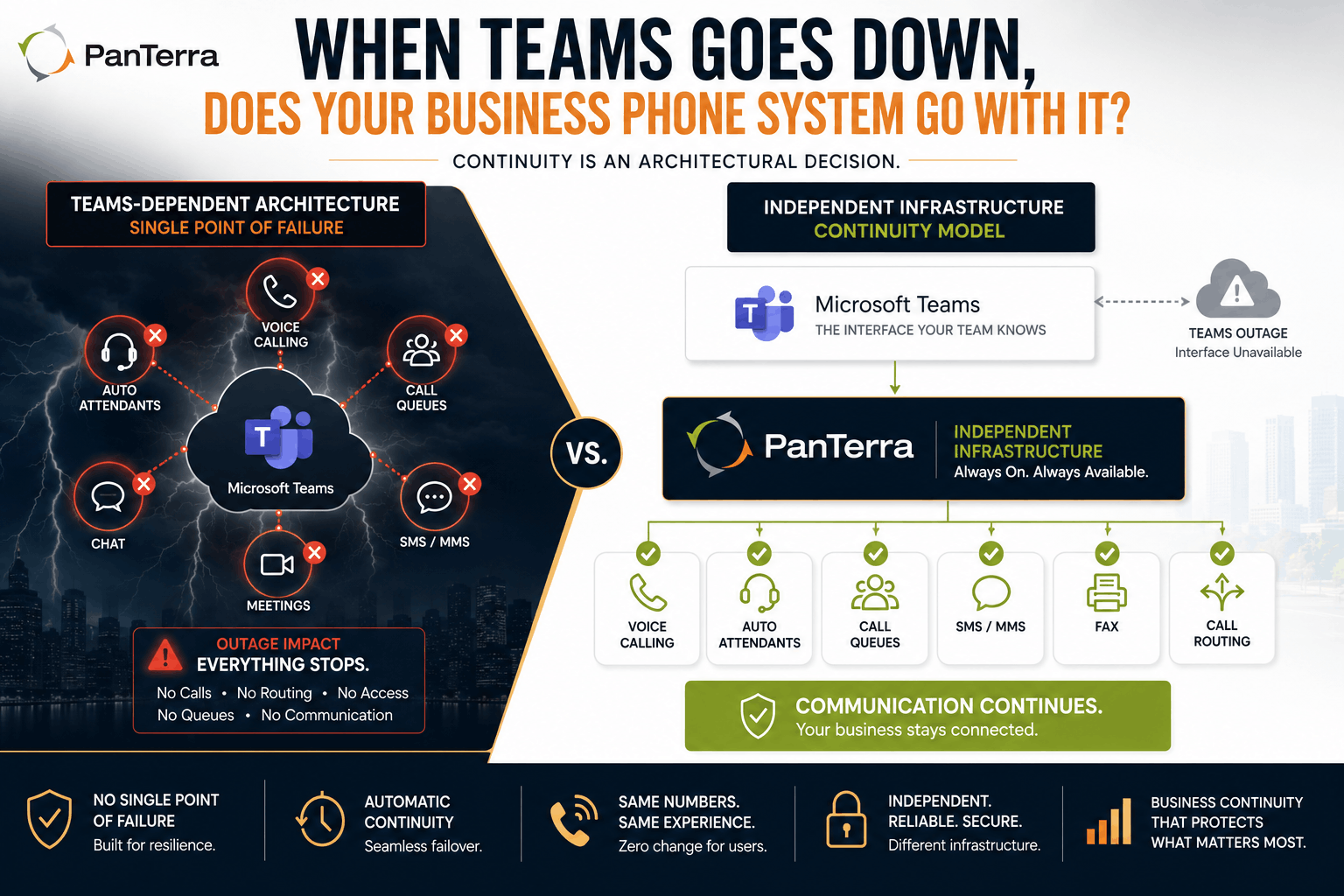
There is one cost category most evaluations omit entirely: what happens to your phone system when Microsoft Teams has an outage.
Across 2025, Microsoft 365 had multiple multi-hour disruptions, including a 19-hour July incident affecting Teams and Exchange. During those windows, Teams Phone customers could not reliably make or receive calls. There is no automatic failover when Teams is down.
Verified buyer reviews on G2 and TrustRadius consistently flag continuity as a top differentiator when comparing UCaaS platforms. It is also a recurring theme in Forrester's coverage of unified communications. When phone is mission-critical, dependent infrastructure is a real risk to budget for, even if it never appears on a per-user pricing sheet.
A four-hour calling disruption in a customer-facing operation means missed sales calls, delayed support response, and downstream revenue impact. None of that is on the Teams Phone pricing page.
How to Run the Evaluation
When I am walking a mid-market IT director through this, I tell them to budget for five things the published prices do not cover:
- The PSTN connectivity layer (calling plan or Direct Routing)
- Resource accounts for auto attendants and call queues
- Hardware refresh for shared spaces and conference rooms
- Administrative overhead in IT hours
- A continuity model for when Teams itself is unavailable
Then compare that fully-loaded number to the alternatives. PanTerra's Streams.AI for Microsoft Teams operates inside the Teams interface but consolidates voice, SMS/MMS, fax, AI voice reception (Luna AI), and continuity infrastructure into a single license at $14.95 per user per month. The PanTerra pricing breakdown is straightforward to compare line by line.
The right answer is not the same for every organization. For an E5 customer with simple calling patterns, native Teams Phone is often the cleanest choice. For a Business Standard or Premium customer with multi-department call routing, hardware needs across shared spaces, and customer-facing operations that cannot tolerate multi-hour calling outages, the consolidated platform tends to win on both cost and continuity.
FAQ
Why does Teams Phone cost more than the advertised $10 per user?
The $10 figure covers only the Teams Phone Standard license — the PBX layer. To make external calls, you also need a calling plan ($12 to $18 per user per month for domestic) or Direct Routing infrastructure. Add resource accounts, hardware, support upgrades, and admin time, and fully-loaded cost reaches $25 to $35 per user per month.
What's included with Microsoft 365 E5?
Teams Phone Standard is included in M365 E5 ($57 per user per month list). PSTN connectivity is still separate — Microsoft Calling Plans, Operator Connect, or Direct Routing.
Are auto attendants and call queues free?
The features themselves are part of Teams Phone, but each one requires a resource account license. Most mid-market organizations need 5 to 15.
How does Streams.AI compare on price?
Streams.AI for Microsoft Teams is $14.95 per user per month, including voice, SMS/MMS, fax, AI voice reception (Luna AI), and continuity infrastructure. Combined with Microsoft 365 Business Standard at $12.50, total per-user cost is $27.45 — typically lower than fully-loaded native Teams Phone.
What This Adds Up To
The Teams Phone evaluation is rarely a single-line decision. The published price is the starting point, not the answer. The real evaluation maps the full licensing stack, the resource account requirements, the hardware needs, the admin overhead, and the continuity model — then compares that fully-loaded number to the alternatives.
PanTerra's Microsoft Teams Phone System Buyer's Guide walks through that math line by line. The pricing comparison is the easy part. The harder part is making sure your evaluation includes every line item that will eventually show up on the bill.
.jpg?width=500&height=500&name=Are%20you%20Getting%20a%20Good%20Deal%20(1).jpg)
Comments