What Enterprise Calling Actually Feels Like Inside Microsoft Teams (Day-to-Day Workflow, Not Marketing)


The Question Every VP of Ops Asks Before Switching
When a VP of Operations is evaluating a Teams calling integration, the IT questions come first: licensing, security, provisioning, continuity. Those are real. We have answered them in other places.
But the question that tends to come last — and matters most to the people who actually use the phone all day — is simpler: "What does my team's day look like after we make this switch?"
It is a fair question. Most articles about Teams calling describe feature sets. They do not describe what an account manager notices when they pick up the phone on a Tuesday morning, or what a customer service rep experiences when they get a call while already in a Teams meeting, or how long it takes a new hire to figure out where their voicemail lives.
That is what this article is. Not architecture. Not licensing. Just the day-to-day workflow — what changes, what stays the same, and what most people do not notice at all.
TL;DR
When enterprise calling, SMS, voicemail, and fax live inside the Microsoft Teams interface, end users stop switching between apps. Their call history and contacts are synchronized with the tools they already use. New hires provision automatically through Microsoft Entra ID. IT does not need to manage a separate phone admin portal. And the platform does not require a Microsoft E5 license — which matters when you are running on Business Standard or Business Premium.
Key takeaways:
- End users make and receive calls from inside Teams — no separate dialpad app, no second softphone window.
- Call history, voicemail, and contacts sync across Teams and the platform's client so nothing is siloed by app.
- Microsoft Entra ID integration means new hires get phone access through the same SSO provisioning that sets up their email and Teams account.
- No E5 license required. The platform works with M365 Business Standard, Business Premium, and E3 — where Teams Phone Standard is an extra cost many organizations skip.
- G2's Microsoft Teams integrations category consistently surfaces app-switching fatigue as the top end-user complaint with legacy calling add-ons. Unified in-Teams calling is the most requested fix.
What Actually Changes for the End User
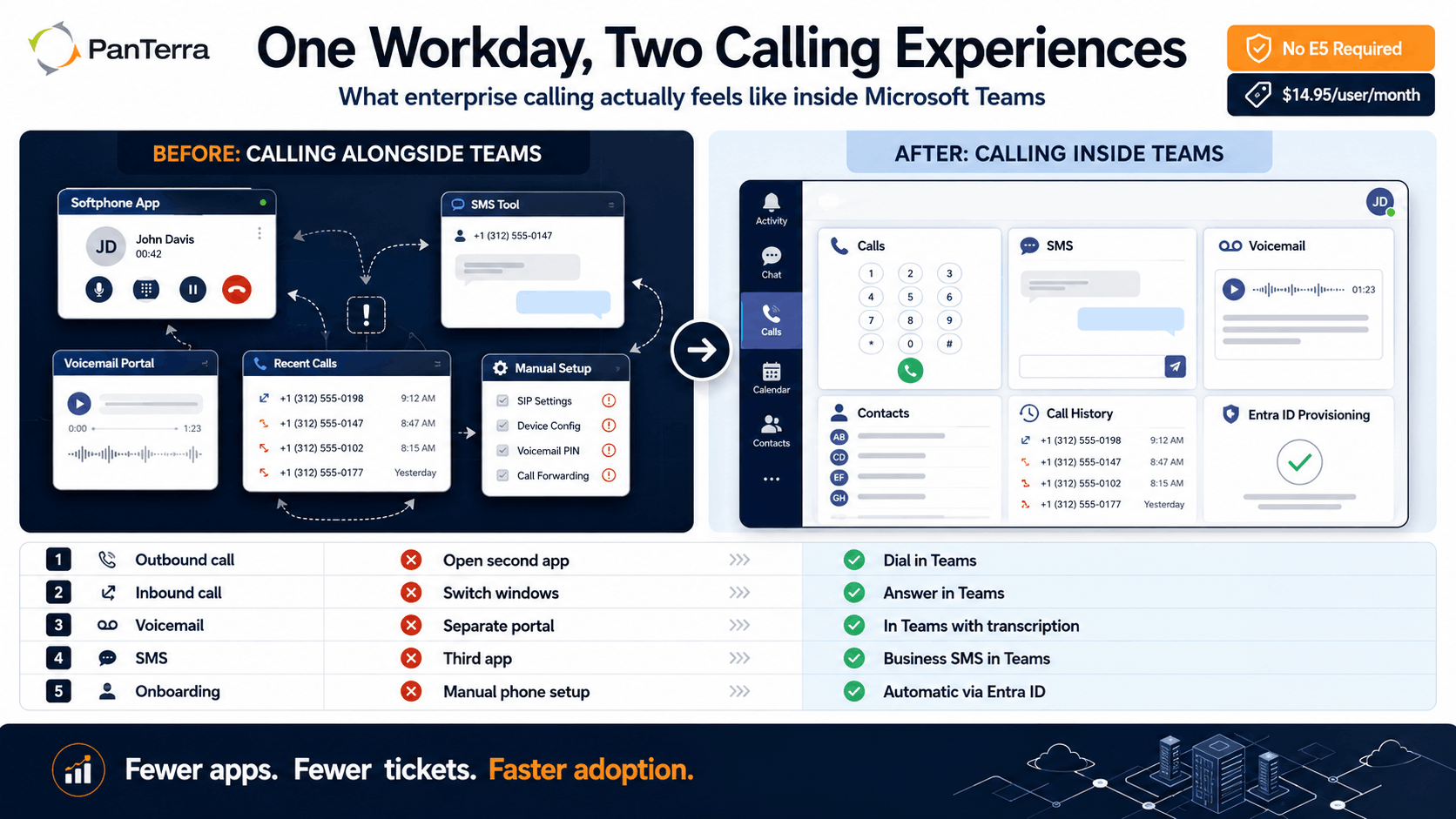
Here is the workflow comparison most Teams calling evaluations skip. Not features — moments in a real workday.
|
Workflow moment |
Before (separate calling app alongside Teams) |
After (calling inside Teams) |
|---|---|---|
| Making an outbound call | Open a second softphone app, find or paste the number, dial from there | Click the dialpad in Teams — same interface used for chats and meetings |
| Receiving an inbound call | Alert fires in the separate app; user switches windows; Teams notifications are already open | Call notification appears in Teams; one click to answer without leaving the active workspace |
| Sending a business SMS | Open a third app, look up the contact, compose and send from there | SMS sent from within Teams — same contact record, same interface |
| Checking voicemail | Log in to the phone portal, or check a separate voicemail app | Voicemail with transcription appears in Teams alongside other messages |
| Looking up call history | Switch to the phone app's recent calls log — separate from Teams activity | Full call history synchronized inside Teams; no tab switching |
| New hire onboarding | IT manually creates a phone account, assigns a number, sets up the separate app | Entra ID provisioning assigns phone access as part of the standard account setup — zero extra steps for IT |
The trade-off worth understanding: "calling in Teams" covers a wide range. The minimum version is a click-to-call button that hands off to a separate app. The real version is a calling experience that lives in the same workspace as chat, meetings, and files — where call history, voicemails, and contacts are part of the same data layer, not synced from an external system.
What IT Notices (Even Though End Users Don't)
End users adapt quickly when calling works inside their primary workspace. What IT notices is different.
With a separate calling platform alongside Teams, the admin surface is fragmented. Phone settings live in one portal. Teams administration lives in another. Provisioning touches both. When someone leaves, offboarding has to happen in two places or the phone account stays active.
With calling built into the Teams architecture, there is one admin layer. Microsoft's Teams admin center documentation covers voice policy, dial plans, and calling routes — but for most organizations, native Teams Phone still requires Azure Portal and PowerShell for advanced configurations. The Streams.AI platform consolidates that into a single admin pane: phone settings, user management, call routing, and analytics without the multi-portal complexity.
Entra ID integration means provisioning and deprovisioning are automatic. When a new hire is added, their phone access is configured. When they leave, it is revoked. For IT teams managing 50 to 500 users, this removes an entire category of manual work and support tickets.
What "No E5 Required" Means in Practice
Microsoft 365 E5 includes Teams Phone Standard. Every other M365 tier — Business Standard, Business Premium, E3 — does not. Adding Teams Phone Standard to those tiers costs around $10 per user per month before calling plans.
This matters because most mid-market organizations are not on E5. They are on Business Standard or E3. They have been told "Teams has calling" and assumed it was included. The real question is whether it actually is — and the licensing answer is no. The full cost of native Teams Phone lands at $22 to $28 per user per month on top of existing M365.
The platform does not require any Teams Phone license. It runs on PanTerra's infrastructure, inside the Teams interface, at $14.95 per user per month. That includes voice, SMS/MMS, fax, AI video conferencing, voicemail with transcription, and AI contact center capabilities.
What businesses actually need to evaluate is the full licensing math — not just the per-seat comparison. For a 100-user organization on M365 Business Standard, avoiding native Teams Phone saves $22,000 to $28,000 per year in additional Microsoft licensing and calling plan costs.
Five Things End Users Notice in the First Week
For teams making the switch, here is what surfaces within the first five days — not in a feedback survey, but in support tickets not filed and questions not asked.
1. One less app.
The separate softphone is gone. Users who were switching between Teams and a phone app stop doing it. Most do not consciously notice; they just notice fewer clicks.
2. Voicemail is where the rest of the messages are.
Voicemail with transcription appears in the Teams message feed. Users catch it the same way they catch a chat notification.
3. Call history is searchable.
A call from last Tuesday shows up the same way a chat from last Tuesday does. Users can find it. This is different from checking a separate recent-calls log.
4. SMS from the business number.
Users who were texting clients from personal phones — because the old phone system had no SMS — can now send from the company number inside Teams. In real business terms: this removes a meaningful compliance gap for customer-facing roles.
5. New hires are ready on day one.
Phone access is configured when the Teams account is. IT does not chase a ticket. The new hire does not wait for phone access on their first morning.
No Jitter consistently reports that end-user adoption of Teams calling integrations tracks almost entirely with how seamless the in-Teams experience is — platforms that require a separate client see significantly lower adoption rates.
FAQ
Does this work inside the standard Microsoft Teams app, or does it require a plugin?
Streams.AI for Microsoft Teams is a native Teams app — it installs through the Teams app store and integrates with the existing interface. No separate desktop client required for day-to-day calling.
What happens to existing business phone numbers during the switch?
Number porting is part of PanTerra's managed deployment. Existing numbers transfer to the platform. Users keep their published numbers; clients calling those numbers reach them inside Teams. The trade-off worth understanding here is timing — number porting typically takes 5 to 10 business days and should be scoped during deployment planning.
Does this work on mobile?
Yes. The mobile app mirrors the Teams experience on iOS and Android — business calls, SMS from company numbers, and voicemail access — without exposing personal numbers.
What does IT manage on an ongoing basis?
Admin is centralized in one portal — call routing, user management, analytics, and voicemail settings. Entra ID handles provisioning automatically. Most organizations find that ongoing phone admin drops to under an hour per week after the first month.
What This Adds Up To
The conversation about Teams calling usually focuses on licensing, cost, and continuity. Those matter. But the question that determines whether a platform actually gets adopted is simpler: does this make my workday simpler or more complicated?
When calling, SMS, voicemail, and fax live inside Teams rather than alongside it, most users adapt in a day or two without noticing. That is the right outcome. The platform should disappear into the workflow.
Full details on how Streams.AI for Microsoft Teams deploys are on the Streams.AI platform page. The launch announcement is in the PanTerra newsroom.
.jpg?width=500&height=500&name=Are%20you%20Getting%20a%20Good%20Deal%20(1).jpg)
Comments