Call Transcription and AI Call Summaries: A Buyer's Guide

Call transcription software turns a recorded or live call into text. AI call summaries read that text and produce a short account: the topics covered, the decisions reached, the commitments made.
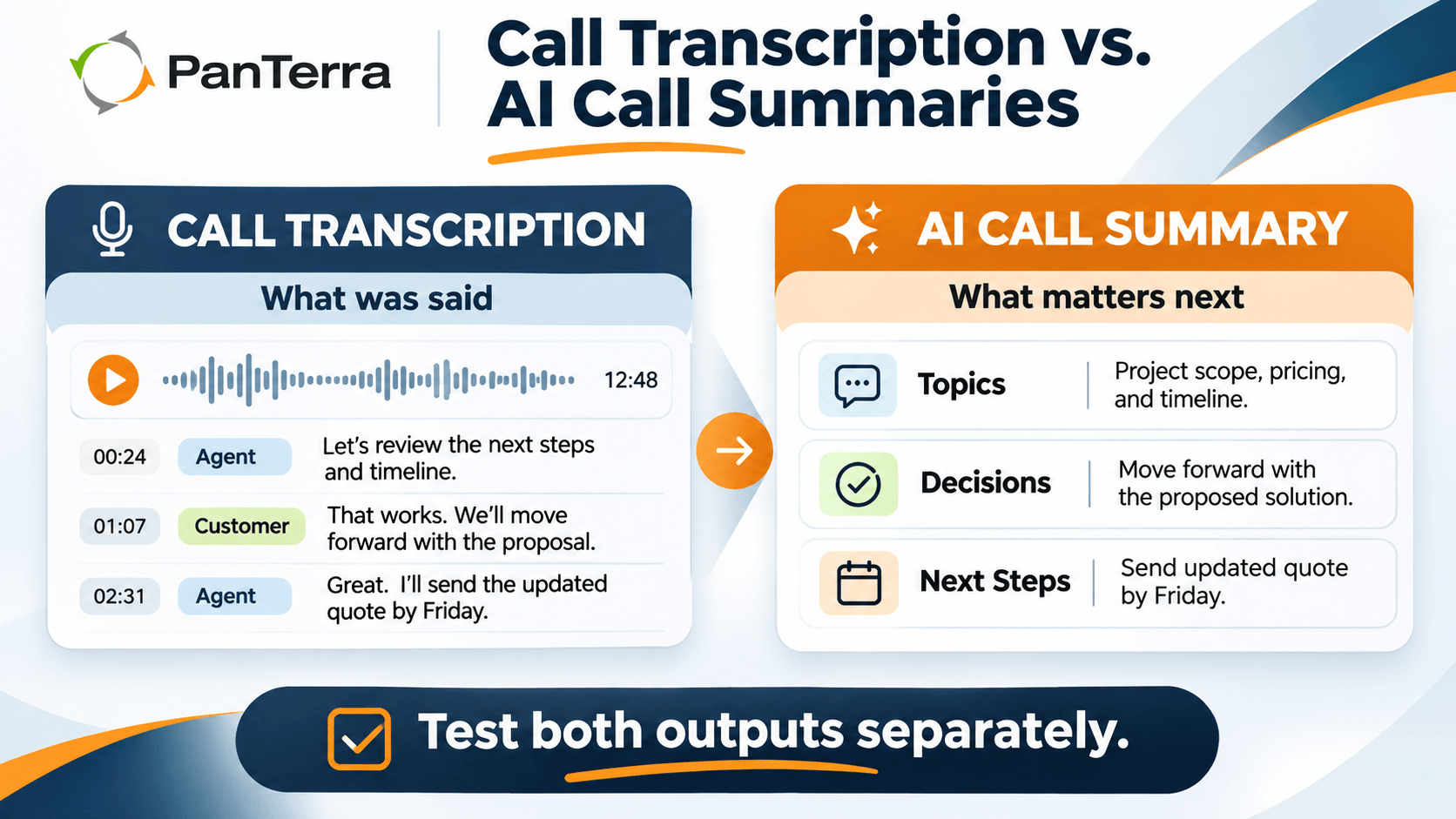
They are often sold together because they solve adjacent problems. A transcript preserves searchable detail; a summary compresses that detail for faster review. Some workflows need only one of them, so evaluate the transcript and the summary as separate outputs even when they share a product bundle.
If you buy them together, test them apart. They fail in different ways, and recording, transcript, summary, and downstream-system retention may be governed by different settings or systems.
Key Takeaways
- Call transcription software produces a text rendering of a call. An AI call summary produces a condensed interpretation of that content. Decide whether you need one or both based on the workflow rather than assuming the bundle is indivisible.
- Transcription errors can be visible at the word level. Summary errors can be harder to notice because the output may read fluently even when it omits or misstates a detail.
- Live and post-call transcriptions solve different problems, and buyers confuse them constantly.
- Speaker labeling can be critical when the workflow depends on knowing who said what. Test it explicitly, especially on calls with multiple participants or shared audio channels.
- Recordings, transcripts, summaries, and exported copies may have different retention settings or live in different systems. Confirm each one instead of assuming a single policy covers the full chain.
- A summary pasted into a CRM note has left the platform, and the platform's retention rules stop reaching it.
Who This Is For
Best for: sales and support teams where call content has to reach a CRM, a ticket, or a colleague. Teams building a quality program that needs searchable records. Anyone whose handover depends on someone remembering a call.
Not ideal for: teams whose calls are short and transactional, and regulated settings where a prescribed record format already exists. Both cases are covered below.
Top use cases:
- Filling CRM notes without manual entry, through CRM phone integration
- Making a call archive searchable for a dispute or an audit
- Feeding a quality monitoring program with text instead of audio
- Handover between agents, or between shifts
What Is Call Transcription Software?
Call transcription software turns call audio into text using automatic speech recognition. It runs in two modes, and confusing them causes most of the mismatched expectations here.
Post-call transcription works on completed audio. A system may be able to use more context than a streaming path, but accuracy still depends on the model, audio, speakers, language, and implementation. It cannot support actions that must happen before the call ends.
Live transcription produces text while people are still talking, which can support in-call search, agent assist, or prompts. Latency and streaming design create different tradeoffs from post-call processing. Do not assume one mode is more accurate without testing the specific product on your audio.
If a vendor offers both live and post-call transcription, ask which path any accuracy claim refers to. For a live use case, test the live output directly rather than carrying over a figure from another processing mode.
What Is an AI Call Summary?
An AI call summary is a short account built from the transcript: what was discussed, what was decided, what was promised, and what happens next. Better builds return structured output, with topics, action items, and next steps as separate fields instead of one paragraph.
If downstream automation matters, ask whether the summary can return structured fields such as topics, action items, or next steps rather than only a paragraph. Structured output can be easier to map into tasks or CRM fields, subject to validation and integration design.
How Each One Fails
Bad transcription is visible. A reviewer sees "Lisinopril" come back as "listen a pril" and stops trusting the transcript. The error announces itself.
Bad summaries hide. The prose reads well, the grammar is clean, and the account is wrong. A conditional promise shows up as a firm one. Two speakers get merged, so an agent gets credit for what the caller said. Nothing flags any of it.
A summary can inherit transcription errors, and it can also introduce its own interpretation errors. Treat high-impact details such as amounts, dates, commitments, diagnoses, or legal positions as items that may require validation against the transcript or recording.
So handle them differently. Test transcription before purchase and continue sampling both transcripts and summaries after deployment. Model behavior, audio conditions, vocabulary, and workflows can change, so quality control should not stop at procurement.
Then write the order down:
- The recording is the evidence.
- The transcript is a text representation to verify against the source.
- The summary is a reading aid.
For high-impact details such as money, diagnoses, legal positions, or commitments, do not treat the summary as the sole source of truth. Design the workflow so a reviewer can trace important details back to the transcript or recording before acting.
What Determines Whether a Transcript Is Usable?
Three specifications are worth testing directly.
Speaker Separation
Whether the transcript marks who said what. The technical name is diarization, and it decides whether a transcript is good for anything beyond keyword search. Without it, a customer's complaint and an agent's reply look the same on the page.
Verify two things. First, whether separation works by channel or by voice. Channel-based separation can give the system a stronger signal about who is speaking when each participant is captured separately. Voice-based diarization on a shared channel relies more heavily on model inference and should be tested with the number of speakers, accents, overlap, and audio conditions you actually expect. Second, ask what happens with three or more people on the call. That is where both separation and accuracy get harder.
Timestamping
Whether the text is anchored to positions in the audio. That is what can let someone jump from a line of transcript to the corresponding point in the recording and makes review much faster. For workflows involving disputes, audits, or coaching, verify that the transcript can be traced back to the source audio. Without it, checking a transcript means listening to the whole call.
Vocabulary Handling
Whether you can give the system a custom dictionary: product names, company names, industry terms, staff names. General-purpose models may perform unevenly on organization-specific names, acronyms, and specialized vocabulary, so test those terms explicitly. Ask how many terms the list holds, how long it takes to apply, who can edit it, and whether it works per account or per team. If the product supports custom vocabulary or term boosting, test it with the names and terminology that matter to your operation. If it does not, evaluate how well the base model handles those terms without assuming it will improve on its own.
How Accurate Is Call Transcription?
Do not assume call transcription will outperform voicemail transcription in every environment. Audio duration, channel quality, codec, speaker behavior, noise, language, and the model itself all affect results.
Accuracy figures are difficult to compare without the test set, audio conditions, language mix, scoring method, and processing mode. Ask for the methodology behind any quoted figure, then test the system on a representative sample of your own calls.
Make accuracy a test procedure rather than a vendor number. Build a representative sample of your own calls that includes difficult conditions such as speakerphone audio, mobile calls, overlapping speech, multiple participants, background noise, and the terminology or accents your teams actually encounter.
Then score the words that carry the meaning, and score them apart. Overall word accuracy can hide the specific errors that matter most to your workflow.
Your proper nouns. Drug names, part numbers, case numbers, carrier names, surnames. These are often the terms that matter most to the workflow, so score them separately instead of hiding them inside an overall accuracy figure.
Your digits. Account numbers, dollar amounts, dosages, dates. Count digit errors on their own. A transcript that gets every sentence right and one account number wrong failed at the only job that mattered.
Audio quality caps all of it. A narrowband or degraded call can give the transcription system less acoustic information to work with than cleaner wideband audio. Include your worst real call paths in testing before attributing an error solely to the model.
Multiple Speakers
Multiple speakers and overlapping speech can make transcription and speaker attribution harder, but the effect varies by model and audio setup. If conference calls are material to your use case, include them in the test set rather than relying on a two-person demo.
Do You Need Consent to Transcribe a Call?
Do not assume that permission to record automatically answers every question about transcription, automated analysis, storage, or downstream use. The applicable notice, consent, privacy, employment, sector, and data-protection rules depend on the jurisdictions, parties, and workflow. Have counsel or the appropriate compliance owner review the actual use case.
One caveat is worth putting in front of them. In some regimes, automated analysis counts as its own processing activity, separate from recording, with its own disclosure duty. A notice that covers recording may not cover analysis of the content.
What transcription does change is reach. A recording makes someone sit through the call. A transcript is searchable, skimmable, and easy to forward. That is the point of it, and it is also the risk.
So treat the platform side as a configuration question. Can an announcement be set per route? Can transcription be switched off for one queue, such as the one taking HR calls, and per number and per extension? Can a user delete the transcript of their own call, and should they be able to? Use the configuration that your legal or compliance review requires for the calls you actually handle. Do not infer a universal "strictest jurisdiction" rule without counsel.
This is a summary of the consideration, not legal advice.
How Long Should Transcripts Be Kept?
Retention is a common place for policy, product settings, and downstream integrations to drift apart.
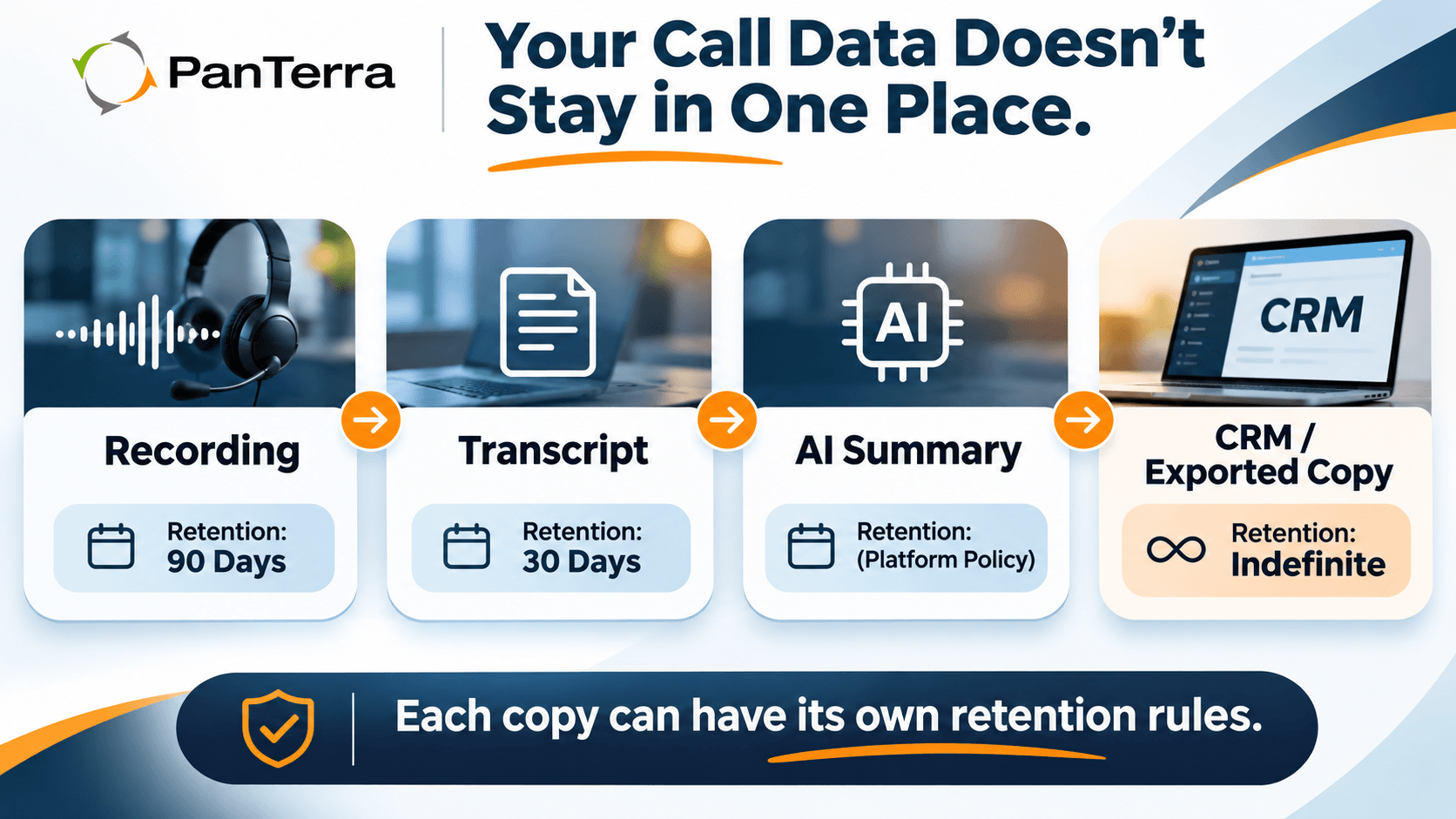
Recordings, transcripts, summaries, and exported copies may have separate retention settings or may be governed by different systems. Nothing guarantees they align. One possible mismatch looks like this:
- Recordings: 90 days, because storage costs money.
- Transcripts: 30 days, because transcription shipped later with a default of its own.
- Summaries: forever, because someone wired the summary into a CRM note, and the CRM keeps notes forever.
Read that in order. In that example, the source audio and transcript disappear on different schedules while a downstream summary may remain. The organization is then left with the least detailed artifact and no source material to validate it.
If the settings are not coordinated, the artifacts can outlive one another in ways that create operational or evidentiary gaps. A transcript may remain after its source audio is gone, or audio may remain after the searchable text has expired. Decide that relationship deliberately rather than inheriting unrelated defaults.
So set the three deliberately rather than inheriting them. Pick the period from the realistic gap between a call and someone needing it, which billing cycles and escalation paths drive, not storage cost. Where a rule specifies longer, the rule governs. Check summaries explicitly as a separate artifact. Do not assume they inherit the same retention rule as the recording or transcript.
If you are a broker or dealer registered with the SEC, the clock is not yours to pick. Rule 17a-4(b) requires you to preserve originals of all communications received and copies of all communications sent relating to the business, for not less than three years, with the first two in an easily accessible place. The rule's own definition of communications covers sales scripts and recordings of telephone calls that section 15F(g)(1) of the Act requires you to keep. Whether a given call sits inside that definition is a question for your compliance team. Determine whether a particular transcript or summary is a required record and apply the relevant retention schedule. A generic vendor default does not resolve that classification.
If a transcript or summary contains protected health information, include it in the HIPAA analysis for the service and workflow. HHS guidance says a cloud service provider that maintains electronic PHI on behalf of a covered entity or business associate is generally itself a business associate even if the data is encrypted and the provider lacks the decryption key. Confirm the vendor's role, the applicable BAA, and what happens to the data at termination with the organization's compliance owner.
The Fourth Copy
The three settings problem has a fourth leg, and it is the one that hurts.
A summary that someone pastes into a CRM note, emails to a colleague, or drops into a chat channel has left the platform. The platform's retention rules no longer reach that copy. Neither does its access control or its audit log. Downstream copies are easy to overlook because they may sit outside the communications platform's retention, access-control, and audit settings.
Decide early where summaries are allowed to land, write it down, and set the integrations to match. A summary that posts itself into a general chat channel is a policy somebody made by accepting a default.
Questions for Your Vendor
Put these before signing, and get the answers in writing.
- Can retention be set separately for recordings, transcripts, and summaries? What is each default?
- Does deleting a recording delete its transcript and summary, or orphan them?
- Where do summaries get written? If the answer includes a CRM, a ticket, or a chat channel, that system's retention governs, not the platform's.
- Who can export a transcript, and does the export get logged?
- Can transcription be disabled per number, per queue, and per extension?
- If HIPAA applies to the workflow, how does the vendor document the BAA scope for recordings, transcripts, summaries, and any downstream services involved?
- On termination, does the vendor return or destroy the transcripts, and how do you confirm it happened?
That last one is where answers go vague. Push until one is specific.
What Should It Integrate With?
The CRM, for anyone with customer contact. A summary that lands in the CRM as a note is worth far more than one sitting in the communications platform. Confirm what syncs, in which direction, and what happens when a sync fails.
The ticketing or task system, if the summary produces action items. Structured action items that cannot become tasks are a demo, not a workflow.
The quality program, if you have one, because review in text is faster than audio review and easier to sample evenly.
Where This Sits Next to Monitoring
Transcription is the input layer. It produces text. What you do with that text is a different program, and the lanes matter.
Scoring interactions belongs to quality monitoring, which samples calls and judges them against criteria. Measuring trends over time belongs to contact center analytics. Live oversight belongs to call monitoring, where a supervisor listens while the call is still running.
Vendors sell automatic scoring from transcripts next to transcription, and it sounds like a small upsell. It is not. Automated scoring can support a quality program, but it needs calibration, review, and an escalation process. Decide whether transcription, scoring, and human review meet the workflow together.
Where This Is the Wrong Purchase
When nobody reads the output. Transcription makes a lot of text. With no CRM sync, no search use case, and no quality program, you are paying to build an archive nobody opens.
When the calls are short and transactional. A quick call confirming an appointment does not need a summary. A disposition code already caught everything.
When it would create a second record that disagrees with the first. In settings with a prescribed record format, an automatic transcript that differs from the official record is a liability rather than an asset. Settle that with compliance before you deploy.
Before You Sign
- Established whether a quoted accuracy figure describes the live path or the post-call path
- Confirmed whether speaker separation works by channel or by voice, and tested it on a call with three or more people
- Confirmed transcripts are timestamped and custom vocabulary is supported
- Submitted twenty of your own worst calls, scoring proper nouns and digits apart
- Confirmed CRM sync direction and what happens when a sync fails
- Had counsel confirm the consent wording covers automated analysis, not only recording
Frequently Asked Questions
What is called transcription software?
Call transcription software turns call audio into text using automatic speech recognition. It runs either post-call, on a finished recording with the full conversation in hand, or live, producing text while people are still talking. The post-call path has more context to draw on, but which mode is more accurate on your audio depends on the model, the audio quality, and the setup, so test both.
What is an AI call summary?
An AI call summary is a short account built from the transcript: what was discussed, what was decided, what was promised, and what happens next. Better builds return structured output, with topics, action items, and next steps as separate fields rather than one paragraph, because fields can feed a task or a CRM record.
How accurate is call transcription?
Accuracy depends on the model, audio, speakers, language, vocabulary, and processing mode. Vendor figures are not automatically comparable because test sets and methods differ. Build a representative sample of your own calls and score high-impact terms such as names, numbers, dates, and amounts separately from overall word accuracy.
Do you need consent to transcribe a call?
Do not assume permission to record automatically resolves transcription or automated-analysis requirements. Notice, consent, privacy, employment, sector, and data-protection rules can depend on the jurisdiction and use case. Have counsel or the appropriate compliance owner review the actual workflow, including any downstream analysis or reuse.
How long should call transcripts be kept?
Retention should match the operational, contractual, and regulatory requirements that apply to the specific record. Confirm recording, transcript, summary, and downstream-system retention separately, because they may be governed by different settings. A summary copied into a CRM, ticket, or chat system follows that system's policies as well.
Does call transcription work with multiple speakers?
Multiple speakers and overlapping speech can make transcription and speaker attribution harder, but performance varies by model and audio setup. If conference calls are part of your use case, include them in the evaluation sample rather than assuming two-person demo performance will carry over.
If the output has no workflow to land in, the integration question matters more than the accuracy question. For the layer that applies the same processing to messages rather than calls, see AI voicemail.

Comments