Microsoft Teams Phone System Alternatives: When to Look Beyond Native Calling


Microsoft Teams phone system alternatives are worth knowing about — not because Teams is a bad platform, but because Teams Phone was built for collaboration, not carrier-grade telephony. The moment your calling requirements push past what native Teams calling was designed to handle, you face a choice: layer on more Microsoft add-ons, or add a purpose-built calling layer that runs inside Teams.
This guide identifies the signals that mean you've outgrown native Teams Phone, explains the main alternative paths, and helps you evaluate which approach fits your organization without moving your team out of Teams.
TL;DR — Key Takeaways
- Teams Phone is a collaboration-first add-on, not a carrier-grade telephony platform built for enterprise calling volume and complexity.
- The clearest signals you've outgrown it: contact center needs, compliance requirements, SMS/fax dependencies, and cost escalation from add-ons.
- The best Teams Phone alternatives don't replace Teams — they add a UCaaS layer inside the Teams app your users already use.
- Independent uptime is the most operationally significant advantage of a UCaaS alternative over native Teams Phone.
When Microsoft Teams Phone Stops Being Enough
Microsoft Teams Phone serves its purpose for organizations with straightforward calling needs. Most of the businesses I talk to don't realize they've outgrown it until they've already hit one of these walls.
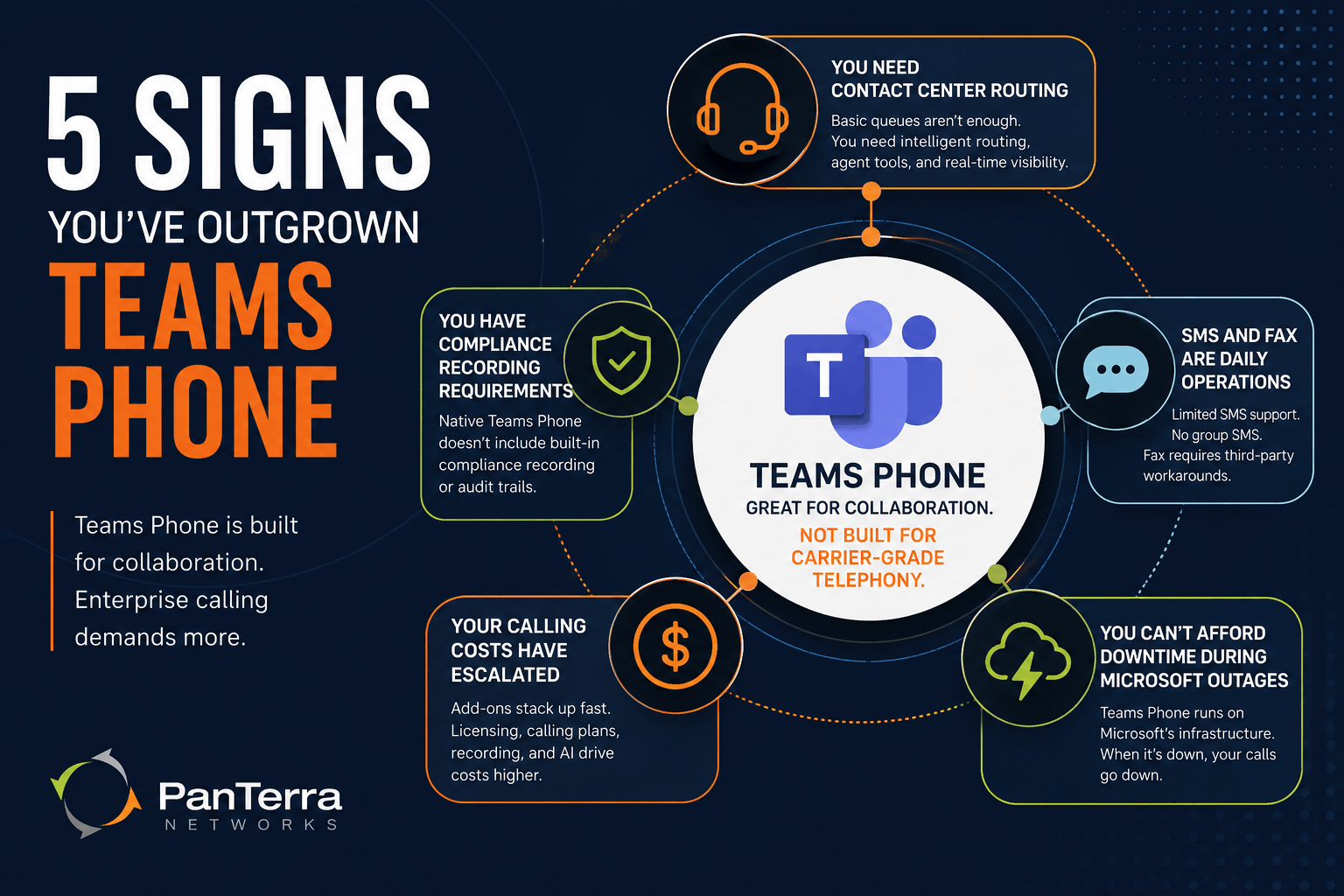
You Need Contact Center Routing
Teams Phone includes basic call queues and auto attendants. What it doesn't include: priority-based routing, intelligent overflow handling, real-time agent wallboards, callback queue management, or supervisor monitoring tools. The moment a customer-facing team is routing more than a few dozen calls per day, the gaps become visible.
You Have Compliance Recording Requirements
Industries like healthcare, financial services, legal, and government often require every call to be recorded and retained with audit trail capabilities. Teams Phone doesn't include built-in compliance recording. It supports third-party recording integrations, but those integrations add cost, complexity, and another administration layer.
SMS and Fax Are Daily Operations
Teams Phone added SMS support in 2025, but only for Microsoft Calling Plan numbers — not Operator Connect or Direct Routing deployments. Group SMS doesn't exist natively. Fax requires third-party services. If your operations team relies on SMS and fax daily, native Teams Phone creates workarounds that slow everyone down.
Your Calling Costs Have Escalated
Per the Microsoft Teams Phone licensing documentation, Teams Phone Standard isn't bundled below E5 — it's an add-on at approximately $8/user/month. Add a Microsoft Domestic Calling Plan and the per-user voice cost runs $20+ for non-E5 subscribers, before any contact center, recording, or AI licensing. See the full Microsoft Teams calling plans pricing breakdown for the complete comparison.
You Can't Afford Downtime During Microsoft Outages
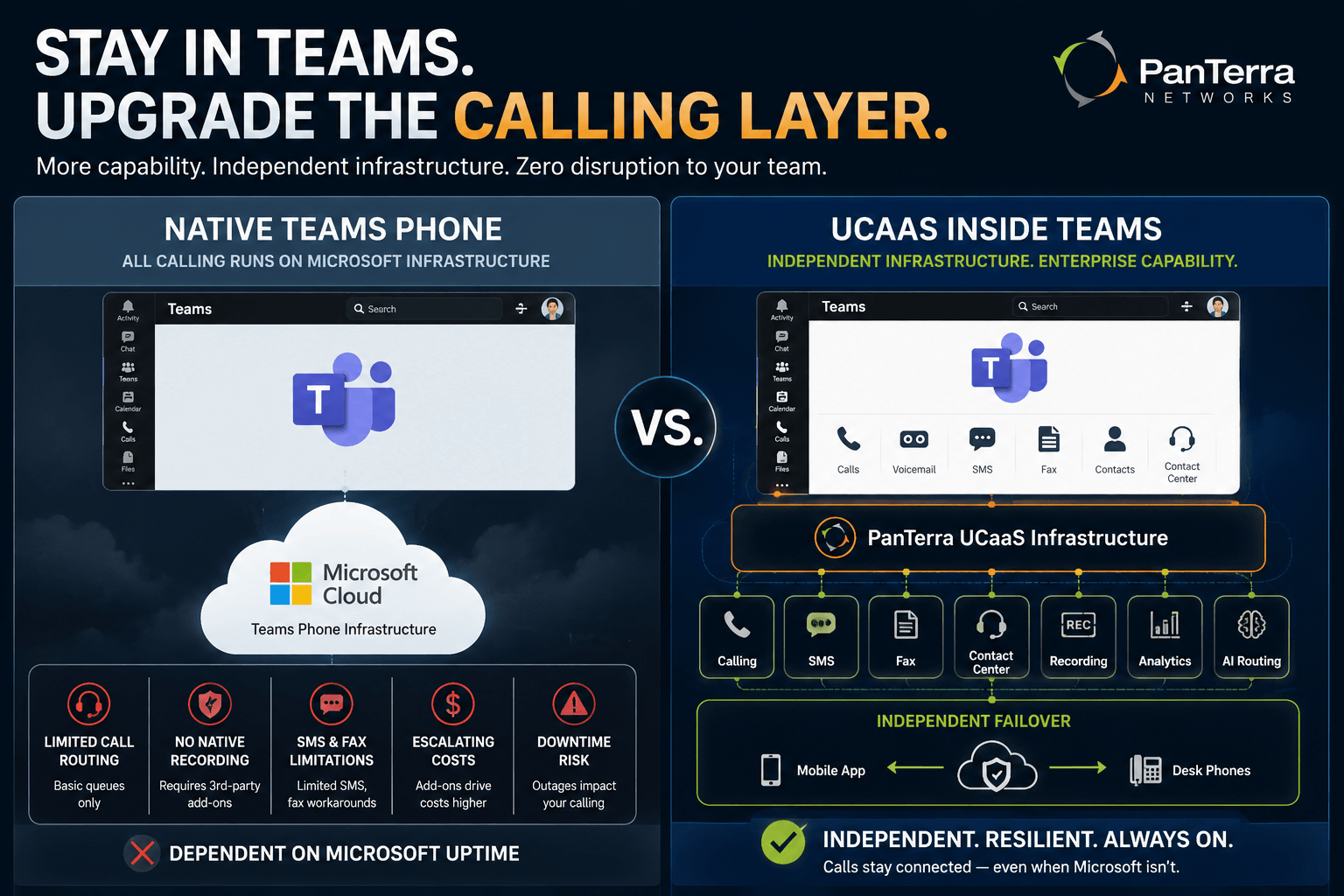
Teams Phone runs on Microsoft's infrastructure. When Microsoft has an outage — over 112 documented incidents since August 2023 — your calls stop routing. There's no built-in failover. For organizations where uninterrupted external calling is a business continuity requirement, this is a material vulnerability.
The Main Alternatives to Microsoft Teams Phone
There are four practical paths for organizations that need more than native Teams calling. The right choice depends on how much you're willing to move away from the Teams interface.
Option 1: UCaaS Native Teams App (Stay Inside Teams)
This is the path that fits Teams-first organizations best. A certified UCaaS provider builds a native app that installs directly into Teams from the App Store. Users stay inside Teams. Calling, voicemail, SMS, contact center, and AI routing all run from a tab within Teams — no separate softphone, no second login. PanTerra's Streams AI for Microsoft Teams takes this approach — a native Teams app that adds full UCaaS capability without requiring Teams Phone licensing. Business Plus starts at $24.95/user/month.
Option 2: Operator Connect (Stay in Teams, Change the Carrier)
If your main complaint about Teams Phone is cost or carrier flexibility rather than missing features, Operator Connect lets you replace Microsoft as your PSTN carrier while keeping the native Teams calling experience. For the full comparison, see Microsoft Teams Direct Routing vs. Operator Connect.
Option 3: Direct Routing (Maximum Control, Same Teams Interface)
Direct Routing connects Teams to any carrier via a certified Session Border Controller, giving you full control over routing, carrier relationships, and call flows — while still delivering calls inside the Teams interface. Best for organizations with existing carrier contracts, multi-site deployments, or complex routing requirements.
Option 4: Standalone UCaaS Platform
Some organizations choose to move all calling to a standalone UCaaS platform and use Teams exclusively for messaging and meetings. The tradeoff is interface fragmentation — users split between Teams for collaboration and the UCaaS platform for calls.
How to Choose
|
Signal |
Recommended Alternative |
|---|---|
|
Need contact center, SMS, fax — want to stay in Teams |
UCaaS native Teams app |
|
Cost is the main problem, features are acceptable |
Operator Connect with a competitive carrier |
|
Existing carrier contracts, complex routing |
Direct Routing |
|
Contact center is primary requirement, Teams is secondary |
Standalone UCaaS |
|
Need independent uptime during Microsoft outages |
UCaaS native Teams app (independent infrastructure) |
Frequently Asked Questions
What are the alternatives to Microsoft Teams Phone?
The main alternatives are: a UCaaS platform with a native Microsoft Teams app (adds enterprise calling inside Teams without Microsoft Phone licensing), Operator Connect (replace Microsoft as PSTN carrier while keeping the Teams admin experience), Direct Routing (connect your own carrier via SBC for maximum control), and standalone UCaaS platforms. The best choice depends on whether your priority is staying inside Teams, reducing cost, or gaining contact center capability.
Can I get enterprise calling inside Teams without Microsoft Teams Phone?
Yes. UCaaS providers with certified Microsoft Teams apps deliver enterprise calling, SMS, fax, voicemail, and contact center routing directly inside the Teams interface — without requiring a Teams Phone Standard license. These apps install from the Teams App Store and run natively within Teams tabs.
Will switching calling platforms mean my team has to leave Microsoft Teams?
Not necessarily. UCaaS providers with native Teams apps keep your users inside Teams. Calling, voicemail, SMS, and contact center features run from a tab within the Teams interface. From the user perspective, Teams is still the workspace — the infrastructure behind it changes.
What's the most important thing to look for in a Teams Phone alternative?
Independent infrastructure is the most overlooked requirement. Any alternative that still routes calls through Microsoft's cloud goes down during a Teams outage. Look for a provider that runs calling on its own infrastructure and can automatically failover to mobile apps or desk phones within 60 seconds of a Microsoft disruption.
.jpg?width=500&height=500&name=Are%20you%20Getting%20a%20Good%20Deal%20(1).jpg)
Comments