AI Receptionist vs. Virtual Receptionist Service: Which Does Your Business Need?


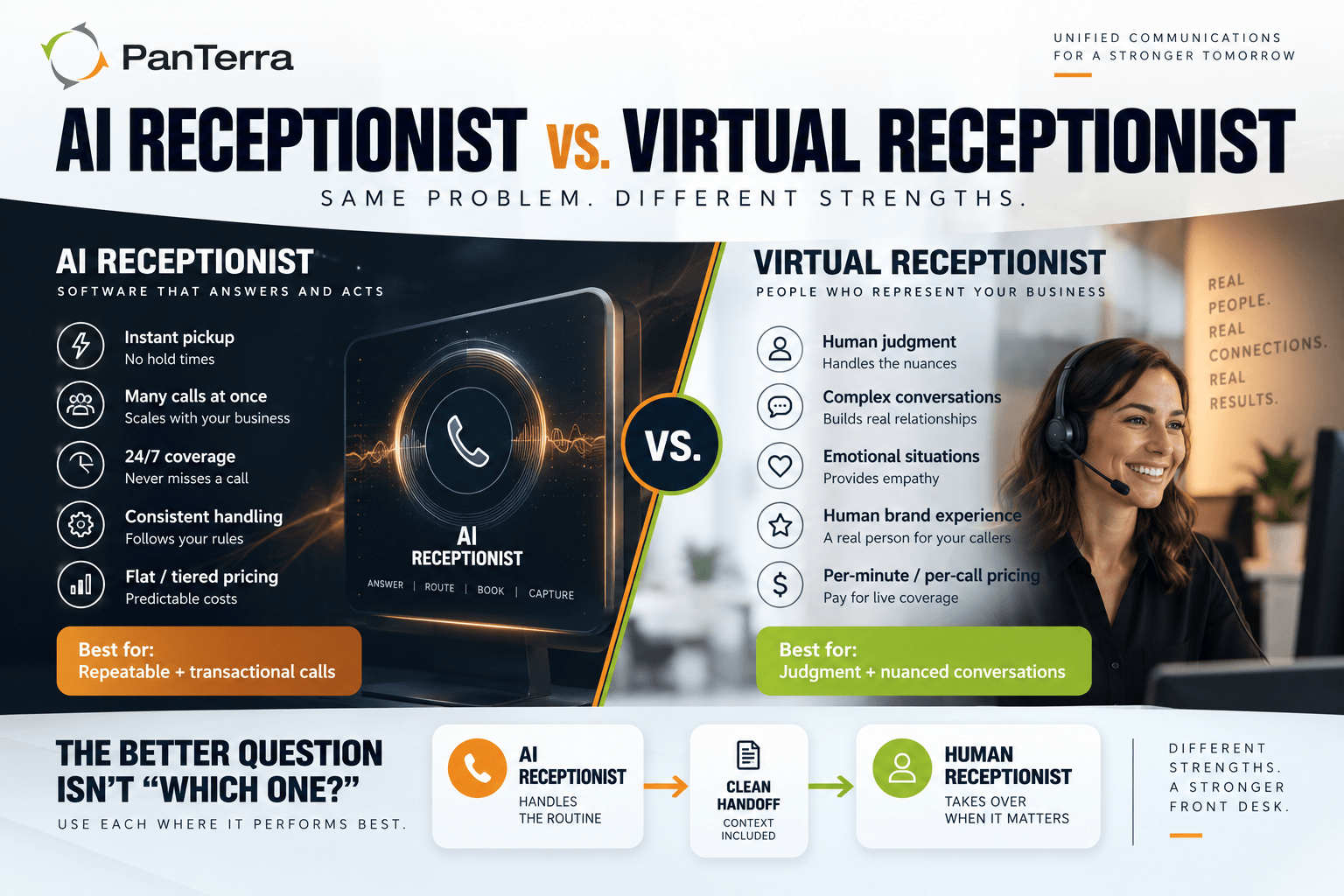
An ai receptionist and a virtual receptionist service solve one problem, calls going unanswered, in two different ways. One is software that answers instantly and handles many calls at once. The other is a remote team of people who bring judgment to conversations software cannot hold.
This is the category guide for both. It defines the terms, sets out the cost shapes, gives you a test that uses your own call log instead of a vendor's benchmark, and points to the places where an industry's rules change the answer.
TL;DR
An ai receptionist is software that answers, routes, books, and captures information on its own, with instant pickup, high concurrency, and flat pricing. A virtual receptionist service routes calls to remote staff who handle them the way a receptionist at your own desk would, with human judgment and per minute pricing. Neither wins across the board; they win on different call types. The decision comes from your own call mix, which you can measure this week, and in regulated fields it comes from what the receptionist is allowed to say. For most multi-site organizations the answer is both, with the ai receptionist answering everything and a person catching what needs one.
Key Takeaways
An ai receptionist holds a conversation. An auto-attendant reads a menu and waits for a keypress. Those are two different products and the terms get conflated constantly.
The cost shapes differ more than the headline prices. Staffed services bill per minute or per call, so a busy month costs more and a successful campaign arrives as an invoice. An ai receptionist is usually a flat fee with volume tiers.
Sort your last hundred calls into four buckets before you shop. Your own mix is the only benchmark worth trusting in this category, because no published one survives a source check.
The most common right answer is both, and the thing to test is the handoff. If escalation drops context and the caller starts over, you have built two bad experiences instead of one good one.
In regulated fields the limit is not the technology. It is what the receptionist may say, and that line is drawn by HIPAA, state practice acts, bar ethics rules, real estate commissions, or the Fair Housing Act depending on the field.
The federal rule on AI voices attaches to the calls a system places, not to the calls it answers.
Who This Is For
Best for: multi-site organizations losing calls to voicemail at lunch, after hours, or in volume spikes · regulated practices and firms where callers mostly want to book, reschedule, or ask a published question · operations leaders standardizing call handling across locations · teams weighing a first automated answering option against a staffed one.
Not ideal for: organizations whose inbound calls are mostly complex sales conversations · single-person companies, which sit outside the scope of this guide · anyone looking for outbound dialing or campaign automation, which is a different category.
Top use cases: after-hours and weekend coverage · appointment booking and rescheduling · overflow during peak periods · front desk relief across multiple sites · one consistent routing pattern for a portfolio or a group practice.
What Is an AI Receptionist?
An ai receptionist is software that answers inbound calls, understands what the caller wants in ordinary speech, and takes action. It routes to the right person, books an appointment, captures a message, answers a published question, or escalates to a human when the conversation moves past what it can handle.
The distinction from an auto-attendant matters, because the two get conflated constantly. That older product plays a menu and waits for a keypress or a keyword. An ai receptionist holds a conversation. A caller can say "I need to move Thursday's appointment to sometime next week" and get it done, without pressing anything or repeating themselves.
You will also see the term ai voice agent, which is the broader category. An ai receptionist is a voice agent pointed at the front desk job specifically. Vendors use "ai phone answering service" and "ai answering service" for roughly the same thing, with no settled distinction between them.
What Is a Virtual Receptionist Service?
A virtual receptionist service routes your calls to a remote team of people who answer using your organization's name, follow a script you provide, and handle the call the way an in house receptionist would. You are outsourcing the seat rather than automating it.
These services usually price per minute or per call, sometimes with a monthly plan that includes a block of minutes. That pricing model matters more than it looks, and it is covered below.
One quirk of this term is worth knowing before you research it. "Virtual receptionist" carries mixed search intent: on the main SERP for the phrase, a major job board holds a first page position, because a large share of the people typing it are looking for work rather than for a vendor. In some fields the term drifts further. In dental, much of what ranks for it is offshore assistant staffing rather than either a software product or a traditional answering service.
What Is an Automated Answering Service?
An automated answering service is any system that answers inbound calls without a person on the line. The phrase covers a range: a plain voicemail tree, a keypress menu, and a conversational ai receptionist all sit inside it.
The term is useful precisely because it is broad, and dangerous for the same reason. A vendor selling an automated answering service may mean any of the three. Ask which one, and ask for a recording.
Which One Handles Your Calls Better?
Neither wins across the board — they win on different call types.
|
AI receptionist |
Virtual receptionist service |
|
|---|---|---|
|
Answer speed |
Instant, every call |
Depends on staffing; queues at peak |
|
Simultaneous calls |
Many at once |
Limited by staff on shift |
|
Coverage |
All hours without staffing cost |
Extended hours, priced accordingly |
|
Handles judgment calls |
Escalates to a person |
Yes, and this is the core strength |
|
Pricing model |
Flat platform fee, tiered by volume |
Per minute or per call |
|
Cost when volume doubles |
Close to flat within tier |
Roughly doubles |
|
Consistency |
Identical on call 400 and call 1 |
Varies by person and shift |
|
Books into your calendar |
Yes, if integrated |
Yes, if given access |
|
Changes to the script |
Setup you control |
A request to the vendor |
|
Multi-site routing |
One pattern, applied everywhere |
Depends on the script and the team |
An ai receptionist is stronger when call volume is unpredictable, when the same questions arrive repeatedly, when calls land outside business hours, and when the caller's goal is a transaction. A virtual receptionist service is stronger when the caller is likely to be distressed or confused, when calls are genuinely hard to script, when your buyers expect a human voice as part of the brand, and when the call is a sales conversation where a person can read the room.
The honest version is that most organizations have both kinds of calls, and the split is rarely even. Which way it leans is the thing to measure rather than assume.
How Do You Know Which One You Need? The Four-Call Test
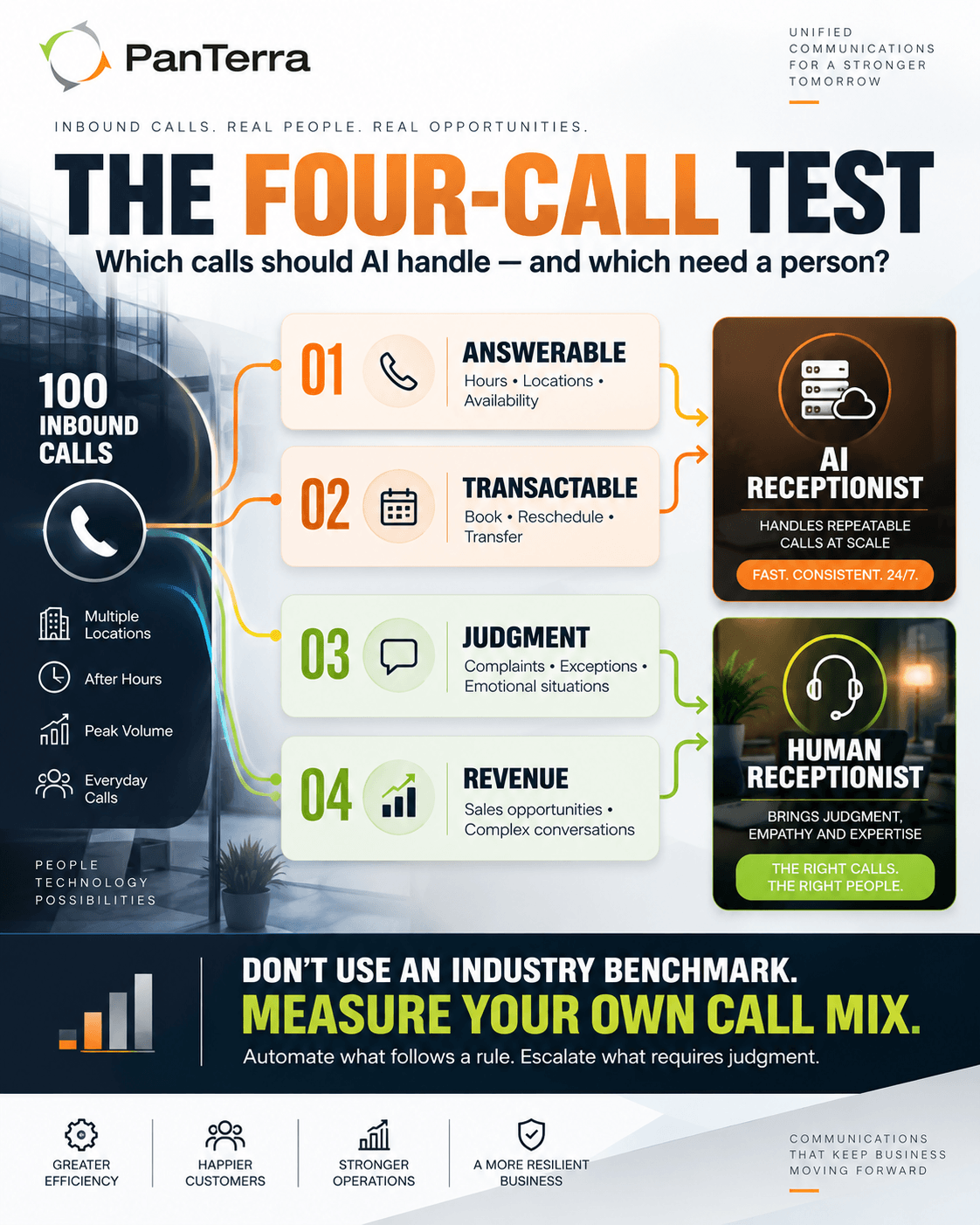
Pull your last hundred inbound calls and sort each into a bucket. This takes about an hour and tells you more than any vendor comparison.
☐ Bucket 1: Answerable. The caller wanted published information: hours, address, holiday opening, whether you take a particular insurance plan, whether a unit is available. An ai receptionist handles all of these at once.
☐ Bucket 2: Transactable. The caller wanted something done that follows a rule: book, cancel, reschedule, transfer to a named person, leave a callback request, log a maintenance issue. An ai receptionist handles these, often faster than a person, because it is not looking anything up.
☐ Bucket 3: Judgment. A complaint, an unusual request, a situation needing a decision, or an emotional register that needs a person. These need a human, yours or a service's.
☐ Bucket 4: Revenue. A live sales opportunity where the conversation does the selling. These need your team.
How to read it. The larger buckets 1 and 2 are, the more of your front desk an ai receptionist can absorb, with a human layer on the rest. If bucket 3 is unusually large, a virtual receptionist service earns its per-minute cost. If bucket 4 is large and those calls are being missed, your problem is coverage rather than automation, and either option beats voicemail.
One deliberate omission. This section used to open with a claim about what share of calls are typically informational or transactional. That figure has no traceable source, so it is gone. The point of the test is that your mix is the only number that should decide this, and you can produce it in an afternoon. Treat any vendor who offers you a category benchmark as someone to ask for the base and the method.
What Does Each One Cost?
The pricing models differ enough that a headline comparison misleads, so compare shapes before you compare quotes.
A virtual receptionist service typically bills per minute or per call against a monthly minimum. That scales with your success. A busy month costs more, and a marketing campaign that works arrives as a bill. Overage beyond plan minutes is usually charged at a higher rate than the included minutes, which is the line to ask about first.
An ai receptionist is usually a flat monthly platform cost, sometimes with usage tiers. Call volume affects it far less, because the marginal cost of one more simultaneous call is close to zero. What moves the number instead is integration scope and the number of sites.
The cost that neither invoice shows is the unanswered call. If calls ring out at lunch, after hours, or during spikes, that cost appears on no quote and in no comparison table.
Deliberately absent here: a market rate range for either model. There is no published range that survives a source check, and PanTerra does not price the ai receptionist as a plan on its rate card, so quoting a figure would mean inventing one. Our companion piece on what an AI receptionist costs models the two shapes against a real call volume, which is the comparison that actually decides it.
Should You Use Both?
For most multi-site organizations, yes, and it is worth naming as its own option rather than a compromise.
The ai receptionist answers every call on the first ring, handles buckets 1 and 2 completely, and escalates buckets 3 and 4 to a person: your team during business hours, a virtual receptionist service outside them. Nothing rings out. Nobody waits in a queue for a question that could have been answered in eight seconds.
The practical requirement is that escalation has to be clean. If the handoff drops context and the caller starts over, you have built two bad experiences instead of one good one. Ask specifically what gets passed to the human: the caller's number, what they said, what the ai receptionist already tried, and where in the conversation the escalation happened.
Where Do Your Industry's Rules Change the Answer?
This is the part a category guide has to route rather than answer, because the constraint is different in every field and it is never a product constraint. In each case the question is the same: what is the receptionist allowed to say?
Healthcare. A service answering patient calls handles protected health information, which makes the vendor a business associate under HIPAA. Ask whether the provider signs a Business Associate Agreement, whether it is included or gated behind a plan tier, and what it covers. Ask every vendor, PanTerra included. Then ask what the system says back, because an ai receptionist that confirms an appointment by repeating a patient's name, procedure, and provider aloud is disclosing information. That is fine if the patient is on the line and wrong on a voicemail a family member might hear. Our medical virtual receptionist buyer's guide covers the practice-side requirements in full.
Dental. The HIPAA analysis is the same, and a second limit sits on top of it. Most state practice acts treat professing to evaluate or diagnose an oral condition as the practice of dentistry, which puts symptom interpretation outside what any receptionist may do. Dental call volume also skews to insurance questions in a way that changes what you should test in a demo. See the dental virtual receptionist guide.
Legal. No ethics rule names virtual receptionists, and several govern them anyway. Most of intake can be delegated. The line is legal judgment: taking down the facts can be handed off, reading them cannot. See the legal virtual receptionist guide.
Real estate. What an unlicensed person may say about a listing is state commission law, and the states genuinely disagree, with one barring it even where the listing already prints the answer. See the realtor virtual receptionist guide.
Property management. Federal regulation applies the ban on discriminatory statements to oral statements, and makes the housing provider liable for an agent's conduct whether or not it knew. The script is the compliance artifact. See the property management answering service guide.
Any field, on outbound. In Declaratory Ruling FCC 24-17, adopted 2 February 2024, the FCC confirmed that an AI voice counts as an artificial voice under the Telephone Consumer Protection Act, so a call your system places in an AI voice needs prior express consent. Answering an inbound call the caller started is outside that rule. The duty attaches to callbacks, reminders, and automated follow-up.
The Cluster A Spoke Index
Everything in the AI receptionist cluster, in reading order. Each page owns one search intent and defers to the others in writing.
- Medical Virtual Receptionist · healthcare vertical. HIPAA, business associate status, what the system may say on a voicemail, and the questions to put to every vendor.
- Dental Virtual Receptionist · dental vertical. The software and staffing ambiguity specific to dental, symptom assessment as a business associate activity, and the practice-act limit on triage.
- Legal Virtual Receptionist · legal vertical. What a firm can delegate at intake, conflict checks, and the two duties that attach when the receptionist is AI.
- Realtor Virtual Receptionist · real estate vertical. What an unlicensed person may say about a listing, state by state, and why routing beats answering.
- Property Management Answering Service · property management vertical. Fair housing exposure on oral statements, maintenance triage design, and the guidance HUD withdrew.
- What an AI Receptionist Costs · cost and total cost of ownership. The two pricing shapes modeled against real volume.
- Can AI Receptionists Handle Enterprise Call Volume? · the capacity objection, concurrency limits, and what to ask instead of "is it unlimited."
- What an AI Receptionist Should Actually Do · the capability baseline, and where most AI phone answering tools fall short of it.
The commercial destination for the whole cluster is the Luna AI receptionist product page. That link lives here, on the pillar, so the satellites can send their editorial authority to this page instead of to a product URL.
What Should You Ask a Vendor Before You Commit?
Seven questions that separate products quickly.
What happens when the ai receptionist does not understand? The answer should be a clean escalation path, not a loop asking the caller to repeat themselves.
How does it handle simultaneous calls? Ask for the actual concurrency limit, not "unlimited."
What can it access? One that cannot see your calendar cannot book. One that cannot see your CRM cannot recognize a returning customer.
How is it configured and changed? If every script change is a support ticket, the total cost is higher than the quote, and in regulated fields your compliance posture moves at the vendor's speed.
What does the caller hear first? Ask to hear a recording of a real call, not a demo script.
What happens to the recording and the transcript? How long it is kept, and who can reach it. This matters more in some fields than others, and in healthcare the recording is protected health information from the moment it exists.
Does it place outbound calls, and how is consent captured? The toggle is usually easy to switch on and easy to forget.
Frequently Asked Questions
What is a virtual receptionist?
A virtual receptionist is someone or something that answers your inbound calls without sitting at your front desk. The term covers two models: a virtual receptionist service, where a remote team of people answer in your organization's name and follow your script, and an ai receptionist, which is software that answers and takes action on its own.
What does a virtual receptionist do?
It answers the call, identifies your organization, and then handles what the caller wants: routing to a person, booking or moving an appointment, taking a message, answering a published question, or escalating. What it must not do varies by field. In regulated industries the limit is set by professional rules rather than by the product.
How does a virtual receptionist work?
Calls to your number route to the service instead of ringing at your desk. A staffed service delivers them to a remote team who work from a script you supply. An ai receptionist answers them in software, interprets the request in ordinary speech, acts on it through integrations with your calendar or systems, and hands the call to a person when it hits a limit you have set.
Is an ai receptionist the same as an auto-attendant?
No. An auto-attendant plays a menu and waits for a keypress. An ai receptionist understands natural speech and completes the task, whether that is booking, routing, or answering, without the caller navigating options.
How much does a virtual receptionist cost?
The two models price differently, so compare shapes rather than headline numbers. A staffed service usually bills per minute or per call against a monthly minimum, with a higher rate on overage, so a busy month costs more. An ai receptionist usually carries a flat monthly fee with volume tiers, so cost moves far less with call volume. Our companion piece on what an AI receptionist costs works both shapes against a real call volume.
How do you choose a virtual receptionist service?
Start with your own call mix rather than a feature list. Sort a hundred recent calls into questions about published information, transactions that follow a rule, judgment calls, and live sales opportunities. The first two are what software handles well. The second two need a person. Then check whether your field puts a limit on what the receptionist may say, because in regulated industries that limit decides the setup before any feature does.
What makes a great virtual receptionist?
Three things, in order. It answers every call, because an unanswered call is the failure the whole category exists to fix. It knows its limit and escalates cleanly, passing the caller's number and what they already said so nobody starts over. And it can be changed by you, quickly, without a support ticket.
Which virtual receptionist services offer live answering at all hours?
Most staffed services sell extended or continuous coverage, and it is priced accordingly, because overnight hours cost more to staff. An ai receptionist covers every hour at the same rate, since there is no shift to fill. If continuous coverage is the reason you are buying, price the staffed option at your real overnight volume before comparing.
Can a virtual receptionist handle callers who do not speak English?
Many services offer two or more languages and the quality varies sharply. Ask which languages are covered, whether coverage runs continuously or only in certain hours, and to hear a real call in the second language. For a staffed service, ask whether the bilingual team is the same team.
Which industries benefit most from a virtual receptionist service?
The pattern is not industry so much as call shape. The organizations that gain most have high inbound volume, a large share of repeatable requests, calls arriving outside staffed hours, and more than one location. That describes healthcare and dental practices, law firms, real estate brokerages, and property management companies, which is why each of those has its own guide in the index above.
.jpg?width=500&height=500&name=Are%20you%20Getting%20a%20Good%20Deal%20(1).jpg)
Comments