What Is Contact Center Automation? A Complete Business Guide


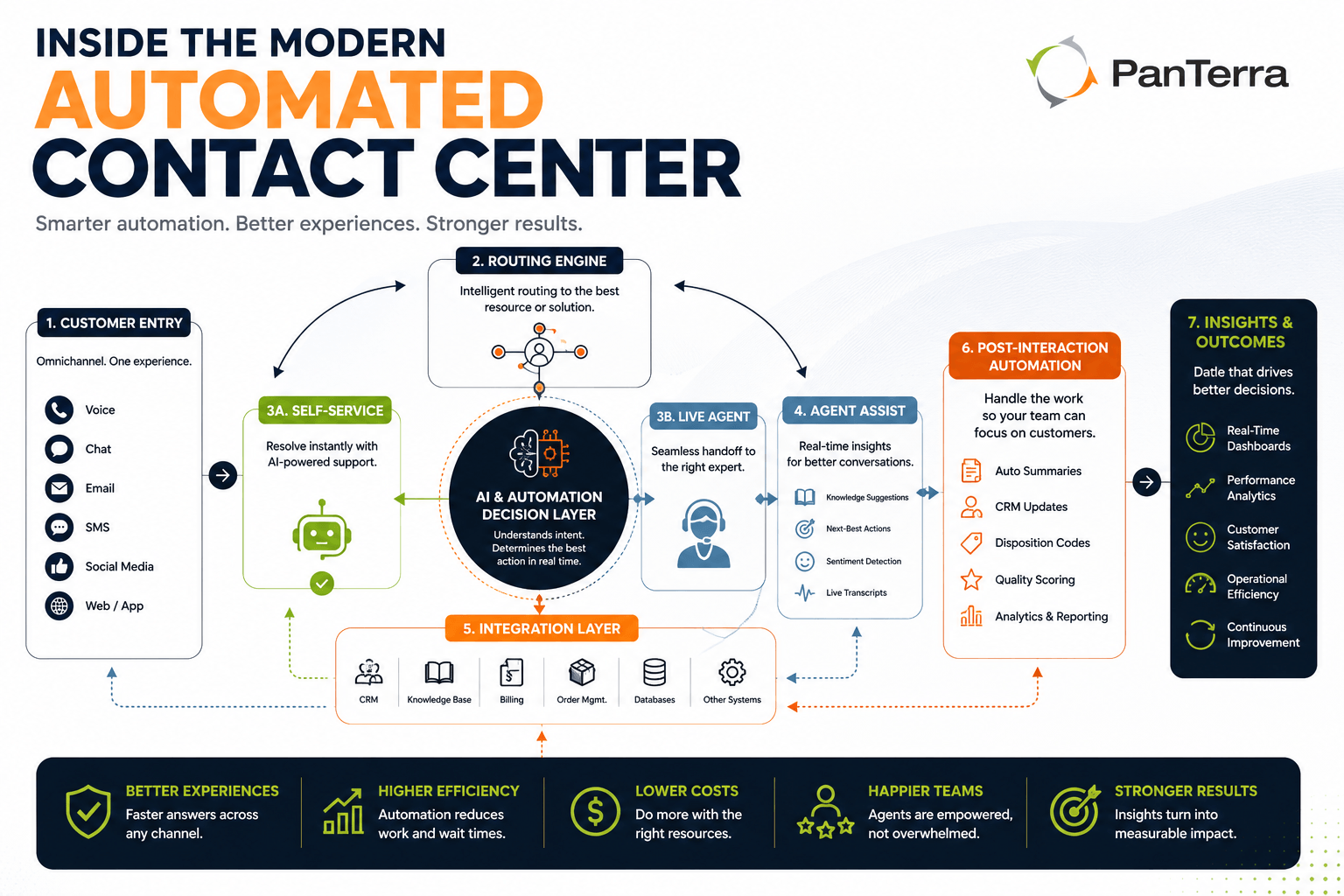
Contact center automation is the use of software to handle contact center work that would otherwise require a person — routing a contact, answering a routine question, assisting an agent mid-conversation, or logging and summarizing what happened afterward.
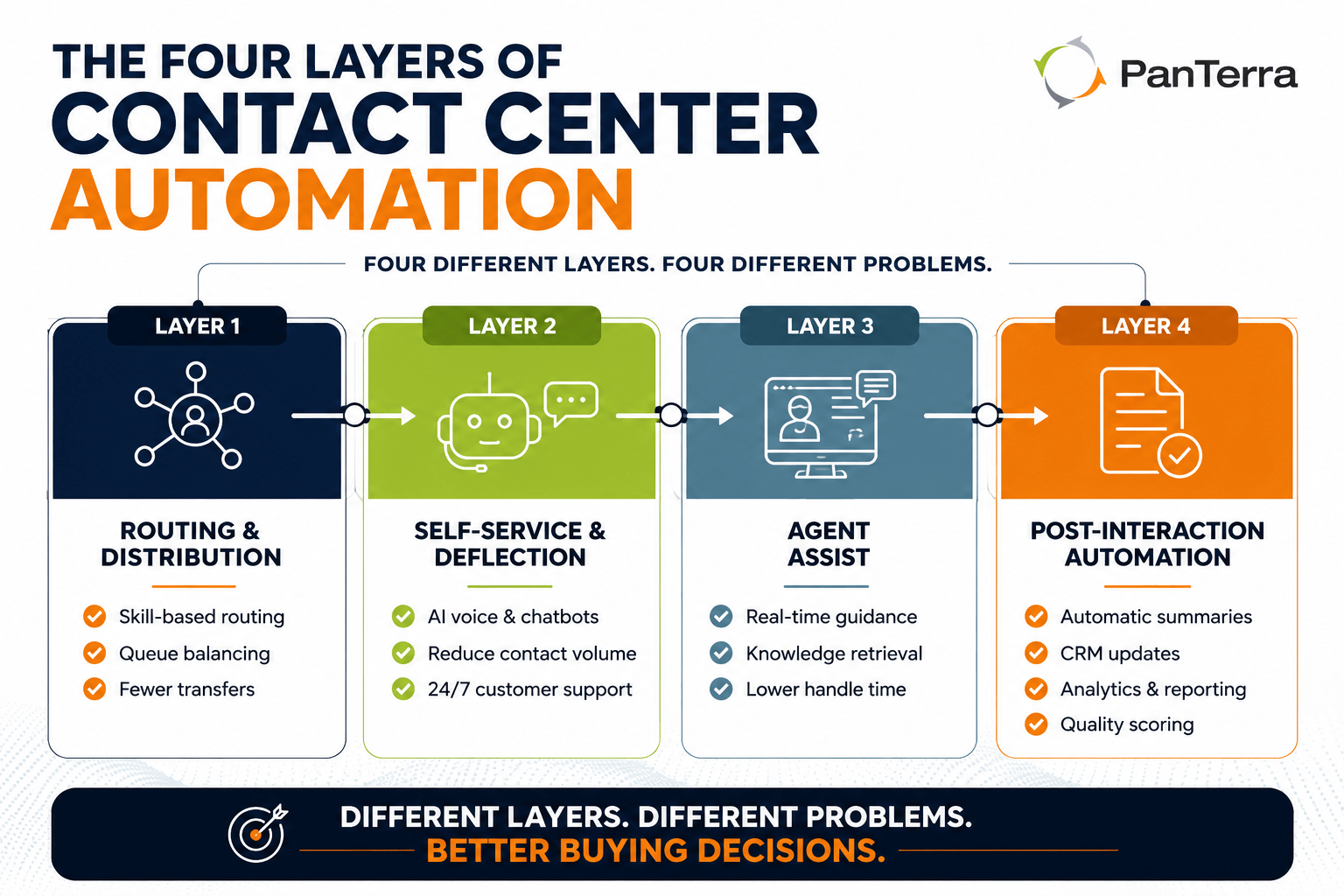
That definition is broad because the term covers four genuinely different things sold under one label. Some of it replaces human effort, some assists a human in real time, and some never touches a customer at all. Knowing which layer a vendor is selling is the difference between a project that pays for itself and a subscription that removes no work.
TL;DR
Contact center automation breaks into four layers: routing and distribution, self-service and deflection, agent assist, and post-interaction automation. Each fixes a different problem. Self-service is the only layer that reduces contact volume; agent assist reduces handle time without touching volume; post-interaction automation removes administrative overhead and usually pays back fastest. Buying the most visible layer when your constraint is a different one is the most common reason these projects disappoint.
Key Takeaways
- Four layers, four different problems. Match the layer to your symptom, not to the sales pitch.
- Self-service is the only layer that removes contacts from the queue. Agent assist and post-interaction automation do not reduce volume at all.
- Post-interaction automation is the least visible layer and often the fastest payback, because after-call work is pure overhead.
- Average handle time goes up after successful self-service deployment — the easy contacts have been removed from the agent queue.
- Containment rate is easy to game. A system that makes reaching a human difficult will show excellent containment and poor satisfaction.
- Outbound automation carries a risk the inbound layers do not: heavy automated dialing changes how carriers label your numbers, and a flagged number drops answer rates for legitimate calls too.
Who This Is For
Best for: operations leaders evaluating contact center automation for the first time · teams that bought one automation tool and did not get the result they expected · anyone building a business case and needing to explain which problem the spend solves.
Not ideal for: teams looking for vendor-specific configuration guidance — this is a category explainer, not a product manual · organizations whose primary need is outbound campaign management, which is a distinct discipline.
Top use cases: scoping an automation roadmap · diagnosing why an existing deployment underdelivered · building internal alignment on what to automate first.
What Problem Does Contact Center Automation Solve?
Three, usually, and they compound.
Volume that exceeds staffing. Contacts arrive unevenly. Staffing to the peak is expensive; staffing to the average makes the peak a queue. Automation absorbs the spike without headcount.
Repetition that wastes skilled people. A significant share of contacts are the same handful of questions. Every hour an experienced agent spends on "where is my order" is an hour not spent on conversations that need experience.
Administrative overhead per interaction. Agents spend a meaningful portion of every contact not talking to the customer — searching records, typing notes, updating fields, tagging, summarizing. Invisible on a call report, enormous in aggregate.
Different layers attack different ones. Buying the wrong layer for your problem is the most common way these projects disappoint.
What Are the Four Layers of Contact Center Automation?
Layer 1 — Routing and Distribution
Software decides where a contact goes: which queue, which agent, which priority. Modern routing goes beyond "next available" — it can route on skill, customer value, history, language, or stated intent. The automation is in the decision, not the conversation.
Fixes: misrouted contacts, long transfers, customers repeating themselves.
Does not fix: total volume. A better-routed contact is still a contact someone handles.
Layer 2 — Self-Service and Deflection
Software handles the contact end to end. AI voice agents on the phone, chatbots in the web channel, and the increasingly capable middle ground where a customer checks status, reschedules, pays, or updates details without queueing.
"Deflection" is doing something specific here. A deflected contact is not an avoided one; it is one the customer resolved themselves, quickly. Done badly, deflection is a wall between the customer and a human. Done well, it is a faster path than waiting.
Fixes: volume, especially the repetitive share.
Does not fix: complexity. Contacts needing judgment still reach a person, and should.
Layer 3 — Agent Assist
Automation aimed at the agent rather than the customer, running during the conversation: surfacing the right knowledge article, suggesting a response, transcribing in real time, flagging compliance language, pulling history without a search.
Most often underestimated, because it does not reduce volume at all. It reduces handle time and flattens the gap between your best agent and your newest. For contact centers with high turnover, that second effect matters more.
Fixes: handle time, consistency, ramp time for new agents.
Does not fix: volume, or after-hours coverage.
Layer 4 — Post-Interaction Automation
Everything after the conversation: automatic summarization, disposition and tagging, CRM updates, follow-up tasks, quality scoring, and feeding all of it into contact center analytics.
The least visible layer and often the fastest return, because it removes pure overhead. An agent who does not spend two minutes writing notes after every contact gains a meaningful fraction of their day.
Fixes: after-call work, data quality, and the reporting problem caused by inconsistent manual tagging.
Does not fix: anything the customer experiences directly.
Which Layer Should You Start With?
Match the layer to the symptom rather than the pitch.
|
If your problem is |
Start with |
Why |
|---|---|---|
|
Customers wait too long during peaks |
Layer 2 — self-service |
The only layer that removes contacts from the queue |
|
Customers get transferred repeatedly |
Layer 1 — routing |
Volume is fine; distribution is not |
|
Handle times long and inconsistent between agents |
Layer 3 — agent assist |
Volume is not the constraint; per-contact efficiency is |
|
Agents drowning in after-call work |
Layer 4 — post-interaction |
Pure overhead removal, usually quickest payback |
|
Reporting does not match what you observe |
Layer 4 — post-interaction |
Inconsistent manual tagging is almost always the cause |
|
Cannot cover nights and weekends |
Layer 2 — self-service |
Software is the only option that does not require staffing |
The common mistake is starting at Layer 2 because it is most visible, when the actual constraint is Layer 3 or 4. Self-service does nothing for a contact center whose problem is that each contact takes too long.
What About Automating Outbound?
Outbound automation is a different discipline, and it carries a risk the inbound layers do not.
The automation is straightforward: dialing systems that place calls, campaigns that sequence attempts, rules that decide when to retry. The risk is what heavy automated outbound does to your phone numbers. Carriers and analytics providers watch calling patterns — volume, duration, answer rate, how often recipients mark a number unwanted — and numbers that look like spam campaigns get labeled as such. Once flagged, your answer rate falls, and it falls for the legitimate calls too.
This is why outbound automation and caller reputation cannot be evaluated separately. A dialer that doubles outbound volume and halves your answer rate has improved nothing. The practices that protect a number — dialing velocity, list quality, respecting consent and do-not-call status, distributing volume appropriately, and monitoring how numbers are being labeled — belong in the outbound plan from the start, not as cleanup after answer rates drop.
Our guide to phone number reputation management covers the mechanics.
How Does Automation Change What You Measure?
Standard metrics get distorted, and if you do not adjust you will misread your own performance.
Average handle time goes up, not down, when self-service is working. Automation removes the short, easy contacts from the agent queue. What remains is longer and harder by definition. A rising AHT after a Layer 2 deployment is usually evidence of success, not failure — and teams that treat it as a regression often roll back a working system.
Contact volume drops, but resolution volume should not. Track total resolutions across automated and human channels, not just contacts agents handled.
First contact resolution needs redefining. If a customer resolves an issue in self-service, that is a first contact resolution — but many reporting setups only count agent-handled contacts, which makes automation look like it did nothing.
Containment rate becomes a headline metric, and it is easy to game. Containment measures the share of contacts handled without an agent. A system that makes reaching a human difficult shows excellent containment and terrible satisfaction. Always read it next to a satisfaction measure and an escalation-success measure.
What Should You Look For in a Platform?
Whether the layers talk to each other. Automation living in four disconnected tools produces four disconnected records of the same customer. Value compounds when the self-service tier knows what routing knew, and post-interaction captures both.
Whether escalation carries context. When automation hands a contact to a person, the agent should see what happened. Any platform where the customer starts over at handoff has built a worse experience than no automation.
What configuration requires. If every change to an automated flow needs vendor involvement, running cost exceeds the license fee.
Where the analytics live. Whether interaction data is searchable, exportable, and connected to your other systems determines whether you can improve the automation over time or only run it.
How it handles the channels you use — a bigger question than it sounds, and the subject of our guide to evaluating an omnichannel contact center.
Frequently Asked Questions
What is contact center automation?
Contact center automation is the use of software to handle contact center work that would otherwise require a person — routing contacts, resolving routine requests without an agent, assisting agents during conversations, and handling post-interaction administration like summaries, tagging, and CRM updates.
What is the difference between contact center automation and a chatbot?
A chatbot is one implementation of one layer — self-service in the chat channel. Contact center automation covers four layers including routing, agent assist, and post-interaction work, most of which a chatbot does not touch.
Does contact center automation replace agents?
It changes what agents do rather than removing the need for them. Self-service absorbs repetitive contacts, which means the contacts reaching agents are longer and more complex. Most organizations redeploy capacity rather than reduce headcount.
Which type of contact center automation gives the fastest return?
Post-interaction automation, usually. It removes after-call work that is pure overhead, requires no change to the customer experience, and improves data quality at the same time.
Why did our average handle time increase after we automated?
Because self-service removed the short, easy contacts from the agent queue. The contacts that remain are longer by definition. Rising AHT alongside falling contact volume is normally a sign the automation is working.
What is containment rate and is it a good metric?
Containment measures the share of contacts fully resolved without an agent. It is useful but easy to game — a system that makes reaching a human difficult scores well while frustrating customers. Read it alongside satisfaction and escalation-success measures.
Does automating outbound calls affect our phone numbers?
Yes. Carriers and analytics providers assess calling patterns, and numbers that look like spam campaigns get labeled. A flagged number sees answer rates fall across all its calls, including legitimate ones. Protecting number reputation belongs in the outbound plan from the start.
How much does contact center automation cost?
It varies by layer and platform, and the headline per-seat price is rarely the whole picture. Ask which layers are included in the base tier, whether integrations cost extra, and what configuration changes require after go-live.
What should we automate first?
Match the layer to your symptom. Long queues at peak point to self-service; repeated transfers point to routing; long and inconsistent handle times point to agent assist; heavy after-call work points to post-interaction automation.
.jpg?width=500&height=500&name=Are%20you%20Getting%20a%20Good%20Deal%20(1).jpg)
Comments