How to Choose Contact Center Software: The Evaluation Scorecard


Most contact center software evaluations go wrong the same way: a forty-row feature spreadsheet, every vendor scoring well on most of it, and a decision made on price or on who ran the best demo.
The fix is to score fewer things, weight them for your situation, and separate criteria that matter to everyone from criteria that only matter to some buyers. That last distinction is what most scorecards miss, and it is why they produce ties.
TL;DR
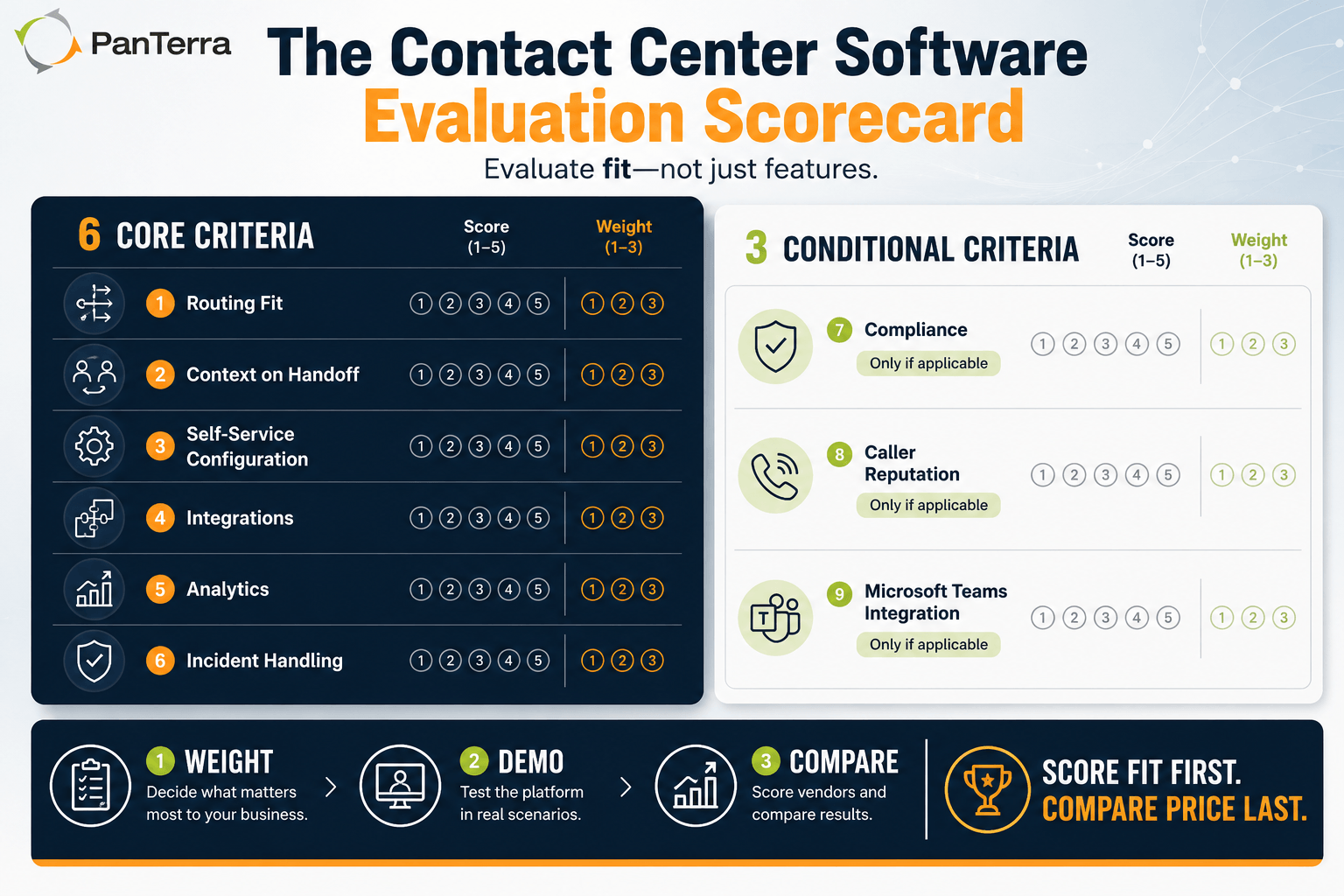
This scorecard has nine criteria in two groups. Six core criteria apply to every buyer: routing fit, context on handoff, self-service configuration, integrations, analytics usability, and incident handling. Three conditional criteria apply only if a condition is true for you: compliance (regulated industries), caller reputation (outbound-heavy operations), and native Teams integration (Microsoft organizations). Skip the conditional criteria that do not apply rather than scoring them low. Weight before you demo. It is free to copy and there is nothing to fill in to get it.
Key Takeaways
- Score fewer things and weight them deliberately — the weighting conversation is where most of the value is.
- Conditional criteria should be removed, not scored low, when they do not apply to you. Otherwise you tilt the comparison toward vendors selling into markets you are not in.
- Test criteria 2, 3 and 5 rather than accepting a description. These are where vendor descriptions and reality diverge most.
- Decide your weights before the first demo. Weighting afterward means weighting toward whoever demoed best.
- Ties are almost always broken by criterion 3 — configuration without the vendor — because that cost compounds monthly for the life of the contract.
- Leave price out of the scorecard. Score fit first, then compare price among platforms that scored well.
Who This Is For
Best for: teams running a contact center software evaluation now · anyone who has been handed a vendor feature matrix and needs something more useful · operations leaders building internal consensus on selection criteria.
Not ideal for: organizations that have already selected and are implementing · teams needing pricing benchmarks rather than fit criteria.
Top use cases: structuring an RFP · scoring vendor demos consistently · settling internal disagreement about what matters.
How Does This Scorecard Work?
Nine criteria in two groups.
Six core criteria apply to every contact center buyer. Score each 1 to 5.
Three conditional criteria apply only if a specific condition is true for your business. If the condition does not apply, skip the criterion entirely — do not score it low, and do not include it in the total. A scorecard forcing every buyer to weight compliance identically has stopped being useful.
Weight each criterion 1 to 3 by how much it matters to you. Multiply score by weight. Total the result. The point is not the number; it is that you have to justify the weights out loud.
What Are the Six Core Criteria?
1. Does the routing match how you actually work?
5: Routing on skill, customer history, value, language and stated intent, configurable by your team without vendor involvement.
3: Skills-based routing, configurable but needing vendor help for anything unusual.
1: Round-robin or next-available with limited configuration.
Test: ask them to build a routing rule you actually need, live, in the demo. How long it takes and who does it tells you what a year of changes will cost.
2. Does context survive a handoff?
The most common failure in contact center software, and the one customers feel most directly.
5: Full interaction history and automation context visible to the agent at transfer, across every channel.
3: History available, but the agent has to search for it.
1: The customer starts over.
Test: run a contact through self-service, escalate it, and watch the agent's screen. Do not accept a description — watch it happen.
3. Can your team configure it without the vendor?
Most affects total cost, least visible in pricing.
5: Flows, scripts, hours, routing and integrations all changeable by an admin on your team.
3: Most changes self-service; complex changes need vendor support.
1: Meaningful changes require a professional services engagement.
Test: ask what the last three customers changed after go-live and who did the work.
4. Does it integrate with the systems you already run?
5: Native, supported integrations with your CRM, calendar and helpdesk, with bidirectional data flow.
3: Integrations exist but need middleware or custom work.
1: API only, or integrations that read but do not write.
Test: name your exact systems and versions. "We integrate with most CRMs" is not an answer.
5. Is the analytics layer usable or just visible?
5: Interaction data is searchable, exportable and connected to your other systems; you can answer a question you did not anticipate.
3: Good standard dashboards, limited ability to go beyond them.
1: Fixed reports, difficult export.
Test: ask a question their standard dashboard does not answer, and see whether the platform can get there.
6. What happens when something breaks?
5: Documented failover behavior, published status history, clear escalation path, and a support model verified with a reference.
3: Reasonable support terms, limited transparency about incidents.
1: Support is a ticket queue and outage history is not public.
Test: ask what happened during their last significant incident and how customers found out. The answer is revealing regardless of what it is.
What Are the Three Conditional Criteria?
Score these only if the condition applies. If it does not, delete the row. Scoring a criterion low when it is irrelevant to you tilts the comparison toward vendors who sell into markets you are not in — which is the opposite of what a fit assessment is for.
7. Compliance and data handling — if you are in a regulated industry
Applies to healthcare, financial services, legal, education, and anyone handling regulated data.
5: Meets your specific regulatory requirement across every channel you intend to use, with configurable retention, encryption at rest and in transit, role-based access to interaction history, and documented deletion and redaction.
3: Meets it on primary channels; gaps on secondary channels or retention configuration.
1: General security posture, no specific accommodation.
For healthcare buyers: ask whether the provider signs a Business Associate Agreement, whether it is included in your plan or gated behind a tier, and — the part that gets missed — whether it covers every channel you will use. A BAA covering voice while your team texts patients leaves the channel you use most casually uncovered.
If you are not in a regulated industry, skip this criterion.
8. Caller reputation management — if you run significant outbound volume
Applies to sales teams, collections, appointment reminders, field service dispatch, and anyone whose business depends on outbound calls being answered.
5: The platform monitors how your numbers are being labeled by carriers and analytics providers, supports branded caller identity, and gives visibility into answer rates by number so you can act before a number is burned.
3: Basic answer rate reporting, no reputation monitoring.
1: No visibility into how your numbers are being treated.
Why it belongs on a scorecard: heavy automated outbound changes how carriers classify your numbers. Once flagged as likely spam, your answer rate falls for legitimate calls too, and recovering a burned number is slower than protecting one.
If your outbound volume is low, skip this criterion.
9. Native Microsoft Teams integration — if you are a Microsoft organization
5: Agents handle contact center work inside Teams without a second application; presence stays consistent; calling and messaging work natively in the Microsoft environment; documented continuity behavior when Teams has a service problem.
3: Teams integration exists but agents run two applications side by side.
1: No meaningful Teams integration.
The question most evaluations skip: what happens to customer calls when Teams itself has an outage. If customer-facing calling depends entirely on one platform being available, an outage becomes a customer-facing failure. Get a specific answer.
If your organization does not run on Microsoft, skip this entirely. It is a measure of fit with your environment, not of platform quality.
How Should You Weight It?
The weights matter more than the scores, because they encode what you are optimizing for.
|
Situation |
Weight heavily |
Weight lightly |
|---|---|---|
|
High volume, mostly repetitive |
Routing, context on handoff, analytics |
Configuration flexibility |
|
Complex products, experienced agents |
Context on handoff, integrations, analytics |
Routing sophistication |
|
Small team, no dedicated admin |
Configuration without vendor, support |
Analytics depth |
|
Regulated industry |
Compliance (7), context, support |
— |
|
Outbound-heavy |
Caller reputation (8), analytics, integrations |
— |
|
Microsoft-native organization |
Teams integration (9), context |
— |
|
Rapid growth expected |
Configuration without vendor, integrations, routing |
— |
If two vendors tie after weighting, the tie is almost always broken by criterion 3 — because that is the cost that compounds every month for the life of the contract.
What Does This Scorecard Deliberately Leave Out?
Number of features. Every platform in serious consideration has enough. Counting them measures marketing, not fit.
AI capability as its own row. AI is a means, not a criterion. Good AI shows up as a high score on routing, context, or analytics. If it improves none of those, it is a demo.
Price. Not because price does not matter, but because a scorecard including price stops being a fit assessment. Score fit first, then compare price among the platforms that scored well.
Vendor size and market position. Analyst quadrants and award badges measure things that are real but not specific to you.
How Do You Run the Evaluation?
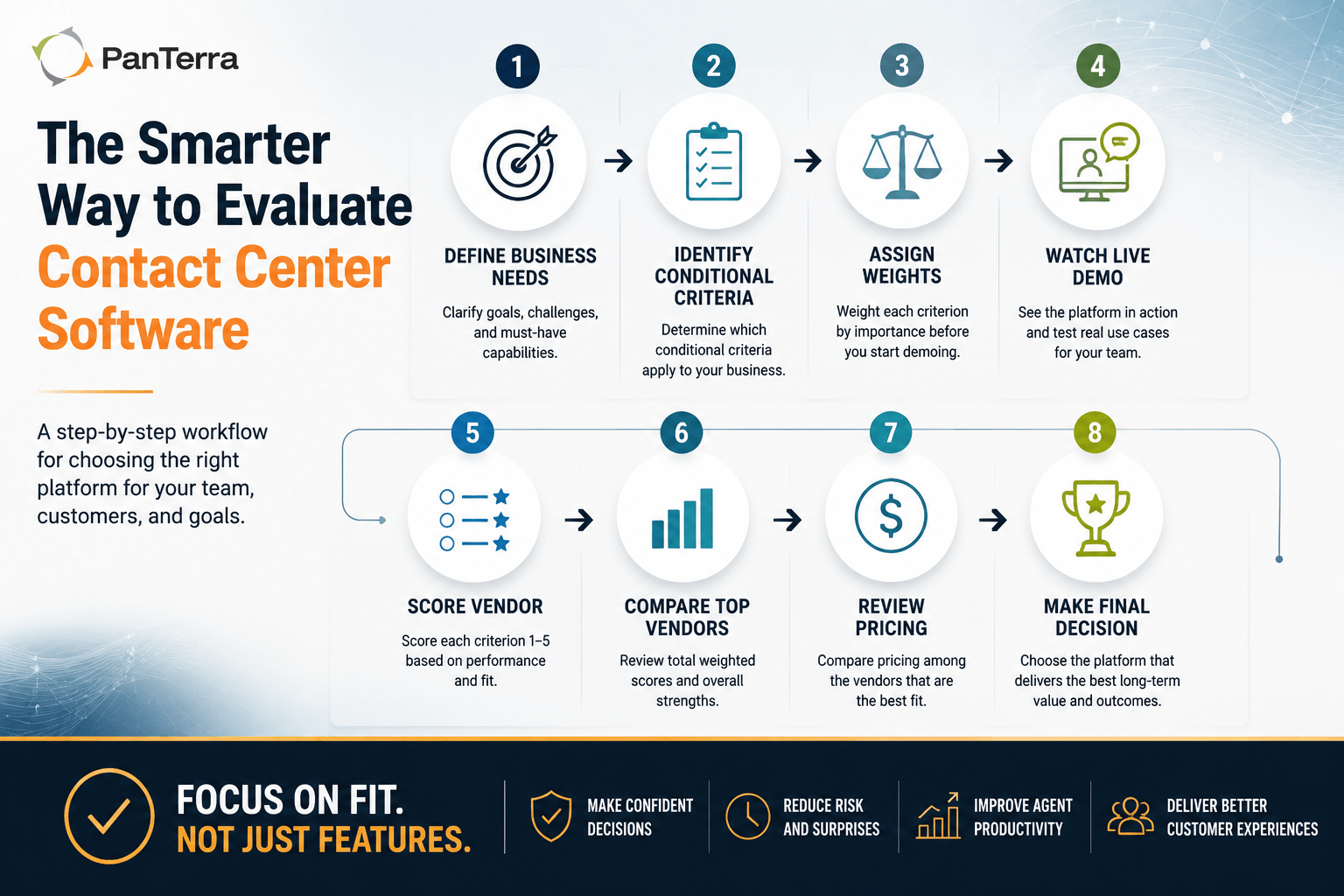
- Decide weights before you see a demo. Weighting afterward means weighting toward whoever demoed best.
- Identify which conditional criteria apply. Write down the condition, not just the criterion.
- Score during the demo, not after. Memory rewards charisma.
- Test rather than accept description on criteria 2, 3 and 5.
- Talk to a reference with your profile — your size, industry, channel mix.
- Then look at price, among platforms that scored well.
Use This However You Like
This scorecard is free to copy, adapt, and use in your own evaluation. There is no form, no download gate, and nothing to sign up for. If you want a formatted version to share internally, there is a PDF of this page — same content, nothing required to get it.
Frequently Asked Questions
How do you evaluate contact center software?
Score a small number of criteria that actually differentiate platforms, weight them for your situation before you see any demos, and test the criteria where vendor descriptions and reality diverge — context on handoff, self-service configuration, and analytics usability. Compare price only among platforms that score well on fit.
What features matter most in contact center software?
Routing fit, whether context survives a handoff, whether your team can configure the platform without the vendor, integration with systems you already run, usable analytics, and how the vendor handles incidents. Feature counts do not differentiate platforms at this level.
What is the most common mistake in contact center software evaluations?
Building a long feature matrix where every vendor scores well, then deciding on price or demo quality. The second most common is weighting criteria after the demos, which weights toward the best presenter rather than the best fit.
Should compliance be part of every contact center evaluation?
No — it should be a conditional criterion. If you are not in a regulated industry, including it tilts your comparison toward vendors who sell into regulated markets, which may not be the right platform for you.
How do I test whether context survives a handoff?
Run a contact through self-service during the demo, escalate it to an agent, and watch the agent's screen. The customer should not have to repeat anything, and the agent should see what was already tried without searching.
Does contact center software need Microsoft Teams integration?
Only if your organization runs on Microsoft. For those that do, the relevant questions are whether agents can work without a second application, whether presence stays consistent, and what happens to customer calls during a Teams outage.
What is caller reputation and why would it be in a software evaluation?
Carriers and analytics providers label numbers based on calling patterns, and a flagged number sees answer rates fall across all its calls. For outbound-heavy operations, whether a platform gives visibility into how your numbers are being labeled is a real differentiator. For inbound-only operations it is irrelevant.
Should price be part of the scorecard?
No. A scorecard that includes price stops being a fit assessment and becomes a value calculation, which is a different exercise. Score fit first, shortlist the platforms that score well, then compare price among them.
.jpg?width=500&height=500&name=Are%20you%20Getting%20a%20Good%20Deal%20(1).jpg)
Comments