PanTerra vs Zoom Phone: Full UCaaS Comparison [2026]


Most teams that reach the PanTerra vs Zoom Phone comparison did not start there. They started with Zoom Meetings, added Zoom Phone because it was convenient, and then discovered the gaps later: no native fax, HIPAA coverage only on higher tiers, limited SMS, or a support queue that routes to chat instead of a live person. Zoom Phone is a strong product for what it is built for. The question is whether what it is built for matches what your business actually needs.
This guide gives you a straight comparison across seven criteria: pricing, HIPAA/HITECH compliance, features, support, uptime, infrastructure, and the Microsoft 365 cost overlap. Where Zoom Phone is the right answer, we say so.
TL;DR
Zoom Phone wins for teams already on Zoom that want one bill and one interface. PanTerra wins on HIPAA compliance, uptime SLA, all in features, and US based support. If your team uses Microsoft 365, PanTerra's Streams.AI integration removes the Zoom overlap entirely.
Key Takeaways:
- Zoom Phone's HIPAA BAA is only available on Zoom Business and Enterprise plans. SMBs on lower tiers do not have access to a signed BAA.
- PanTerra includes HIPAA/HITECH compliance and BAAs on every plan, including the entry tier at $14.95 per user per month.
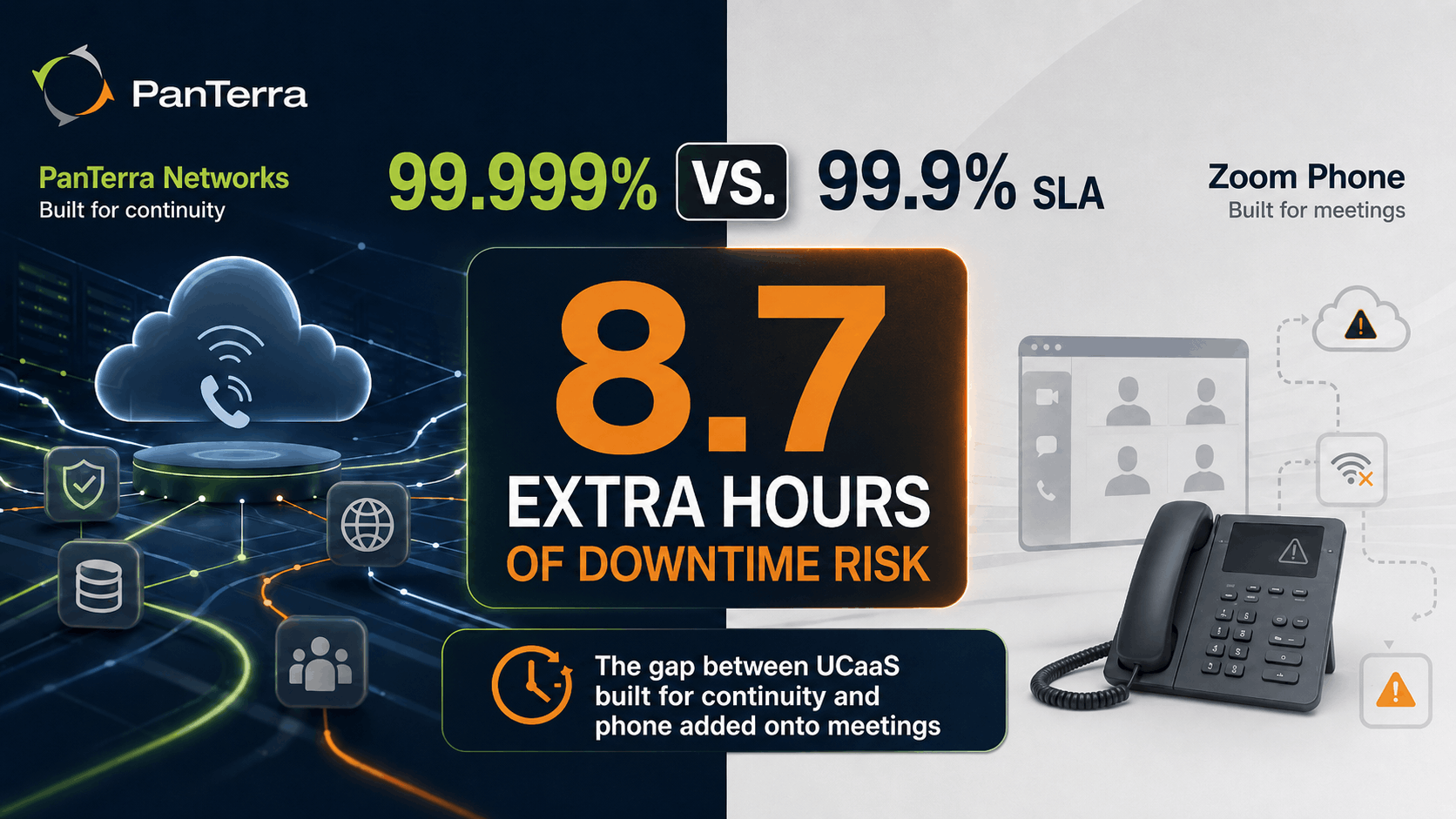
- Zoom Phone's uptime SLA is 99.9%. PanTerra's is 99.999%. That gap equals 8.7 hours of extra allowed downtime per year.
- Teams using Zoom and Microsoft 365 together are paying for two video conferencing tools. PanTerra's Streams.AI runs inside Microsoft Teams and removes the Zoom cost entirely for those teams.
- Zoom Phone does not include native fax, phone number reputation tools, or built-in call recording on base plans.
Who This Is For:
Best for: IT managers comparing Zoom Phone and PanTerra at contract renewal; healthcare and regulated industry teams; Microsoft 365 users evaluating the Zoom cost overlap; teams frustrated by Zoom Phone's feature limits.
Not ideal for: Teams fully satisfied with Zoom's ecosystem; very small teams with basic calling needs and no compliance needs.
Quick Take: Which Platform Fits Your Team?
Choose Zoom Phone if: Your team is already on Zoom Meetings, the video interface is embedded in daily workflow, compliance is not a driver, and you want to reduce the number of vendors on your bill.
Choose PanTerra if: You need HIPAA/HITECH compliance at any seat count, you use Microsoft 365 and want to drop the Zoom license, your team manages multiple locations, or support quality is a key factor in the switch.
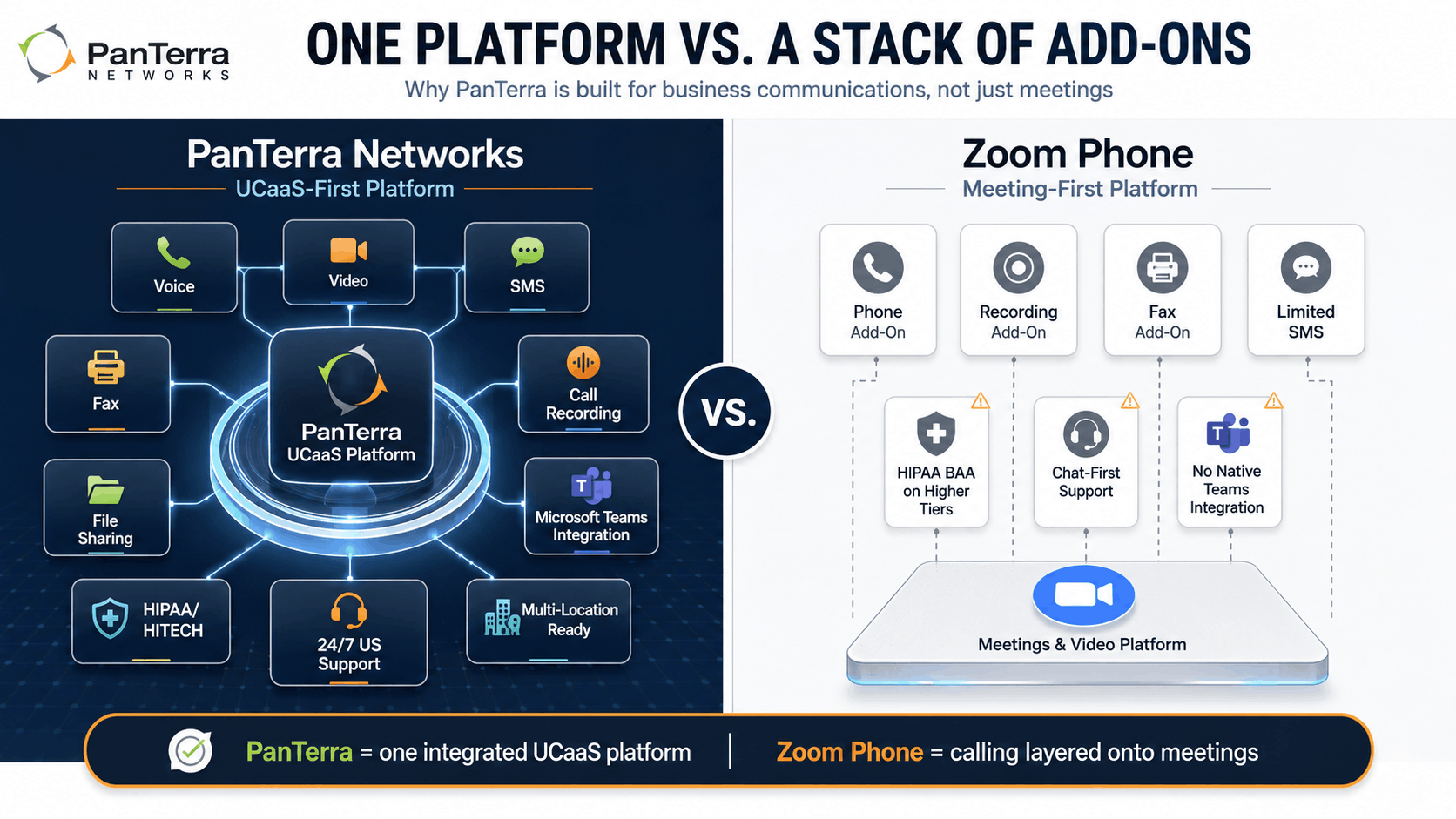
Both platforms are legitimate choices. However, they are built for very different buyers. Zoom Phone is a calling add on for a video first platform. PanTerra is a full UCaaS platform built from the ground up for business communications.

Why Teams Start Looking for a Zoom Phone Alternative
Many businesses do not begin by searching for a Zoom Phone alternative. The switch conversation usually starts after teams realize they are paying for overlapping collaboration tools, struggling with feature limitations, or hitting compliance requirements that require higher-tier plans.
For Microsoft 365 organizations, Zoom Phone can become redundant once Teams is already handling meetings and collaboration. Other teams begin exploring alternatives to Zoom Phone after running into add-on costs for call recording, fax, or advanced support access.
PanTerra is often evaluated as a Zoom Phone replacement by organizations that want:
- One platform for voice, messaging, fax, SMS, and collaboration
- HIPAA/HITECH compliance without enterprise gating
- Better support responsiveness
- Multi-location communications management
- Microsoft Teams integration without maintaining separate Zoom licensing
For businesses comparing Zoom Phone competitors in 2026, the decision often comes down to whether the platform is optimized for meetings first or for full business communications operations.
Pricing: The Microsoft 365 Overlap Problem
Zoom Phone's base plan starts around $10 per user per month for US and Canada calling. That price is low. However, most mid-sized businesses that use Zoom Phone are also paying for Microsoft 365, which includes Microsoft Teams with its own video conferencing tools. In practice, these teams are paying for two video platforms and only using one.
PanTerra's Streams.AI platform runs natively inside Microsoft Teams. So, for a team that already pays for Microsoft 365, adding PanTerra replaces Zoom rather than stacking on top of it. Business Plus at $24.95 per user per month covers voice, video, SMS, messaging, and Teams integration in one plan. The Zoom license becomes unnecessary.
Also, Zoom Phone's feature gaps often require add-ons that close the price difference quickly. Call recording is not included in the base plan. Fax requires a separate add-on. AI transcription sits behind a higher tier. For a team doing the full cost model at 25 or 50 seats, PanTerra's all-in tiers are often the lower total cost.
PanTerra pricing:
- Business Basic: Retail pricing at $17.95/user/mo, with qualified pricing starting at $12.95
Best for basic business voice, auto attendant, voicemail, call recording, and secure phone service. - Business Plus: Retail pricing at $24.95/user/mo, with qualified pricing starting at $14.95
Best for full UCaaS value, including video, SMS, team messaging, and Streams.AI for Microsoft Teams. - Professional: Retail pricing at $29.95/user/mo, with qualified pricing starting at $19.95
Best for teams that need manager tools, analytics, app workflows, and voicemail transcription. - Call Center: Retail pricing at $44.95/user/mo, with qualified pricing starting at $29.95
Best for teams that need ACD, call queues, AI agents, and advanced routing. - Qualified pricing may be available for annual agreements, migrations, bundled deployments, and volume licensing. See the full PanTerra pricing and plans for tier details.
Every plan includes HIPAA/HITECH compliance, its own cloud, and 24/7 US support. See the full PanTerra pricing and plans for tier details.
HIPAA/HITECH Compliance: A Tier Gap That Creates Real Risk
This is the area where the Zoom Phone comparison ends for many regulated industry teams.
Zoom does offer a HIPAA BAA. However, it is only available on Zoom Business and Enterprise plans. SMBs on the Pro plan or Zoom Phone base plans do not have access to a signed BAA. For a small healthcare practice or mental health provider that chose Zoom Phone because it was affordable, that tier gap is a live compliance exposure. Teams often discover it during an audit or a vendor review, often not before deployment.
PanTerra includes HIPAA/HITECH compliance and a signed BAA on every plan. Business Basic at $14.95 per user per month comes with HIPAA access on day one. There is no enterprise minimum and no waiting period. Also, PanTerra holds SOC 2 Type II certification, which matters for security reviews in covered fields.
For any healthcare, legal, or financial services team comparing Zoom Phone and PanTerra, this is the decision point. See how HIPAA access plays out across platforms in our HIPAA/HITECH compliant phone systems guide.
Features: Meeting First vs. All in One
Zoom Phone evolved from Zoom's meeting-first ecosystem, while PanTerra was built as a unified communications platform from the start. That difference shapes how each platform approaches business communications, collaboration workflows, compliance, and operational management.
Zoom Phone does not include native fax on base plans. Business SMS is available but limited on lower tiers. Call recording requires a higher tier or a separate add-on. Phone number reputation tools are not part of the platform. Multi-site management is not a core design focus.
PanTerra is built as a full UCaaS platform. Every base plan includes call recording, auto attendant, voicemail, and SmartBox file sharing. Business Plus adds unlimited video, SMS, and Microsoft Teams integration. The Streams.AI platform covers voice, video, messaging, fax, and file sharing in one login on any device.
Also, PanTerra's Phone Number Reputation Tools monitors your numbers across AT&T, Verizon, T-Mobile, and major analytics providers. When a number gets flagged as spam, PanTerra starts remediation within 72 hours. Zoom Phone does not offer this. For any business making regular outbound calls, a "Spam Likely" label on your number is a real revenue problem. Most teams do not notice it until call answer rates have already dropped.
For multi-location teams: PanTerra is multi-site ready on every plan. Cupbop connected all 64 US locations on one PanTerra platform and launched new locations in one day. Zoom Phone works well for many standard business deployments, but PanTerra places a stronger emphasis on centralized multi-location communications management, onboarding consistency, and operational scalability across distributed teams.
Support: Live vs. Queue
Zoom support quality varies by plan tier. Business hours chat and email support are the standard at most plan levels. Priority support is available on Business and Enterprise plans. For teams on base or Pro plans, live phone support is not the default option.
PanTerra provides US-based live support 24 hours a day, every day of the year. Customers confirm this in verified reviews: "I can dial 611 from any phone and someone is waiting right away to help." When a phone system goes down on a Saturday, the two platforms respond very differently.
PanTerra holds the TrustRadius 2026 Buyer's Choice Award and TrustRadius 2025 Top Rated recognition, both driven by verified customer reviews. In contrast, the most common Zoom Phone complaint in verified reviews is not the product itself. It is support access and response time when something goes wrong.
Uptime and Infrastructure
Based on annual SLA calculations, the difference between 99.9% uptime and 99.999% uptime represents up to 8.7 additional hours of allowable downtime per year. For businesses that rely heavily on voice communications, support availability, and inbound customer calls, that difference can become operationally significant.
Zoom runs its own global infrastructure. So does PanTerra. The key difference is not cloud ownership. Both platforms own their stacks. The difference is SLA commitment and what support looks like when the commitment is tested.
PanTerra has built and run its own cloud since 2001. When something breaks, the engineer who picks up the support call built the platform. That is a different model from a large public company where support is a separate cost center.
Feature Comparison
|
Criteria |
PanTerra Networks |
Zoom Phone |
|---|---|---|
| Uptime SLA | 99.999% | 99.99% |
| HIPAA/HITECH BAA | Yes, all plans | Business/Enterprise only |
| Starting Price | $14.95/user/mo | ~$10/user/mo |
| Call Recording | Included all plans | Add on or higher tier |
| Native Fax | Yes | No |
| Phone Number Reputation | Yes ($10/number/mo) | No |
| 24/7 US Phone Support | Yes | Business/Enterprise |
| Microsoft Teams Integration | Yes (Streams.AI) | No native integration |
| Multi-Location Ready | Yes, all plans | Limited |
| SMS | Business Plus+ | Limited on base plans |
How to Choose
If you use Microsoft 365: PanTerra's Streams.AI removes the need for Zoom entirely. Business Plus at $24.95 gives you full UCaaS inside the Teams interface you already use.
If HIPAA/HITECH compliance is required: PanTerra. Zoom's BAA is gated to Business and Enterprise plans. For SMBs on lower tiers, that gap is a real compliance risk.
If you are a Zoom first team with no compliance needs: Zoom Phone is a reasonable choice at the entry level. The add-on cost model is worth modelling before you commit.
If multi-location management is a priority: PanTerra's multi-site platform handles this at the entry tier. Zoom Phone does not prioritise this to the same depth.
If support response time matters: PanTerra's 24/7 US-based staffing is the direct answer. Zoom's chat first support model works well until the day you need a live person during an outage.
Frequently Asked Questions
Is Zoom Phone HIPAA compliant?
Zoom offers a HIPAA BAA, but only on Business and Enterprise plans. Teams on the Pro plan or Zoom Phone base plans do not have access to a signed BAA. PanTerra includes HIPAA/HITECH compliance and BAAs on every plan, including the entry tier at $14.95 per user per month.
Is PanTerra Better Than Zoom Phone for Healthcare?
Yes, for healthcare organizations and regulated industries, PanTerra is generally the stronger fit because HIPAA/HITECH compliance and signed BAAs are included on every plan. Zoom only provides HIPAA BAAs on Business and Enterprise tiers, which can create compliance gaps for SMB healthcare teams using lower-level plans.
Is Zoom Phone Redundant With Microsoft Teams?
For many Microsoft 365 organizations, yes. Teams already includes meetings, chat, collaboration, and workflow integrations. Businesses that add Zoom Phone often end up paying for overlapping collaboration ecosystems. PanTerra's Streams.AI platform runs directly inside Microsoft Teams, helping consolidate communications into a single environment.
Can I use Zoom Phone with Microsoft Teams?
Zoom Phone and Microsoft Teams are competing platforms. Teams that use both are paying for two video and collaboration tools. PanTerra's Streams.AI integration runs natively inside Microsoft Teams, giving you full UCaaS features such as voice, SMS, fax, and voicemail transcription inside the Teams interface, without a separate Zoom license.
What is the best phone system for a 10 to 50-person team?
For teams in regulated fields, PanTerra's Business Basic plan at $14.95 per seat covers HIPAA/HITECH compliance, auto attendant, and call recording from day one. For Zoom first teams without compliance needs and on tight budgets, Zoom Phone at $10 per user is a low-friction option. The right choice depends on whether compliance, support quality, or price is the main driver.
How does PanTerra compare to Zoom Phone in terms of price?
Zoom Phone starts at around $10 per user per month. However, call recording, fax, and full SMS require add-ons or higher tiers. For teams on Microsoft 365, adding PanTerra replaces the Zoom license rather than adding to it, often making the total cost lower. PanTerra's Business Basic at $14.95 includes call recording, voicemail, and auto attendant with no add-ons.
Which has better uptime, PanTerra or Zoom Phone?
PanTerra's uptime SLA is 99.999%, which allows less than 6 minutes of downtime per year. Zoom Phone's SLA is 99.9%, which allows up to 8.76 hours. For phone-dependent businesses, that gap is worth understanding before choosing.
Can I switch from Zoom Phone to PanTerra?
Yes. PanTerra supports full number porting from Zoom Phone. The process takes two to four weeks on average. For Microsoft 365 teams, PanTerra's Streams.AI setup is managed by the onboarding team and averages 11 days for a full deployment.
8.7 hours of extra allowed downtime per year. That is the gap between Zoom Phone's 99.9% SLA and PanTerra's 99.999%.
Customer quote: "I can dial 611 from any phone, and someone is waiting right away to help." — Verified customer, panterranetworks.com
Checklist: What to confirm before choosing between PanTerra and Zoom Phone:
- Is HIPAA/HITECH compliance available at your current plan tier, or gated higher?
- Does your team use Microsoft 365? If so, are you paying for two video tools?
- Is call recording included in the base plan, or is it a separate cost?
- What is the support model when something breaks outside business hours?
- Does your platform include phone number reputation tools to protect outbound call answer rates?
.jpg?width=500&height=500&name=Are%20you%20Getting%20a%20Good%20Deal%20(1).jpg)
Comments