Microsoft Teams Phone Integration: Architecture and Continuity


Microsoft Teams Phone integration is an architectural decision that determines how PSTN connectivity, call routing, and voice availability are dependent on the Microsoft Teams platform, even though it is often treated as a configuration task.
For many organizations, the focus stays on deployment models, licenses, and feature enablement, while the underlying dependency structure goes largely unexamined.
In practice, how Teams Phone is integrated determines far more than user experience. It shapes availability, troubleshooting control, and an organization’s ability to maintain voice communications during platform disruptions.
This guide examines how different Teams Phone integration models actually work, how they affect operational continuity, and why architecture, not features, ultimately defines reliability at scale.
How Microsoft Teams Phone Integration Actually Works?
Microsoft Teams Phone works by routing voice services through the Microsoft Teams platform using one of three native integration models: Microsoft Calling Plans, Operator Connect, or Direct Routing.
Each model determines who controls Public Switched Telephone Network (PSTN) connectivity, how calls are routed, and how dependent voice services are on Teams availability.
This Teams Phone Architecture Evaluation Framework assesses integration models across four dimensions:
- PSTN ownership and control
- Dependency on Teams availability
- Troubleshooting authority
- Business continuity during outages
The full framework analysis is outlined below.
PSTN ownership and control
Architectural decisions shape how voice services operate within Microsoft Teams. Three native integration models actually dominate the market: Microsoft Calling Plans, Operator Connect, and Direct Routing.
Microsoft Calling Plans position Microsoft as both platform and carrier; Operator Connect is a connectivity model that partners with certified telecom providers; PSTN connectivity through Direct Routing allows connecting any carrier via Session Border Controllers (SBCs).
Dependency on Microsoft Teams availability
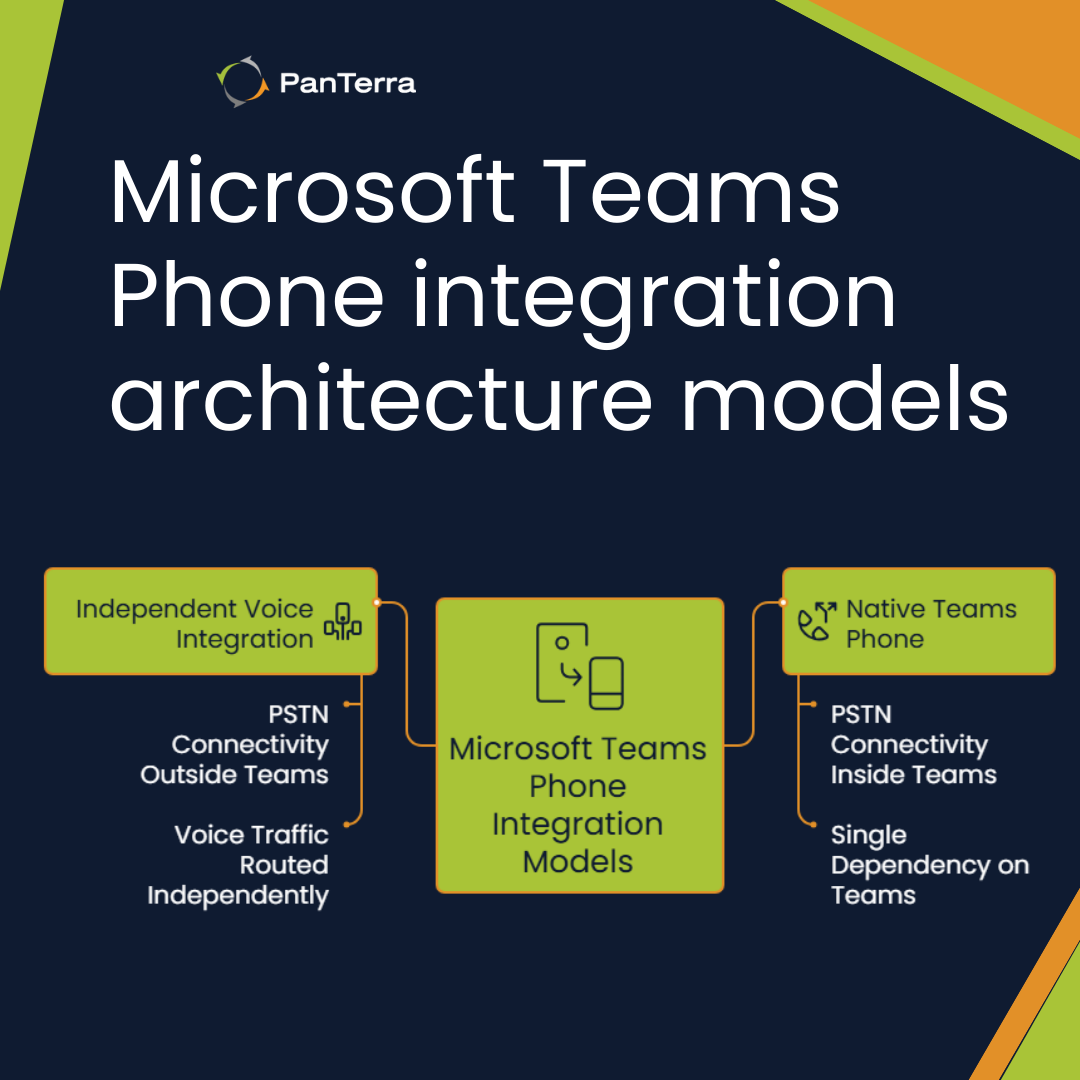
An independent voice integration architecture creates a fundamentally different model. Voice infrastructure operates independently from Microsoft Teams, while users continue working inside the Teams interface.
Call traffic is routed through separate systems, allowing voice services to remain available even during Teams outages.
Organizations using native Teams Phone models typically lose calling capabilities during Microsoft Teams outages, while those using independent voice integration continue to place and receive calls.
This experience prompted them to explore architectural alternatives for maintaining business continuity. A Independent Voice Integration (also called a decoupled voice architecture) is a telephony setup where Microsoft Teams is connected to a non-Microsoft voice provider or PBX using customer-managed infrastructure, and can be considered as a viable alternative.
| Feature | Native Teams Phone | Independent Voice Integration |
|---|---|---|
| PSTN ownership and control | Native Teams Phone | Independent Voice Integration |
| Dependency | Voice tied to Teams availability | Independent voice infrastructure |
| Ownership | Microsoft or certified partners | External voice infrastructure managed outside Teams |
| Administration | Single Teams admin console | Separate console plus Teams admin (with automated provisioning) |
| Continuity | Vulnerable to Teams outages | Voice continues during Teams disruptions |
Understanding Integration Architecture Impact
Integration choice shapes long-term operational resilience. Native Teams Phone creates a streamlined experience yet introduces a single point of failure.
Architectures that separate the voice layer from Microsoft Teams improve service continuity, even if they introduce additional administrative surfaces.
We often see optimization reach diminishing returns near $30-35 per user per month for organizations with 50-5,000 employees. Beyond this threshold, architectural considerations outweigh feature enhancements.
The integration decision depends on your organization's tolerance for service interruptions versus administrative simplicity. For many businesses, this represents a strategic architectural choice.
What are the critical steps for Microsoft Teams Phone integration?
Microsoft Teams Phone integration consists of five core steps that must be coordinated across Microsoft, telecom providers, and internal teams.
Each step introduces operational dependencies that can affect timeline, reliability, and business continuity.
1. License Assignment and Voice Enablement
This step enables calling at the user account level inside Microsoft Teams.
- Purchase Microsoft Teams Phone licenses for each user
- Assign licenses through the Microsoft Teams admin center
- Enable Enterprise Voice for each account
- Coordinate licensing changes across procurement, IT, and finance
Key risk: Misaligned licensing delays downstream PSTN configuration.
2. PSTN Connectivity Configuration
This step determines how voice traffic enters and exits Microsoft Teams.
- Select a PSTN integration model:
- Microsoft Calling Plans (Microsoft-managed)
- Operator Connect (certified carrier-managed)
- Direct Routing (customer-managed SBCs)
- Configure Session Border Controllers (for Direct Routing)
- Manage certificates, firewall rules, and network settings
Key risk: PSTN architecture directly affects call reliability and outage behavior.
3. Number Acquisition and Assignment
This step connects phone numbers to users, services, and call flows.
- Acquire phone numbers from the selected provider
- Create service numbers for auto attendants and call queues
- Assign numbers to users and Teams services
- Coordinate number porting from existing carriers
Key risk: Number porting timelines are externally dependent and frequently delay go-live dates.
4. Emergency Calling Setup
This step ensures legal and regulatory compliance for emergency services.
- Define emergency locations for offices and sites
- Associate locations with users and phone numbers
- Configure dynamic emergency calling where required
- Validate compliance with regional emergency regulations
Key risk: Emergency calling failures expose organizations to regulatory and legal consequences.
5. Testing and Validation
This step confirms that Teams Phone functions reliably in real-world conditions.
- Test inbound and outbound calling
- Evaluate call quality across networks and locations
- Verify emergency calling behavior
- Identify configuration gaps or policy conflicts
Key risk: Testing often reveals issues that require revisiting earlier integration steps.
Microsoft owns the native Teams Phone platform, and carriers handle connectivity components. During service disruptions, troubleshooting involves IT teams, Microsoft, and telecom providers.
Microsoft Teams Phone is now a large-scale enterprise telephony platform, with 80 million users globally and 20 million using PSTN calling, according to UC Marketing.
However, deployments often extend beyond initial timelines due to the overhead of coordinating across multiple vendors.
Organizations frequently underestimate the effort required to align Microsoft, telecom providers, and internal IT teams, which leads to extended project durations and increased operational workload.
Defining a detailed vendor responsibility matrix before deployment significantly reduces delays.
Clear ownership across licensing, PSTN connectivity, number management, and emergency calling minimizes coordination friction and prevents stalled integration phases.
Voice traffic is routed through independent systems, separating calling availability from Teams service status.
Administration also differs between these approaches. Native Teams Phone centralizes management inside the Teams admin center, but incident resolution remains tied to Microsoft’s platform.
Architectures that separate the voice layer introduce an additional management surface, while providing independent troubleshooting paths and greater operational control during Teams outages.
What compatibility requirements must be met before Microsoft Teams Phone integration?
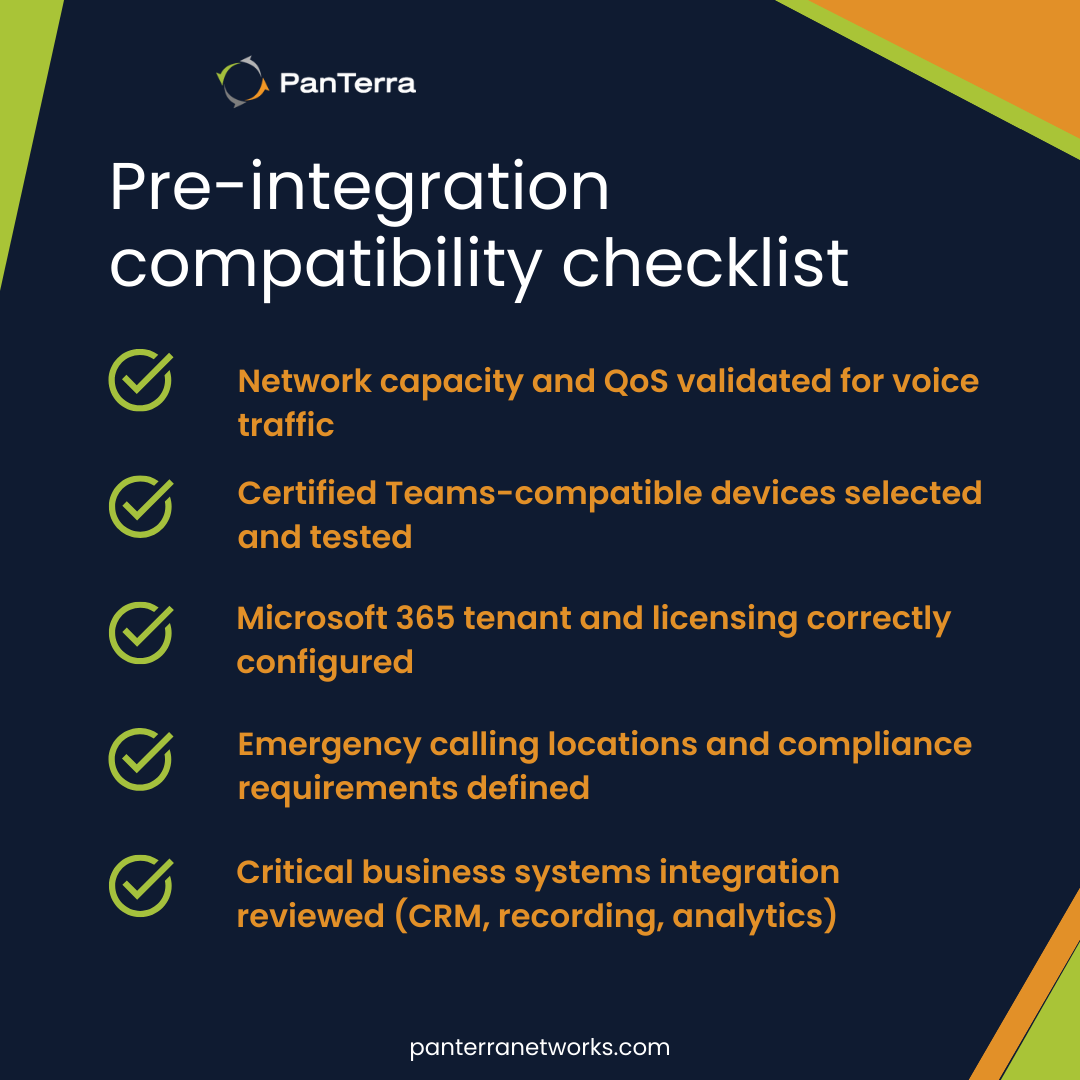
Before integrating Microsoft Teams Phone, organizations must validate network readiness, device compatibility, Microsoft 365 tenant configuration, emergency calling compliance, and integration with existing business systems.
Skipping these checks commonly results in poor call quality, failed deployments, and user frustration.
Network Readiness
Network capacity must match voice traffic demands. According to Microsoft, Teams Phone needs sufficient bandwidth for quality calls. Test your network under peak load conditions.
Configure Quality of Service settings to prioritize voice packets. Open required UDP and TCP ports on your firewall. Enterprises implementing these network practices report 143% ROI with quick payback, per Cloud Revolution.
Device Compatibility
Verify Teams Phone compatibility for all endpoints. Teams compatible phones include certified desk phones, headsets, and conference systems from partners like Yealink and Poly. Test mobile clients on current iOS and Android versions.
We notice organizations often postpone hardware planning until late stages. This creates immediate user resistance. One client experienced 30% adoption failure due to incompatible devices. Plan your hardware strategy early.
Microsoft 365 Tenant Configuration
Microsoft 365 tenant preparation involves several steps:
- Verify domains for SIP addressing
- Assign proper licenses to users
- Configure admin roles with correct permissions
- Enable policies for Teams Phone features
This setup requires coordination between identity and telecom teams. We find this collaboration often reveals dependencies between systems.
Emergency Calling Compliance
Emergency calling requirements differ by location. Most regions mandate accurate location information for emergency services. Teams Phone supports dynamic location services, but proper configuration remains essential.
This involves both technical setup and legal considerations. Your organization bears responsibility for emergency calling compliance. We recommend documenting your approach to meet regulatory obligations.
Business System Integration
Examine how Teams Phone connects with existing systems:
- CRM platforms
- Contact center solutions
- Call recording systems
- Analytics tools
A manufacturing client we supported discovered their CRM integration needed custom development. This extended their timeline by eight weeks. We now recommend integration discovery before procurement.
Teams Phone requirements may appear technical, but they directly reflect business priorities. Organizations that achieve significant telephony cost reductions address these fundamentals first. Compatibility rarely blocks deployment — architecture determines long-term success.
Why Teams Phone Optimization Reaches a Ceiling
Teams Phone optimization reaches a predictable cost ceiling at approximately $30–35 per user per month, because most licensing and feature efficiencies are realized early, and additional configuration changes deliver diminishing operational returns.
Teams Phone delivers strong early ROI, with organizations achieving 102–348% return, according to Forrester. These early gains typically come from replacing legacy systems and streamlining communications.
Most IT teams follow a predictable path. Often, they add auto attendants and call queues that enable analytics to track performance. Next, they fine-tune call routing to improve experience.
License refinement offers additional savings. Teams Phone licensing provides various combinations to reduce expenses. Teams mix Shared Device licenses for common areas with full licenses for knowledge workers. Some implement Shared Calling to lower costs.
Despite these improvements, feature enhancements eventually plateau. We consistently see diminishing returns when per-user costs reach $30-35 per month. Beyond this point, new capabilities just don't justify their expense.
Organizations typically reach the Teams Phone optimization ceiling when the following indicators appear:
- Call quality improvements stall despite continued investment
- User adoption rates stabilize regardless of new rollouts
- Support tickets shift from feature requests to system limitations
- Teams create workarounds for handling peak call volumes
In 2024, a financial services client we supported hit this threshold.
They had realized significant early productivity gains, yet further investments improved performance by less than 2%. This pattern appears across industries.
The Forrester report shows similar trends for Teams Phone Mobile. While initial deployments deliver up to 20% productivity gains per user, these benefits actually diminish over time.
Companies eventually need architectural changes rather than feature tuning.
When teams encounter this ceiling, they reassess their approach. Some adopt Teams Phone Mobile for its mobility advantages, while others explore independent voice integrations that preserve the Teams interface while decoupling voice services from full platform dependency.
This ceiling represents a natural evolution, not a shortcoming. Understanding when you've reached peak optimization helps inform smarter decisions about your communications architecture.
Troubleshooting Teams Phone Integration When Things Break
Troubleshooting Microsoft Teams Phone is complex because voice, identity, and call routing are tightly coupled to Microsoft’s platform and multiple external dependencies.
When issues occur, resolution paths depend heavily on how voice services are integrated.
In native Teams Phone deployments, calling availability and recovery timelines are directly tied to Microsoft’s service status, which becomes critical during outages or platform degradation.
Call quality problems top the list of support tickets. Poor audio, dropped calls, and one-way sound often stem from network constraints, and packet loss, jitter, and bandwidth limitations cause these issues.
Resolving them requires visibility into network paths.
Authentication and provisioning failures create frustrating experiences. These manifest as sign-in loops, missing dial pads, or error messages.
We helped a manufacturing client hit provisioning problems after migration. Two hundred users lost phone access, and fixing this typically required coordinated changes across three admin portals.
During updates, configuration errors and policy conflicts emerge, and Teams troubleshooting resources help identify these issues. Check calling policies, voice routing, and emergency location settings for mismatches.
Resolution ownership becomes the most challenging aspect. When issues occur, determining responsibility between Microsoft, carriers, and networks takes time. This triangulation process just extends outages by hours.
When troubleshooting Teams Phone issues, IT teams should systematically evaluate the following questions:
- Does the problem affect all users or specific locations?
- Are other Microsoft 365 services working properly?
- Can you reproduce the issue on different networks?
- Does the problem occur on mobile clients, desktop clients, or both?
Business Continuity During Outages
Business continuity varies dramatically by architecture.
Native Teams Phone deployments depend entirely on Microsoft's timeline, while independent voice integration architectures almost always maintain calling capabilities during Teams outages.
We supported a financial services customer during a Teams service degradation. Their headquarters, using native Teams Phone, lost all calling capabilities.
Other branches using an integration architecture with an independent voice layer remained operational.
Customer call abandonment rates stayed below 5% in those locations, while headquarters could not receive calls.
Control over troubleshooting and resolution speed depends on architectural choices. This factor really outweighs feature considerations when evaluating Teams Phone approaches for mission-critical communications.
How to Evaluate the Right Teams Phone Integration Architecture
Choosing a Microsoft Teams Phone integration model is ultimately an architectural decision, not a configuration task.
At smaller scales, native Teams Phone deployments often meet basic calling needs with minimal overhead.
As environments grow more complex, however, integration architecture begins to determine availability, troubleshooting control, and how well voice services hold up during platform disruptions.
Organizations evaluating Teams Phone should assess:
- How dependent voice availability is on Microsoft Teams uptime
- Who owns PSTN connectivity and incident resolution during outages
- How much operational control IT teams retain when issues occur
- Whether voice continuity requirements extend beyond licensing efficiency
Teams Phone can be an effective platform when its architectural trade-offs align with business tolerance for disruption.
When they don’t, integration architecture, not features or licenses, becomes the deciding factor.
Frequently Asked Questions About Microsoft Teams Phone Integration
What are the main Microsoft Teams Phone integration options?
Microsoft Calling Plans, Operator Connect, and Direct Routing.
Each model differs in carrier ownership, routing control, and dependency on Teams availability.
How does native Teams Phone differ architecturally from independent voice integration models?
Native Teams Phone routes voice entirely through Microsoft Teams infrastructure. Independent voice integration architectures separate the voice layer while keeping the Teams interface, reducing dependency on Teams service availability.
What compatibility requirements must be met before Teams Phone integration?
Organizations must validate network readiness, certified devices, Microsoft 365 tenant configuration, emergency calling compliance, and integration with existing business systems before enabling Teams Phone.
Why does Teams Phone optimization reach a cost ceiling around $30–35 per user?
Most licensing and feature efficiencies are realized early. Beyond $30–35 per user per month, additional spend delivers diminishing returns, and architecture, not configuration, becomes the primary lever for improvement.
What happens to calling during Microsoft Teams outages?
When Teams is unavailable, voice services are typically impacted unless alternative routing or continuity mechanisms are in place.
.jpg?width=500&height=500&name=Are%20you%20Getting%20a%20Good%20Deal%20(1).jpg)
Comments