PanTerra vs Ooma: Full UCaaS Comparison [2026]


Ooma Office is one of the most common starting points for small businesses moving off landlines. The pricing is genuinely accessible, setup is fast, and for a team of five to ten people that primarily needs basic calling, it delivers exactly what it promises — it is a good product within its design envelope.
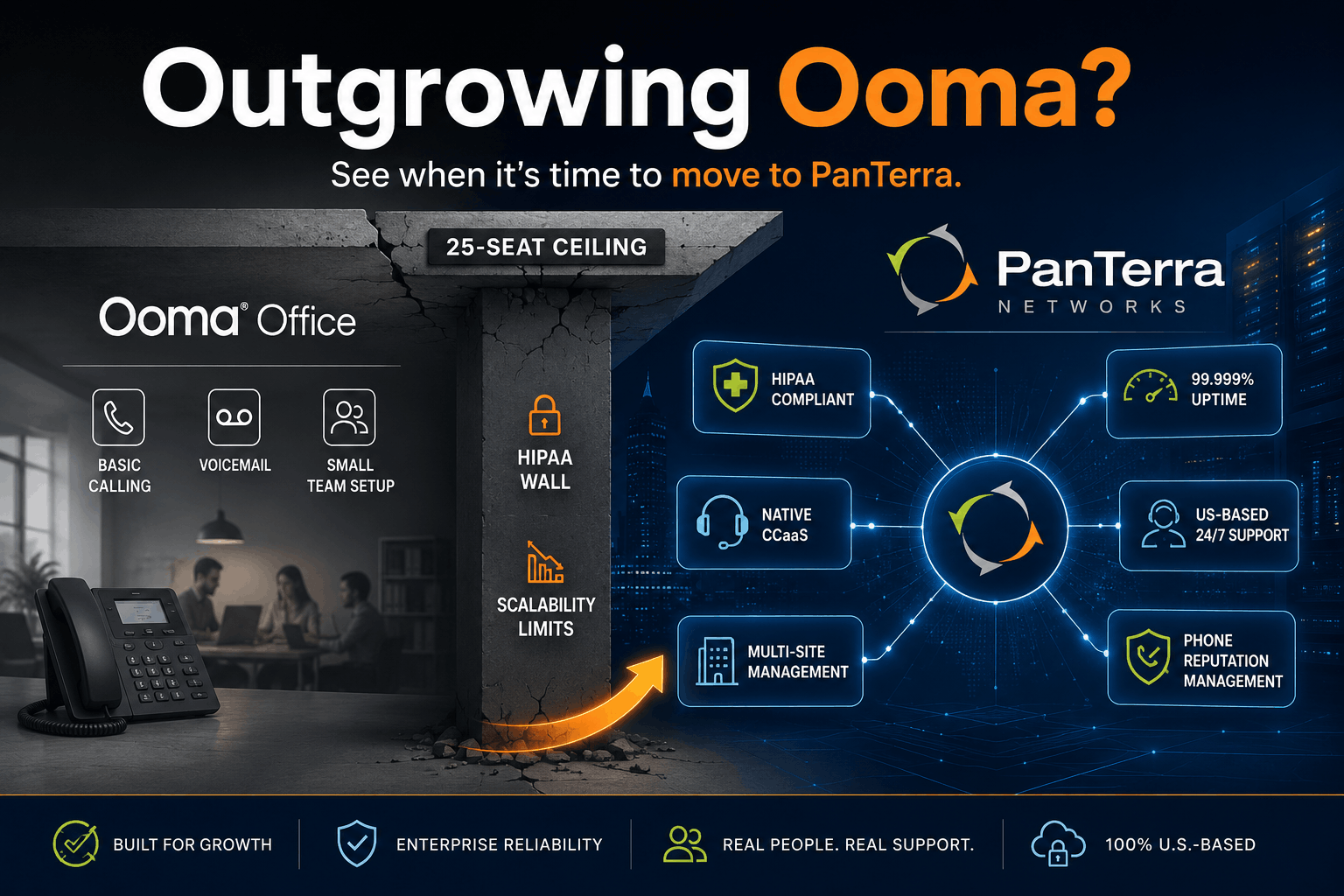
The problem is not that Ooma is bad. The problem is that businesses grow, and Ooma was not designed to grow with them. This comparison is for the IT manager or operations leader who signed up for Ooma two or three years ago and is now running into its ceiling: HIPAA compliance the platform does not support, contact center features that require a completely separate product, multi-site management that does not scale cleanly, and support that routes technical issues offshore.
This guide covers where Ooma is the right call, where it runs out of runway, and what the migration to PanTerra Networks looks like when a business is ready for a platform built to last past 25 seats.
TL;DR: Quick Verdict
- Ooma Office is a legitimate fit for small businesses under 15 users with basic calling needs, no compliance requirements, and month to month billing as a priority.
- PanTerra Networks is the right next step for businesses that have outgrown Ooma: teams scaling past 25 users, any organization in healthcare or a regulated industry, multi-location operations, or teams that need contact center capabilities.
- The two most common Ooma exit triggers are the HIPAA wall (Ooma offers no BAA at any tier) and the scale wall (SMS caps, CCaaS gaps, and admin depth limits that surface around 25 seats).
- See the full side-by-side on the PanTerra vs Ooma comparison page.
Who This Is For
- Best for: IT managers, operations leaders, and business owners who started on Ooma and are evaluating whether to stay or move to a platform built for their next stage of growth.
- Not ideal for: Very small teams under 10 users with no compliance needs and no growth plans — Ooma is a reasonable fit for that buyer.
- Top use case: Migrating from Ooma Office to a UCaaS platform that supports HIPAA compliance, multi-site management, and contact center operations without a platform switch again at 50 or 100 seats.
Company Overview: Residential Roots vs Enterprise Focus
The most important thing to understand about Ooma is where it came from. Ooma launched in 2006 as a consumer VoIP product: a hardware device that let homeowners make cheaper calls over their existing landline connection. The business phone product, Ooma Office, came later. As of the most recent public reporting, approximately 75% of Ooma's revenue still comes from residential customers. The company is publicly traded on the NYSE (NYSE: OOMA).
PanTerra Networks was founded in 2001, has been led by the same CEO, Arthur Chang, since day one, and has served mid-market and enterprise business customers exclusively from the beginning. PanTerra is privately held, operates its own proprietary Tier 4 data center infrastructure in the United States, and has never had a residential product line. Every architectural and roadmap decision reflects a single customer type: the business IT buyer.
This is not a marketing distinction. It is a product architecture distinction. The limitations that Ooma customers hit as they scale: HIPAA, CCaaS, admin depth, multi-site management, are not bugs. These are the natural consequence of building a product for a different buyer.
Pricing: What You Actually Pay
Ooma Office Pricing (per user/month, published)
|
Plan |
Price |
Contract |
Notes |
|---|---|---|---|
| Essentials | $19.95 | No contract | Basic calling, voicemail, mobile app |
| Pro | $24.95 | No contract | Adds video, call recording, analytics |
| Pro Plus | $29.95 | No contract | SMS capped at 1,000/mo account-wide |
| Enterprise Call Center | From $49.99 | Contract required | Separate product — not an upgrade |
Ooma's no-contract billing is a genuine advantage for small teams with uncertain headcount. Cancel any month, port numbers out free, no early termination fees. What the pricing page does not surface clearly: SMS is capped account-wide (not per user) on Pro Plus, outbound toll-free minutes are metered on all plans, and the Enterprise Call Center is a separate product with a contract requirement.
PanTerra Networks Pricing (per user/month, retail)
|
Plan |
Retail |
Qualified Starting At |
|---|---|---|
| Business Basic | $17.95 | $12.95 |
| Business Plus | $24.95 | $14.95 |
| Professional | $29.95 | $19.95 |
| Call Center | $44.95 | $29.95 |
Qualified pricing is available for annual agreements, migrations, bundled deployments, and volume licensing. Review PanTerra pricing for current plan details.
At comparable tiers, PanTerra and Ooma land at similar per-user rates. The difference is what is included. PanTerra's Business Plus at $24.95 includes video conferencing, team messaging, SmartBox enterprise file sharing, HIPAA/HITECH certification, and a dedicated project manager on deployment. None of these are available on Ooma's Pro plan at any price.
Head-to-Head Feature Comparison
|
Category |
PanTerra Networks |
Ooma Office |
|---|---|---|
| Target market | Mid-market and enterprise | SMB and residential (~75% residential revenue) |
| Uptime SLA | 99.999% (proprietary Tier 4) | 99.99% on higher tiers; none on Essentials |
| Infrastructure | Proprietary US Tier 4 data centers | 3 data centers (Canada, Virginia, San Jose) |
| HIPAA/HITECH | Native; BAA on every plan | No HIPAA compliance at any tier; no BAA |
| Contact center | CCaaS add-on (same platform) | Separate product (contract required, ~$49.99+) |
| Multi-site management | Native: unified billing, admin, reporting | Limited; scales poorly past 10 locations |
| Support | 24/7 US-based; 30 second response SLA | Tier II/III offshore (Manila) |
| Dedicated PM | Yes (every deployment) | No |
| Phone # Reputation Mgmt | Yes: native add-on ($10/number/mo) | No |
| Enterprise file sharing | Yes (SmartBox, included) | No |
| Video conferencing | Connect AI (included) | Available on Pro and above |
| Team messaging | Yes (included) | Yes (included) |
| Business SMS | Yes (included) | Capped (1,000/mo account-wide on Pro Plus) |
| No-contract billing | Annual and month to month options | Month to month on all SMB plans |
| Company structure | Privately held; enterprise since 2001 | Public (NYSE: OOMA); ~75% residential |
| Founded | 2001 | 2006 |
Where Ooma Wins
See the complete side-by-side on the PanTerra vs Ooma comparison page. Here is our honest assessment of where Ooma has a genuine edge.
No-contract flexibility. Ooma's month to month billing with no early termination fees is its strongest structural advantage. For small businesses with uncertain headcount, seasonal operations, or teams that have previously been locked into a 36-month UCaaS contract, the optionality is worth real money.
Entry-level price point. Essentials at $19.95/user/month is among the lowest published prices for a business VoIP system with a desktop and mobile app. For a solo operator or a three-person office, it is a practical starting point.
Speed of setup. Ooma's setup process is consistently rated as one of the fastest in the category. Buy a plan, plug in a phone or open the mobile app, and calling typically works within an hour.
Simplicity for very small teams. Ooma Office does not overwhelm a non-technical small business owner with enterprise admin complexity. For a team that needs phones and nothing else, the interface is approachable.
Where Ooma Runs Out of Runway
No HIPAA compliance at any tier. This is Ooma's most consequential limitation for a large segment of its customer base. Ooma Office does not support HIPAA compliance and does not offer a Business Associate Agreement at any plan level, including the Enterprise tier. For healthcare organizations, dental practices, therapy offices, wellness centers, and any business handling protected health information, this is a disqualifier. PanTerra's HIPAA and HITECH certification covers the entire Streams.AI platform on every plan, with a BAA included at no additional cost. See PanTerra's healthcare page for a breakdown of clinical workflow support.
The 25-seat ceiling. Independent analysis of Ooma Office reviews and G2 feedback consistently identifies a breakpoint around 25 seats where the platform's SMB design becomes a constraint: SMS caps hit account-wide rather than per user, contact center features require migrating to a separate product, CRM integrations are thin on standard plans, and admin reporting lacks visibility for mid-size teams. Businesses that hit this ceiling do not upgrade within Ooma. They migrate platforms.
Contact center as a separate product. Ooma Enterprise Call Center is not an add-on to Ooma Office. It is a distinct product with a contract requirement and custom pricing starting around $49.99/user/month. A business that starts on Ooma Office and later needs CCaaS capabilities is switching products, not scaling within a platform. PanTerra's Contact Center AI is a native add-on to the same Streams.AI platform. No platform migration required.
Offshore support on escalations. PanTerra's landing page documents what Ooma itself has not disputed: Tier II and Tier III support is handled offshore in Manila. For enterprise IT teams where support escalation speed is a contractual requirement, this is a material difference. PanTerra's 30 second response SLA for US-based live support applies on every plan, 24/7.
Infrastructure gap. Ooma operates three data centers (Canada, Virginia, San Jose). PanTerra runs on proprietary Tier 4 US data center infrastructure with a 99.999% uptime SLA: one nine better than Ooma's published 99.99% on higher tiers, with no published SLA at all on Ooma's Essentials plan.
Phone number reputation management. PanTerra is the only major UCaaS provider that integrates phone number reputation management natively, monitoring business numbers across AT&T, Verizon, T-Mobile, and major analytics providers with automated remediation. Ooma offers no equivalent. For businesses where outbound call answer rates drive revenue, this gap compounds over time.

The Upgrade Path: Migrating from Ooma to PanTerra
The two most common triggers for Ooma-to-PanTerra migrations are HIPAA and scale. Healthcare adjacent businesses often start on Ooma because of its low entry cost and simple setup. The HIPAA problem surfaces when the organization realizes that no plan tier offers a BAA. At that point the migration is not optional.
Scale-driven migrations typically happen around 25 to 30 seats, when the combination of SMS caps, CCaaS gaps, and admin reporting limitations makes the platform a constraint rather than an asset.
In both cases, PanTerra includes white-glove migration support at no additional cost. The migration team handles number porting from Ooma, hardware provisioning, call flow design, and end user training. Most migrations complete in 5 to 10 business days. For businesses coming off Ooma whose numbers may have accumulated spam labels, see our STIR/SHAKEN guide for context on what authentication covers and what reputation management addresses separately.
When to Choose PanTerra vs Ooma
Choose PanTerra Networks when:
- Your organization is in healthcare, dental, legal, or any industry where HIPAA compliance is required
- Your team is approaching or past 20 users and hitting SMS caps, CCaaS gaps, or admin reporting limits
- You need contact center capabilities without migrating to a separate product
- You manage multiple locations and need unified billing, provisioning, and reporting from one portal
- Support response time is a contractual or operational requirement
- You need phone number reputation management for outbound call operations
Choose Ooma Office when:
- Your team is under 10 users with no compliance requirements and no near-term growth plans
- Month to month no-contract billing is a primary decision driver
- You need the fastest possible setup with minimal IT involvement
- Your communication needs are basic calling and voicemail with no need for CCaaS, HIPAA, or enterprise file sharing
Frequently Asked Questions
Does Ooma Office support HIPAA compliance?
No. Ooma Office does not support HIPAA compliance and does not offer a Business Associate Agreement at any plan tier, including the Enterprise plan. Healthcare organizations, dental practices, and any business handling protected health information cannot use Ooma Office as a HIPAA-compliant communications platform. PanTerra Networks' Streams.AI platform is natively HIPAA and HITECH certified across all channels on every plan, with a BAA included at no additional cost.
How does Ooma pricing compare to PanTerra in 2026?
Ooma Office plans run $19.95/user/mo (Essentials), $24.95 (Pro), and $29.95 (Pro Plus), all without contracts. PanTerra's retail pricing starts at $17.95/user/mo (Business Basic) through $44.95/user/mo (Call Center), with qualified pricing from $12.95/user/mo for annual agreements and migrations. At comparable per-user rates, PanTerra includes HIPAA certification, SmartBox file sharing, Luna AI Receptionist, and a dedicated deployment PM — none of which are available on Ooma at any tier.
Can I keep my Ooma phone numbers when switching to PanTerra?
Yes. Number porting transfers your existing Ooma numbers to PanTerra's Streams.AI platform. The porting process is managed by PanTerra's migration team at no additional cost as part of standard onboarding. Landline and VoIP number ports typically take 7 to 14 business days. PanTerra coordinates the port request, monitors status, and manages cutover to ensure continuity.
What is the difference between Ooma Office and Ooma Enterprise?
Ooma Office is the SMB product with three plan tiers and month to month billing. Ooma Enterprise (and Ooma Enterprise Call Center) is a separate, contract-required product for larger organizations, with custom pricing starting around $49.99/user/month for the call center tier. A business that starts on Ooma Office and later needs CCaaS is migrating to a different product, not upgrading within the same platform. PanTerra's CCaaS capabilities are native add-ons to the same Streams.AI platform with no product migration required.
Does PanTerra have a no-contract option like Ooma?
PanTerra offers both annual agreement pricing and flexible billing arrangements. The qualified pricing rates (starting at $12.95/user/mo) are tied to annual agreements, migrations, or volume commitments. Ooma's no-contract month to month billing is a structural advantage for very small teams with uncertain headcount. For specific billing flexibility options, contact PanTerra's sales team.
What happens to my Ooma devices when I switch to PanTerra?
Ooma-branded hardware (Telo devices, Ooma IP phones) is proprietary and will not work on PanTerra's platform. PanTerra supports standard SIP-compatible IP desk phones and includes hardware provisioning as part of the white-glove migration process. PanTerra also supports softphone clients on desktop and mobile, so employees can use the platform without new physical hardware if preferred.
Is Ooma good for a growing business?
Ooma Office is well-suited for businesses under 15 to 20 users with basic calling needs. As teams scale past 25 users, SMS caps, limited CCaaS capabilities, and admin reporting gaps become constraints. Businesses in healthcare or regulated industries will hit the HIPAA wall regardless of team size. Independent reviews consistently identify 25 seats as the practical ceiling for Ooma Office before a platform migration becomes necessary.
What is phone number reputation management and does Ooma offer it?
Phone number reputation management monitors your business phone numbers across carrier networks and analytics providers, detects when a number has been flagged as spam, and initiates remediation to restore the number's reputation. PanTerra is the only major UCaaS provider that integrates this natively, monitoring numbers across AT&T, Verizon, T-Mobile, and providers like Hiya, First Orion, and TNS, with automated remediation typically resolving labels within 2 to 3 business days. Ooma does not offer phone number reputation management at any tier.
.jpg?width=500&height=500&name=Are%20you%20Getting%20a%20Good%20Deal%20(1).jpg)
Comments